
Software > Project Management > Project Management > BCS (Business Coordination Software)
BCS – ERP for service providers with a focus on project management

BCS (Business Coordination Software)

BCS – ERP for service providers with a focus on project management

Version:  26.1


Updated on 03. Mar 2026 by Projektron GmbH
Demo version

BCS – ERP for service providers with integrated project management

Comprehensive functions – flexible customization – secure technology

BCS (Business Coordination Software) is an ERP solution for project-oriented service companies based on powerful project management. The software supports companies in holistically planning, controlling, and evaluating their project-based business processes – from quotation creation to implementation and billing.

The focus is on integrated project management: times, services, resources, and costs are recorded directly in the project context. This creates end-to-end transparency regarding project progress, budgets, and capacity utilization. Functions such as multi-project management, project portfolio management, forecasts, and plan/actual comparisons enable sound control even of complex project landscapes.

As an ERP system, BCS also combines central business areas such as resource management, CRM, contract management, and quotation and invoicing in a single solution. The consistent database creates end-to-end processes without media breaks and a reliable basis for controlling and business decisions.

The integrated e-invoicing function supports legal requirements and formats such as XRechnung and ZUGFeRD and enables fully digital invoice processing, including validation and archiving.

BCS can be flexibly operated as a SaaS solution in the cloud or on-premises. In the case of cloud operation, hosting takes place in certified data centers in Germany in compliance with high data protection standards.

The software is developed in Germany (“Made in Germany”) and meets the highest information security requirements: Projektron is certified according to ISO/IEC 27001:2022, which guarantees a comprehensive information security management system. In addition, measures such as encrypted data transmission, access controls, two-factor authentication, and regular security updates ensure the protection of sensitive company data.

Thanks to its modular architecture, flexible configuration options, and granular rights management, BCS can be individually adapted and scaled to meet different requirements. Regular releases ensure continuous development and future-proofing.

Project management functions in BCS

Single and multi-project management

BCS provides you with the basis for strategic and operational single and multi-project management.

  • Multi-project controlling
  • Project portfolio evaluations
  • Cross-project milestones
  • Project groups and categories
  • Resource planning for project groups

Project preparation

  • Determining strategic importance
  • Software-supported goal definition
  • Project environment analysis
  • Risk management
  • Stakeholder identification and management
  • Risk management
  • Opportunity management
  • Idea management
  • Project application

Project planning

  • Planning assistants for various project management methods
  • Flexibly customizable templates
  • Work packages, tasks, and milestones
  • Project structure plan (PSP)
  • Critical path
  • System-supported cost calculation and resource planning
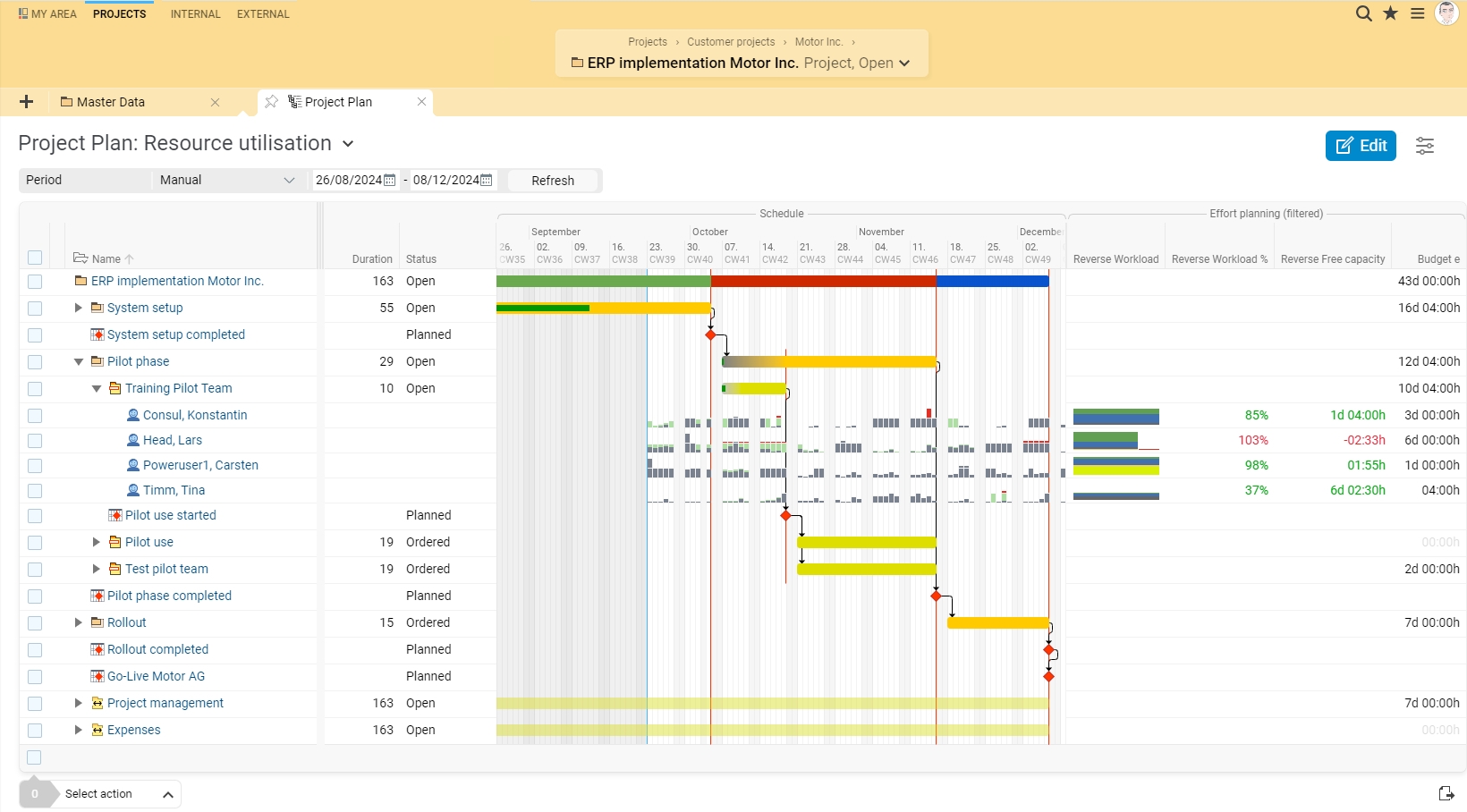
  • Time planning with interactive Gantt chart and automatic optimization
  • Resource-accurate scheduling
  • Material cost planning and management
  • Automatic personnel cost calculation
  • Project planning in intervals: orders, expense planning, and material cost planning
  • Comparable planning statuses

Project execution

  • Flexible evaluation dimensions
  • Resource planning
  • Project calendar
  • Kanban board for visual task planning
  • A wide range of tools for internal and external project communication
  • Change requests
  • Project-related time tracking
  • Clear and centralized project documentation directly in the project

Project controlling

  • Dashboards with profile pictures and comments
  • Flexible and multiple evaluation dimensions with maximum depth of detail
  • Multidimensional task evaluation with the interactive sunburst chart
  • Earned value analysis
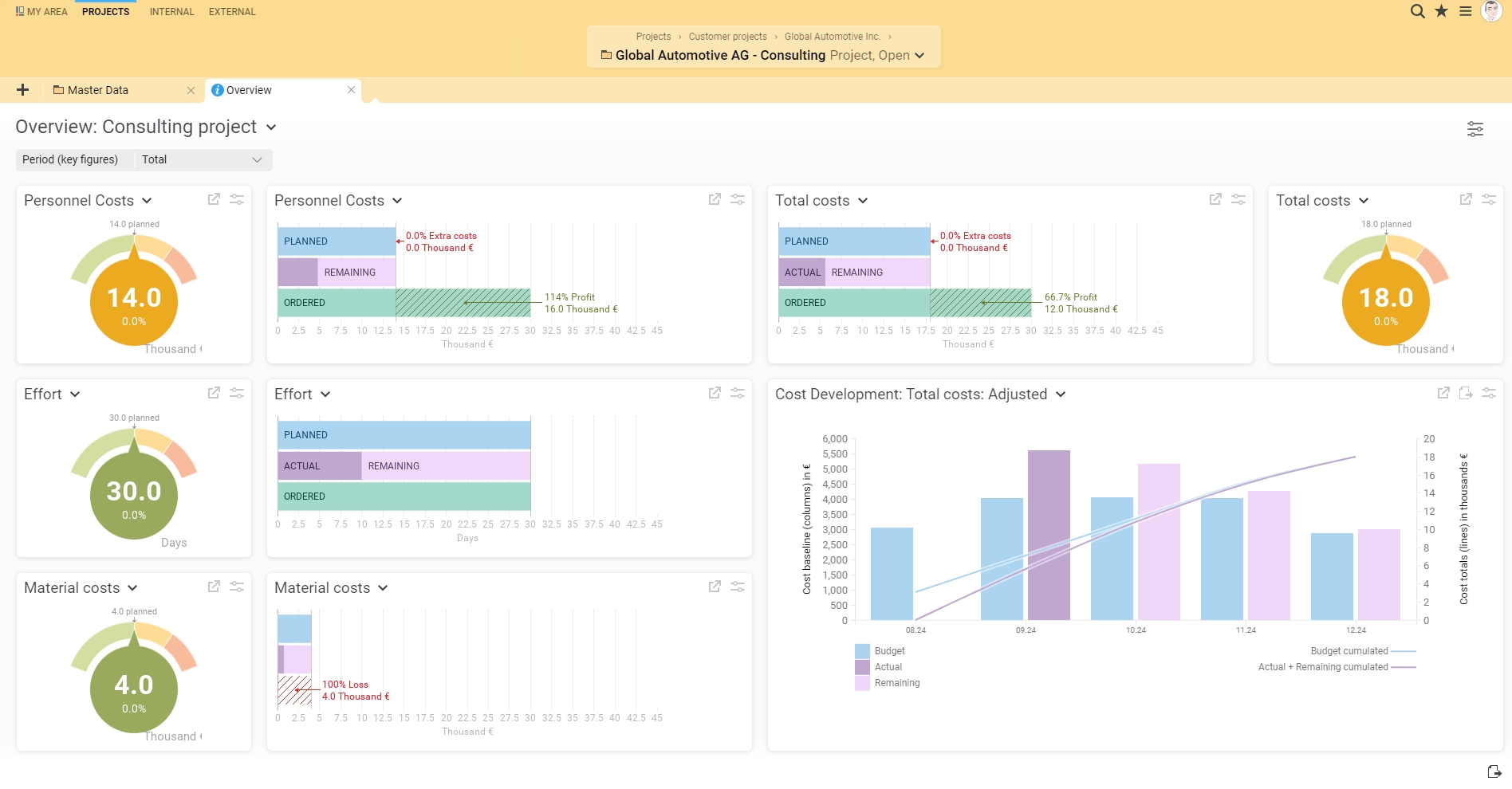
  • Forecasted budget overruns: Identify the need for change early on
  • Target/actual comparisons
  • Subsequent plan changes and history
  • Milestone trend analysis
  • Automatically generate and send project reports

Resource management

  • Capacity balancing for realistic planning
  • Human resources: Utilization analyses and forecasts
  • Resource controlling reports
  • Material resource management
  • Skill management
  • Capacity balancing
  • Vacation management
  • Material resources
  • Wage supplements
  • Travel expense accounting
  • Evaluations for groups of people
  • Map flexible project organization structures (line, matrix, etc.)

Multi-project management

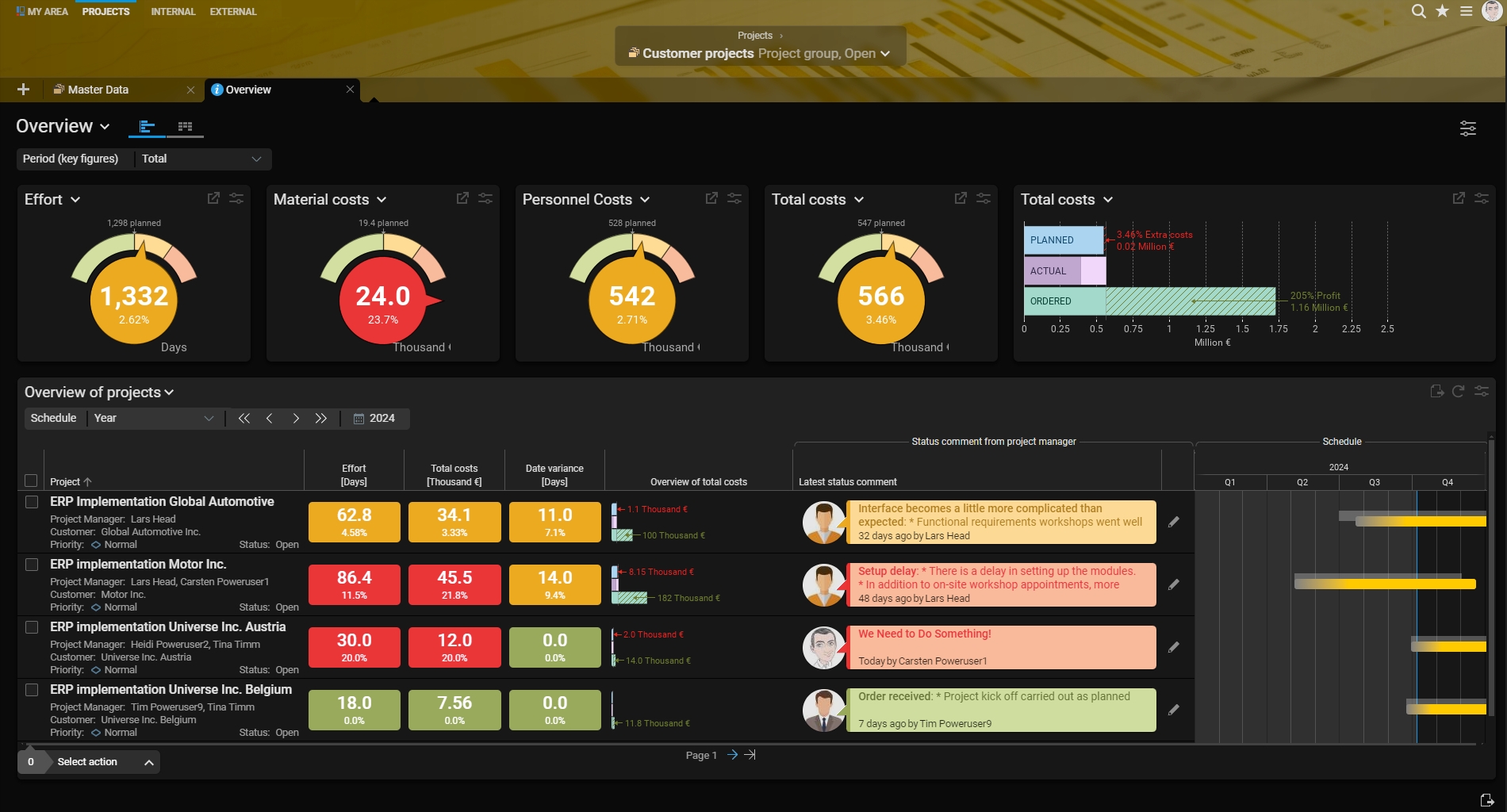
  • Graphical multi-project controlling with cost overview and status information
  • Flexible structuring with programs and project categories
  • Project portfolio evaluations: Compare projects and programs according to complexity and benefit
  • Resource planning for project groups
  • Cross-project milestones
  • Multi-project board structured according to status, priority, or project category

Project portfolio management

  • Record project ideas and transfer them to a checklist-based process for review
  • Visualize the strategic importance of project proposals
  • Create project portfolios and compare them with each other using various criteria and key figures
  • Individual project index for calculating the strategic importance of projects
  • Interactive project portfolio diagram for visualizing and evaluating the strategic importance of your projects
  • Display of resource utilization of teams in different portfolios and projects
  • Strategic importance of projects presented in a transparent and easy-to-understand manner

ERP functions in BCS

Time recording

  • Ergonomic booking masks: Intuitive time recording by employees.
  • Four time recording options: Individual, weekly, daily booking, and stopwatch.
  • Work time accounting: Seamless accounting of expenses via BCS.
  • Project time recording: Control of processing statuses and remaining expenses.
  • Working time models: Individual customization, e.g., TVöD.
  • Time recording evaluation: Graphical representations and reports.
  • Mobile time recording: Booking on the go, offline, and online

Ticket system

  • Relief for the hotline through a digital ticket system
  • Transparent service quality through clear presentation of response times
  • AI-supported ticket summaries and suggested responses
  • Internal tickets for change requests and to-do lists
  • Email notifications with comment function
  • Prioritization through ticket assignment and categorization
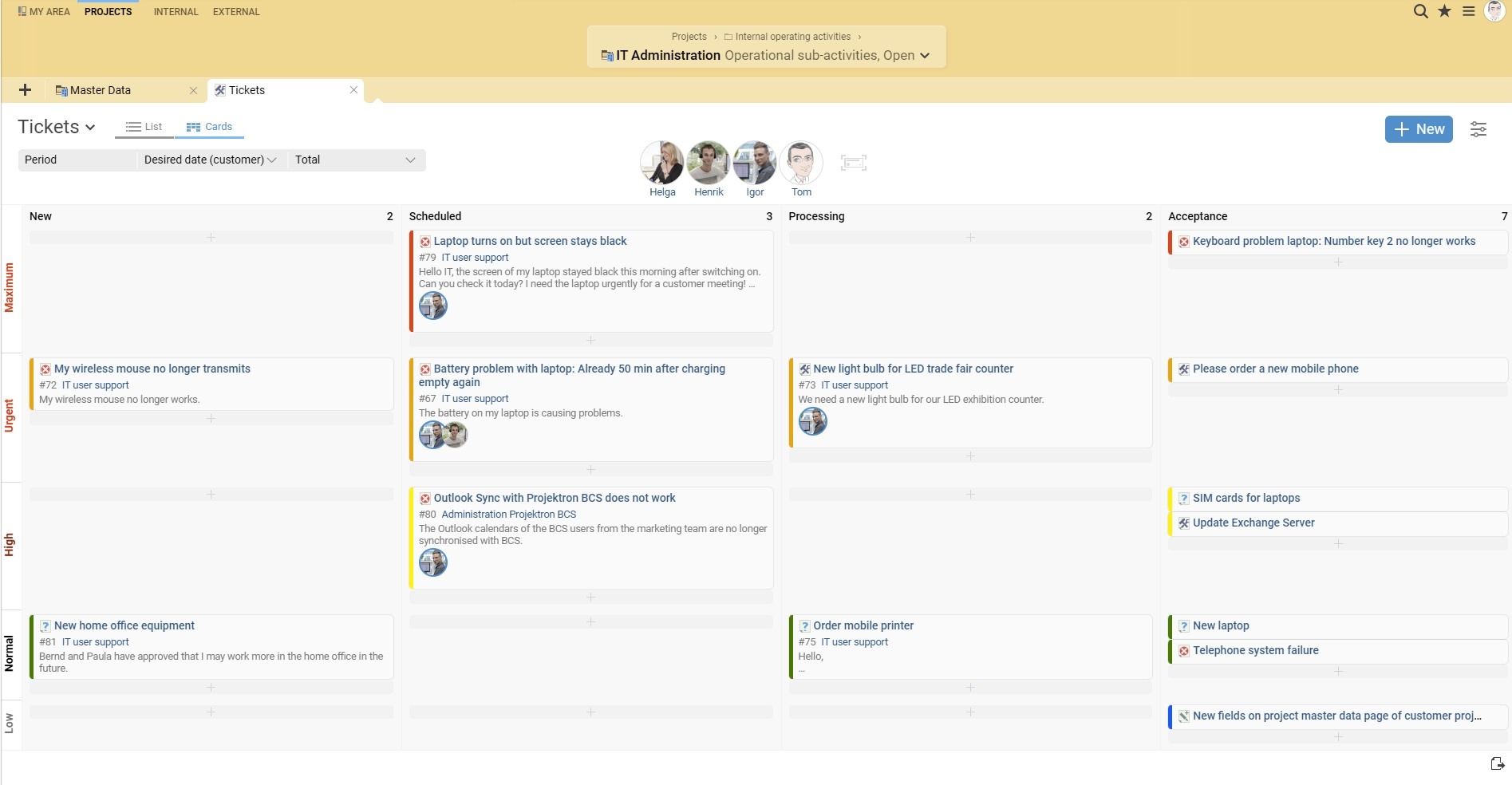
  • Kanban board for visualizing ticket status
  • Time tracking directly on the ticket for invoicing
  • Link to Scrum elements (e.g., user stories)
  • Individual evaluations with tables and diagrams
  • Effective ticket search and linking through keywords and filters

Applicant and personnel management

  • Applicant management: Recording and selection of applications, organization of interviews and contract documents
  • Onboarding: Creation of an individual process and transfer of applicant files to employee files
  • Central employee data: Management of master data, working time models, and skills for resource planning
  • Analyses: Graphical representation of personnel data for analyzing the personnel structure
  • Vacation management: Approval workflow and substitute arrangements
  • Payroll accounting: Time tracking and integration with DATEV
  • Offboarding: Smooth separation of departing employees with process design in BCS

Quotation creation

  • Templates: Use your CI design and templates for quotations and cover letters
  • Data transfer: Transfer project data and select the recipient directly from the CRM
  • Quotation assistant: Assign reviewers, set follow-ups, and notify by email
  • Approval process: View, approve, or return quotations for revision
  • International: Calculate quotations in foreign currencies, including specific prices and tax rates

Invoicing

  • Time and material and fixed-price invoices: Directly from projects with multiple currencies
  • Electronic invoicing: XRechnung & ZUGFeRD
  • E-invoicing capability (receipt, creation, and dispatch)
  • Swiss QR invoices
  • Payment terms: Discount rules, payment deadline control with traffic lights
  • Automated invoice dispatch: Email with invoice and supporting documents
  • Invoice templates: Customizable templates and invoice generator
  • Reminder run: Automated reminder actions
  • International billing: Multi-currency capability, automatic conversion, customizable tax rate

Reporting and accounting

  • Standard reports: Project preparation, progress, status, and cost reports, expense reports, payroll accounting, expense reports
  • Report requests: Automated report generation with email delivery to specific recipients
  • Custom reports: Customization of content, layout, and design using BIRT report designer
  • Common file formats: Diverse export options for reports

Customer relationship management (CRM)

  • Customer database: Central management of customer data, including contact history
  • Transparent communication: Traceable interactions through automatic email import
  • Circulars: Digital circulars for project communication, newsletters, or campaigns
  • Forecasts: Sales forecasts and acquisition probabilities
  • Customer login: Independent information retrieval about the project progress
  • Sales traffic lights: Identification of need for action and closing opportunities
  • Telephone system connection: CTI interface for direct call integration and customer files

Document management (DMS)

  • Central access: All relevant documents are stored centrally and can be accessed at any time
  • Easy management: Uniform filing structure for better organization
  • Document upload: Upload documents via drag-and-drop and assign them to tasks or projects
  • Workflow integration: Seamless integration into work and approval processes
  • Automatic versioning: Clear version management and editing history
  • Full-text search: Search PDFs and Office documents for relevant text passages
  • Security: Rights management for secure document editing and deletion

Expense management

  • Wizards: Intuitive recording of expenses using a wizard in BCS
  • International expense management: Country-specific expense rates and automatic currency conversion
  • Approval workflow: Automation of the entire expense process, from recording to settlement
  • Templates and favorites: Save time with templates and favorites for recurring expenses
  • Mobile entry: Enter expenses and receipts on the go via the BCS app, even offline

Teamwork with collaboration tools

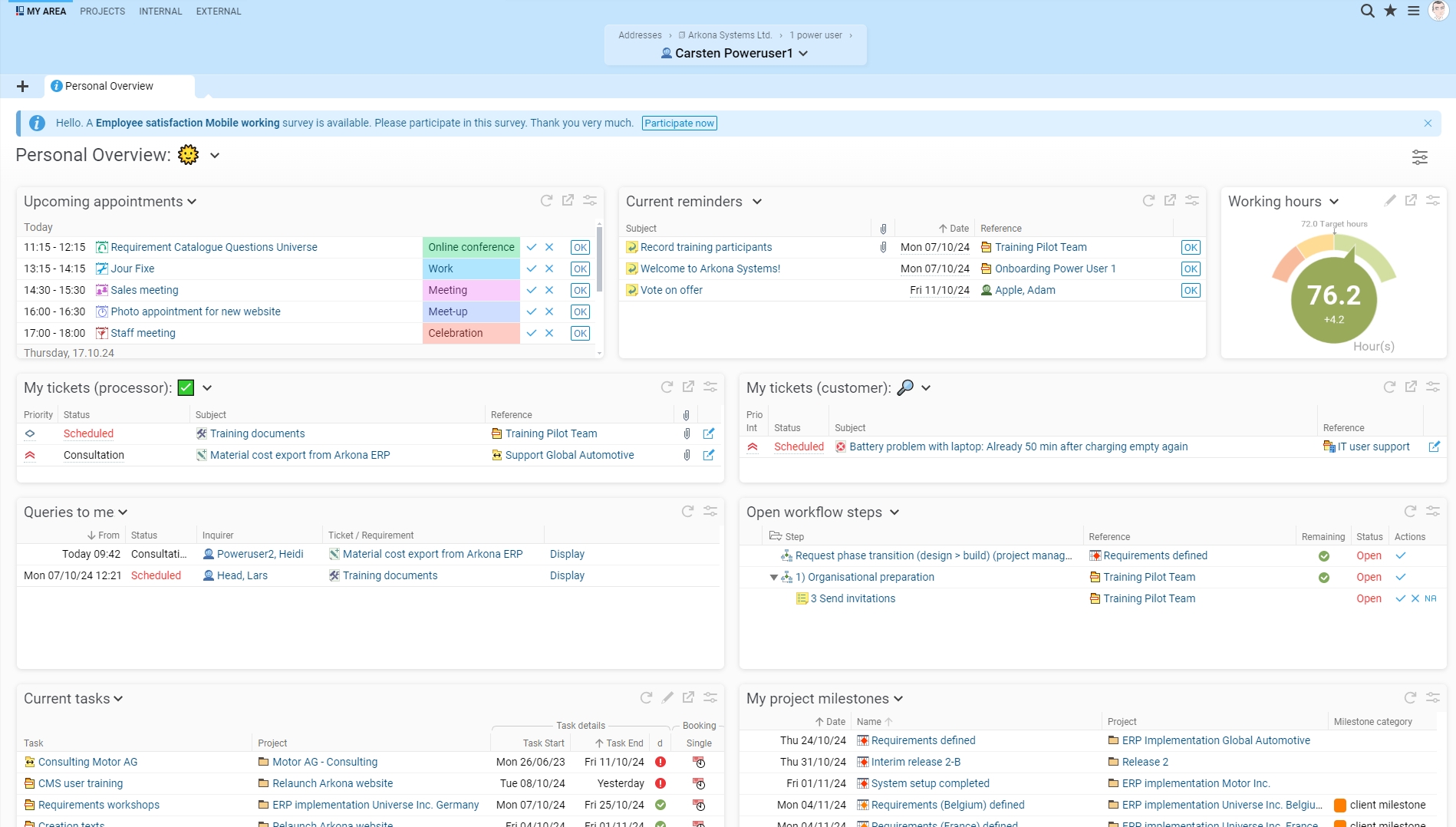
  • Personal overview: Dashboard can be customized with drag & drop for a tailored view
  • Calendar: Efficient appointment management with automatic appointment coordination
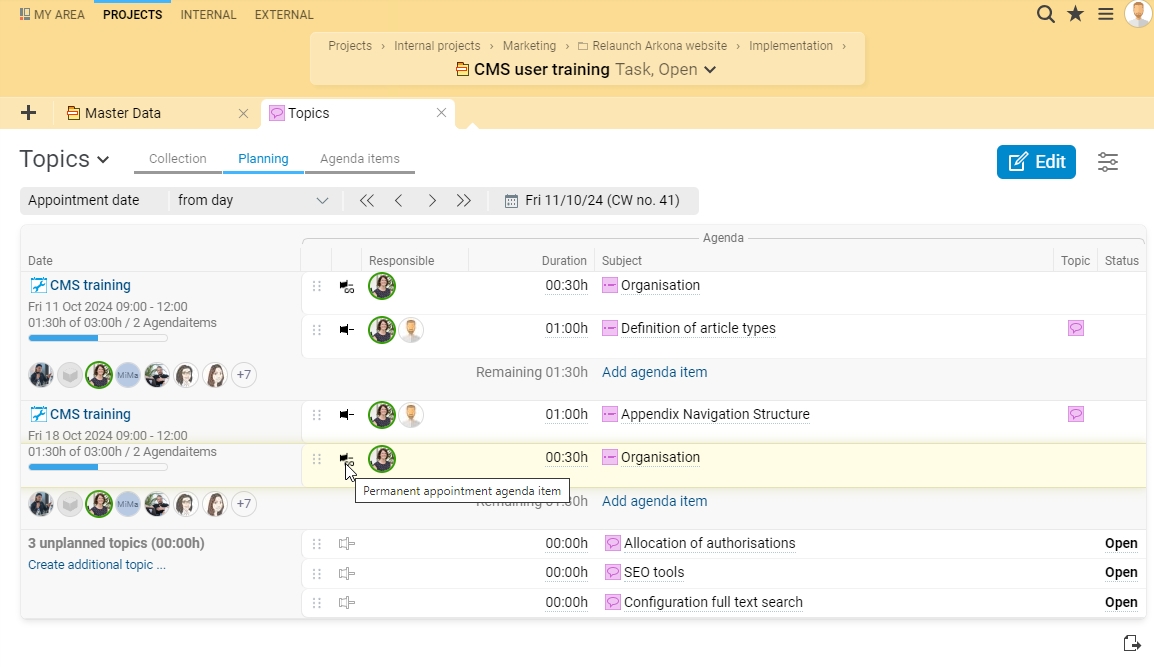
  • Topic and agenda planning: Creation of meeting agendas and automated minutes generation
  • Standardized workflows: Structuring and coordination of teamwork through standardized and customizable processes
  • Follow-ups: Delegate tasks and set reminders
  • User messages: Quick communication via messages to other users
  • Multilingualism: User interface available in ten languages

Inventory and contract management

  • Contract generator: Create contracts with the wizard according to individual requirements
  • Workflow integration: Seamless integration of contracts into work and approval processes
  • Deadline monitoring: Automatic notifications for important contract deadlines
  • Document upload: Easy drag-and-drop upload of contract documents
  • Contract linking: Link contracts to quotes, invoices, or other documents
  • Contract assignment: Assign contracts to partners, service providers, or customers
  • Inventory management: Assign contracts to inventory items and resource management for projects

Process management and process automation

  • Model processes according to the international BPMN 2.0 specification
  • Automation: Automation of BCS objects such as appointments, tickets, and emails
  • Define workflows: Definition of processing sequences, response times, and target times
  • Traffic light function: Visualization of urgency and time management
  • Checklists and templates: Structuring of workflows with checklists and their storage as templates

Quality management

  • Checklists & templates: Preventing errors with standardized checklists and templates for projects, tasks, and processes
  • Wiki integration: Using external and internal wikis to document and link processes and knowledge
  • Evaluations: Monitoring the effectiveness of quality measures with flexible evaluation options, e.g., for response times and error frequencies
  • Documentation: Documenting experiences and project progress to enable continuous improvement and sound process analysis

Methods and process models in BCS

IPMA/GPM

  • Goal definition: Forms for easy definition of main and sub-goals
  • Project environment analysis: Support through graphical overviews
  • Stakeholder management: Planning communication strategies
  • Risk management: Support from BCS throughout the entire project
  • Project structure plan: Visualization of the plan in graphical or tree view
  • Time and resource planning: Conflicts and bottlenecks are identified
  • Reporting: Generate project reports quickly and directly
  • Multi-project overview: Central overview of all projects

PRINCE2

  • PRINCE2 Assistant: Support in all project management phases
  • Quality register: Recording of criteria and responsibilities for testing
  • Tolerance limits: Definition and monitoring of project values
  • Project phases: Creation of a schedule and individual color design
  • Resource management: Reservation of employee capacities for projects
  • Change management: Management of approvals and changes
  • Business case: Export of reports from BCS
  • Project roles: Presentation of roles as an organizational chart
  • Graphical network plan: Visualization of dependencies between products

Scrum

  • Task overview: Effective daily scrum with customizable overview and graphical representation in the burndown chart
  • Digital scrum board: Drag-and-drop control for activities
  • Product backlog & user stories: Structuring and refining requirements
  • Sprint planning: Consideration of team velocity and story points
  • Sprint backlog: Drag-and-drop user stories
  • Scrum assistants: Support for Scrum projects
  • Resource management: Capacity reservation for sprints
  • Sprint calendar: Automatic creation of Scrum meetings
  • Time tracking: Booking expenses on user stories
  • Ticket system: Integration of tickets in user stories and backlogs

Kanban board

  • Visual project management: Kanban board for visualizing processing statuses and task organization
  • Kanban view: Compact overview of tasks, priority, and processing team in the dashboard
  • Easy handling: Drag and drop to change processing status and responsibility
  • Team planning: Quick assignment of tasks via drag and drop
  • Customizable board: Define processing statuses and swimlanes for different priorities
  • Kanban and Scrum: Use the board as a Scrum or Scrumban board
  • WIP limits: Set limits for tasks to avoid overloading the team

HERMES

  • Configuration of standard scenarios: Create templates for specific HERMES projects with a wizard in BCS
  • Milestones as quality gates: Define phases and milestones for quality assurance during the course of the project
  • Quality management: Use workflows and checklists to support and ensure project quality
  • HERMES and Scrum: Combine HERMES with Scrum for agile development processes in BCS
  • Uniform role model: Define project roles and specify the rights for each role

PMflex

  • Life cycle support: Accompany projects from initiation to completion with functions for goal definition, risk management, and resource management
  • Risk management & process optimization: Identify and minimize risks and continuously improve processes
  • Documentation & collaborative tools: Use centrally stored documents and reusable templates for team collaboration
  • Resource & role planning: Dynamic resource allocation and precise role distribution.
  • Tailoring & customizing: Adapt project methods to different project classes and save plans as templates to standardize processes
  • Reporting & communication: Create project reports and status updates with a single click
  • Agile integration: Integrate agile methods such as Scrum and Kanban

PM²

  • Roles & Responsibilities: Define PM² roles with clear access rights and responsibilities
  • Resource Planning: Manage resource capacities according to PM² guidelines for optimal utilization
  • Stakeholder Management: Use stakeholder registers and communication plans to systematically manage expectations and influencing factors
  • Life cycle phases: Guide projects through all PM² phases for seamless process monitoring
  • Tailoring: Flexibly adapt projects to your organization with PM²-compliant templates and wizards
  • Portfolio & programs: Prioritize projects according to strategic criteria and manage programs comprehensively
  • Agile integration: Combine agile and classic PM² methods for flexible project execution
  • Compliance: Ensure data protection and compliance with detailed access controls

Automotive SPICE

  • Process definition and evaluation: Define and evaluate all necessary processes in accordance with Automotive SPICE standards for software development and system integration
  • Maturity model: Use the SPICE maturity model to continuously improve your development processes
  • Risk management: Systematically identify and mitigate risks to ensure the quality and efficiency of your projects
  • Quality management: Integrate quality management processes to comply with Automotive SPICE requirements and optimize development standards
  • Documentation and traceability: Ensure that all development and testing processes are documented in a traceable manner to meet Automotive SPICE compliance requirements
  • Automated reporting: Use integrated tools to create reports and status updates in line with SPICE guidelines

PMI/PMBOK Guide

  • Process groups and knowledge areas: Support all five process groups (initiation, planning, execution, monitoring, and closure) and integrate the 10 knowledge areas of the PMBOK® Guide to effectively manage projects
  • Resource planning and management: Plan and monitor resources in accordance with PMI guidelines to maximize utilization and efficiency
  • Project structuring and milestones: Define and monitor project phases and milestones with a clear focus on quality and time management
  • Risk management: Identify, assess, and mitigate risks through systematic processes and regular reviews
  • Integrated reporting: Create regular project reports and status updates based on PMBOK specifications
  • Stakeholder management: Manage stakeholders through detailed communication plans and use stakeholder registers for targeted information control
  • PMI Agile Method Integration: Combine agile methods such as Scrum and Kanban with classic PMI approaches for flexible and iterative project implementation

V-model

  • Systematic phase planning: Track V-model phases such as requirements definition, system design, and test planning, and integrate them efficiently into your project plan
  • Waterfall model and iterations: Combine the structured approach of the V-model with iterative approaches for flexible adjustments and improvements
  • Requirements management: Manage requirements and their tests in detail using the requirements management module and synchronize them with the development phase
  • Test management: Plan, control, and document test phases and activities in accordance with the specifications of the V-model
  • Documentation and traceability: Create complete documentation and maintain traceability of all changes to ensure that all requirements are met
  • Quality assurance: Ensure that the quality requirements of the V-model are met through system-controlled processes and regular reviews
  • Risk management: Identify and control risks through early analysis and continuous monitoring throughout the entire life cycle
  • Integration of agile and classic approaches: Offer a hybrid way of working that combines agile methods and the V-model to respond flexibly to dynamic requirements.

Rights management

  • Company-specific rights concept
  • Fast assignment and intuitive configuration of rights
  • Targeted rights assignment
  • Access for external parties

Customizing

BCS can be tailored precisely to your company-specific requirements. Possible customizations range from the scope of functionalities to business logic and corporate language to corporate design.

Interfaces

  • Jira: Integration of Jira data for project management, evaluation, and invoicing
  • Import/export module: Flexible data exchange with virtually any system
  • Confluence and wiki software: Linking BCS with wiki systems for context-related information provision
  • Version management: Automatic import of changes from Subversion repositories
  • Logs and exchange formats: Standardized formats for email servers, document management, and calendars
  • Time tracking via app: Recording of project- and task-related working hours via the BCS app
  • User management and authentication: Integration of LDAP, Kerberos, OAuth 2.0, OpenID Connect, TOTP for authentication and rights management
  • Microsoft: Integration with Microsoft 365, Dynamics 365 Business Central, Exchange, SharePoint, and Office applications
  • SAP: Flexible interfaces for integration with SAP systems
  • Telephone systems (CTI): Connection of BCS to telephone systems via TeamCall Telephony Access
  • Reporting tools: Connection to tools such as Eclipse BIRT for customized reporting
  • Web service: Flexible data integration via SOAP web services
  • Time recording terminals: Automated import of data from time recording terminals
  • DATEV: Easy transfer of invoice and cash register data to tax advisors

Interfaces:

confluence
DATEV online
E-Mail-Server
Eclipse BIRT
HCL
IBM
ilink TeamCall Telephony Access Platform
JDBC
JIRA
Microsoft Office
OAuth
OpenID
SAP
Termin-Abo 365/Exchange
WebDAV
Web services REST/SOAP

Target groups:

Areas of application for BCS

A particular focus among Projektron's 850 customers is on numerous IT companies and IT departments of large companies that use BCS for software development. Multimedia agencies, research and development departments in industry, the financial and energy sectors, biotechnology, and healthcare also use BCS. The software is also suitable for public institutions, research centers, and large consulting firms. The BCS.light edition supports smaller project teams or companies with less project depth – from quotation to invoice.

Industry use of BCS

  • Information technology
  • Software development
  • Consulting
  • Agencies
  • Mechanical engineering
  • Electrical industry
  • Automotive industry
  • Industry
  • Healthcare
  • Public sector

Focus on IT project management

Several aspects and functions of BCS make the use of the software particularly promising in IT companies and departments. First and foremost is the ticket system, which provides support for support requests. Tickets can be categorized according to error messages, change and service requests, suggestions, and requirements. There are both cross-project and project-specific ticket lists. Tickets can also be tagged to find thematically related tickets. Ticket costs can be recorded directly on the ticket and offset against the support budget.

References:

More than 850 customers in Europe use BCS with emphasis on IT companies and departments as well as research and development departments. Some of our references:

  • DFB
  • German National Library
  • Axel Springer
  • Stiftung Warentest
  • TÜV Rheinland
  • Accenture GmbH
  • Leadec
  • ENGIE Germany
  • gematik
  • Cariad
  • HanseMerkur
  • Hörmann KG Antriebstechnik
  • Toll Collect
  • UniVersa

Further references at https://www.projektron.de/en/references/

Contact information:
Ms. Claudia Kedor
+49 30 3474764-0
Explore more about the software:
Information
directly to the product website
Online demonstration
directly to the product website
Video appointment
request
Success story
directly to the product website
Software exposé
request URL
Prices
directly to the product website

Screenshots

Functions (excerpt) of BCS (Business Coordination Software):

Absence management
Absenteeism statistics
access controls
Accounting functions
Accounting of different time models
Active Directory
Activity planning
Ad hoc reports
Additional database fields
Address and contact lists
Address Books
Address management
Agent rules
Alerts
allocation of internal activities
Analysis
Analysis functions
Applicant assessment
Applicant data
Application management
Application processing
Appointment monitoring
Approval workflow
Archiving
Article, customer and invoice numbers
Assessment forms
Assessment tools
Aufgabenaktualisierung
Aufgabenplanung
Aufgabenpriorisierung
Availability check
Availability display
Blocking of individual time models
Booking absenteeism
BPMN 2.0 workflows
Break detection
Break times
Budgeting
Business trips and customer visits
Calendar and appointment management
Calendar functions
Campaign management
Cancellations
Capacity calculation
Capacity planning
Categorization
Central address management
Change orders
Classification of cost types
Client management
Collaboration
Comment function
communication
Communication tools
Computer Telephony Integration (CTI)
Contact management
Contact persons
Contact persons
Contact planner
Contract approval workflow
Contract controlling
Contract Lifecycle Management
Contract management
Contract partner management
Contract type definition
Control system
Controlling functions
Cost accounting system
Cost centers
Cost management
Cost overviews
Cost recording
Create invoices directly
Credit notes
CRM
CRM customer data reconciliation
CRM interfaces
Customer account overview
Customer accounts
Customer data
Customer data import
Customer display
Customer groups
Customer history
Customer ideas
Customer management
Customer portal
Customizing
Dashboards
Data export
Data import
Database interfaces
Date-related price changes
Deadline management
Deadline monitoring
Deduplicate functions
Delivery addresses
Deployment planning
Discounts
Display of personnel attendance overviews
DMS
Document entry
Document input
Document workflow
Domestic travel expense accounting
Draft storage
Drill-down analysis
E-Invoice
e-Invoice
E-mail alerts
E-Mail dispatch
E-mail invoice dispatch
E-mail management
E-mail notification
Electronic files
Employee capacities
Employee management
Escalation management
Escalation mechanisms
Expenses
Export functions
Final invoices
Financial accounting interface
Flextime
Foreign currencies
Form Designer
Forms for debtors
Gantt charts
Geographical display
Graphical disposition
grouping
Header and footer texts
History
Holiday management
Hourly rate management
Idea evaluation
Idea input
Idea management
Idea prioritization
Import functions
Incoming invoice verification
Individual and framework contracts
industry-specific accounting
Installment payments
Integration of company logos and images
Interfaces
Internal communication
International Travel Expense Reporting
Invoice export
Invoice items
Invoice processing
Invoices
Invoices in PDF format
Invoicing
Invoicing
Invoicing
Job descriptions
Knowledge management
Lead management
legal holidays
License agreements
Listing of customer purchases
Mail merge functions
Mailings
Maintenance contracts
Mapping of core working hours
Mapping of predefined work shifts
Master data management
Measures management
Message system
Metadata
Mileage accounting
Milestones
Minimum working time and daily target
Mobile time recording
Mobile working time recording
Modeling workflow
Monitoring of workflows
Multi-project controlling
Multi-project management
Multi-user capability
Multilingualism
Multiple campaigns
Multitenancy
Network plan
Notification system
Offline time recording
On-call and stand-by duties
Online help
Operating calendar
Opportunity management
Order management
Order processing
Order status
Order times
order-related personnel time recording
Out of office assistant
Outlook integration
Overtime calculations
Payment methods
Payment targets
Performance Appraisals
Personnel controlling
Personnel cost centers
Personnel cost planning
Personnel key figures
Personnel management
personnel master data
Personnel resource planning (PRP)
Personnel time recording
Phone logs
Plan dispatch
Plan variants
Planning aids
Planning calendar
Planning documents
Planning period
Planning sections
Portfolio management
Price management
Print function
Probabilities of occurrence
Procedure Models Project Management
Process Designer
Process documentation
Process management
Process models
Process reporting
Process visualization
Processing status
Processing times
Procurement workflow
Progress invoices
Progress Tracking
Project acquisition
Project budgeting
Project controlling
Project cost centers
Project costing
Project data acquisition
Project documentation
project evaluation
Project evaluations
Project forecasts
project groups
Project ID
Project invoicing
Project Management
project metrics
Project performance capture
Project planning
Project statistics
Project structure
Project templates
Project time recording
Project timing
Project workflow
Project-related vacation planning
Quality management
Quotation generation
quotation management
Ranking of risks
Real-time evaluations
Real-time tracking
recurring invoices
recurring risks
Remote access
Report management
Reporting
Requirements management
Resource allocation
Resource Management
resource monitoring
Resource overview
Ressourcenplanung
resubmission of risks
Resubmissions
Reviews
Risk analysis
Risk assessment
Risk cockpit
Risk control
Risk control measures
Risk management
Risk recording
Risk types
Sales opportunity management
Scalability
Scheduled workflows
Scheduling
Scrum
Search
SEPA
Serial appointments
Simulation
Single Sign On / API
Skills
SLA contract management
Statistics
Status changes
Status Reporting
Structure plan
Support of the selection process
Support project management
Surcharge calculation
Surveys
Target Agreements
Task management
Task tracking
Text module management
Ticket creation
Ticket Distribution
Ticket processing
Ticket system
Time accounting rules
Time and work plans
Time bookings
Time models, time accounts
Time off accounts
Time planning
Time recording
Time recording interfaces
Time recording systems
To-do lists
Top-down or bottom-up procedure
Traffic light system
Travel allowances
Travel expense flat rates
Travel expense recording
Travel expense report
Travel expenses
Travel requests
Trend analyses
User and time stamp
User management
Vacation entitlements
Vacation group administration
Vacation management
Vacation Request System
Value Added Tax Identification Number
VAT rate
Versioning
Wage and salary interfaces
Warnings for planning inconsistencies
Workflow management
Workflow optimization
Workflow status
Working time calculation
Working time corrections
Working time management
Working time models
Working time monitoring
Working time recording
Worktime triggers
ZUGFeRD

Get to know the software better! Request a video appointment for a personal presentation!

Technical specifications:

Web-based:
yes
SaaS, Cloud:
yes
On-premises (local installation):
yes
Multi-user (network-compatible):
yes
Multi-client compatible:
yes
Maintenance:
for a fee
Customizing:
possible for a fee
First installation (year):
2001
Number of installations:
800
Manufacturer based in:
Germany
Training:
for a fee
Installation support:
for a fee
Documentation:
Manual, Online Help, Demo version, Technical documentation
Dialogue language(s):
English, German, French
System requirements:
Compatible operating systems (runs with):
Win 11
Win 10
Win Server
Mainframe based
Unix based
Linux based
Mac OS
Mobile OSs (supports):
iOS
Android
Old Compatible Operating Systems:
Win 8
Win 7
Win Vista
Win XP
Blackberry
Win Phone / Mobile
Data storage medium:
DVD
CD-ROM
Download
Flash memory

Software was recommended by SoftGuide in this IT projects:

Craft business (PV systems) seeks business software

Project no.: 25/3511
Tender until: finished

We are looking for craftsman and project management software for our specialist company (PV ... more

Engineering firm seeks customer manager in connection with process/workflow management

Project no.: 25/3503
Tender until: finished

As a small engineering firm in the field of environmental analysis, we are looking for customer ... more
State authority seeks working time recording system

Project no.: 25/3494
Tender until: finished

We are looking for new software for time recording for our state authority. ... more

more IT projects