CLM in SMEs: Studies & market statistics
The latest BearingPoint study on contract lifecycle management (CLM) for 2025 shows that 74% of companies surveyed in German-speaking countries do not yet use a dedicated CLM tool for their contract management. Contract management has been underestimated up to now, even though 42% of companies cite content-related risks (e.g. unclear clauses) and 43% cite missed deadlines as key problem areas. 36% criticise inefficient processing procedures, while 34% complain about the lack of up-to-date contract statuses.
However, as a result of increased digitisation requirements, at least 25% of companies are already investing in digital contract creation or automated workflows. 66% view the increased use of AI in contract management positively, even though only 24% actually use AI for document creation and around 10% for reviewing contractual content. According to the study, there is a strong willingness to transform in all functional areas; the key is to overcome implementation barriers.
Another market overview identifies the levers of effectiveness that medium-sized companies can realise with CLM:
- Shorter turnaround times and reduced error rates through automation and standardisation in all phases of the contract lifecycle
- Time and cost savings in contract management, security gains in terms of compliance and audit requirements
- Greater transparency with regard to deadlines, responsibilities and accountabilities
Why CLM is a lever for SMEs in particular
In medium-sized companies, contract management is often still organised via email correspondence, document versions (e.g. in Word) and network drives. This leads to typical problems:
- Multiple versions and conflicting processing statuses
- Outdated templates or unclear clause variants
- Delays due to non-transparent approvals
- Uncertainty regarding deadlines, extensions and audit requirements
CLM creates a central location for this: every contract follows defined processes, has defined mandatory fields, is controlled by workflows and is consistent and verifiable thanks to templates and clause libraries.
Building blocks of effective CLM / contract management
Effective contract lifecycle management (CLM) forms the backbone of modern contract management and ensures clear, transparent and efficient processes. Companies that actively manage their contract landscape minimise risks, reduce costs and significantly accelerate internal processes. The following building blocks show which elements make up a powerful CLM system and why they are indispensable for sustainable business success.
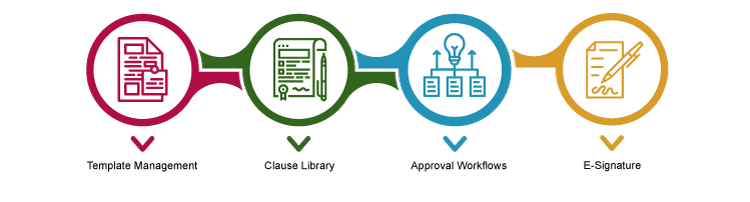
Template management
- Map contract types All relevant document types, such as NDAs (non-disclosure agreements), service agreements, SaaS/user agreements, purchasing agreements and framework agreements, are maintained centrally as standardised templates.
- Variable fields/placeholders Central fields (contracting parties, prices, term, notice periods) are available as placeholders for automated generation and customisation of contract texts. Fallback standards reduce risks due to missing information.
- Multilingual templates International contractual relationships are covered by multilingual, approved templates (DE/EN/others).
- Versioning & history Each template is version-managed, with a rollback option and change log.
Clause library
- Categories & playbooks Systematic classification (e.g. liability, warranty, data protection, SLA, price). An integrated ‘clause playbook’ clearly defines permissible and impermissible variants for each clause.
- Approval rulesThresholds (e.g. liability limits, data protection scenarios) automatically trigger approvals by Legal, InfoSec, etc. in the CLM; ‘auto-routing’ immediately forwards deviating cases to the right place.
- Deviation trackingEvery deviation from the standard is documented; evaluations show the typical top 3 deviations per contract type.
Approval workflows
- Serial vs. parallel approval: Depending on value, risk or contract type, sequential (serial) or simultaneous (parallel) approvals are possible.
- Thresholds & escalation: In the event of delays, SLA reminders and escalation chains, including audit trails, are automatically initiated.
- Role-based workflows: Legal, business, finance, IT and other stakeholders can be involved with clear responsibilities, including substitution rules.
E-signature
- Signature level/sequence Depending on the contract type, the signature level can be set as AdES (advanced) or QES (qualified); Signature sequences, delegation rights and complete logging are included as standard.
- Evidence & archiving
- Evidence and a legally compliant, GoBD-compliant archive with access controls are usually integrated into contract management.
- Interfaces to e-signature gatewaysAutomated status reporting (webhook) and seamless process integration until completion.
Interfaces – CLM as the backbone between CRM and ERP
- CRM integration
- Transfer of opportunity/quote data to the contract (parties, prices, term)
- Feedback of status/dates/signature results to CRM
- ERP integration
- PO/order reference for purchasing contracts, conditions/master data, cost centres
- Contract as master data object (ID), usage data for billing/renewal
- DMS/archive & e-signature gateway
- GoBD/audit archive, storage, versioning, access controls
- Event-based webhooks for status changes
Data model & governance (brief, practical)
Effective contract management is based on a clearly structured data model and clean governance. The graphic shows the central building blocks of mandatory and metadata, from object orientation to role management and compliance, which together create a consistent, audit-proof foundation. This results in a transparent database that accelerates processes and reduces risks.
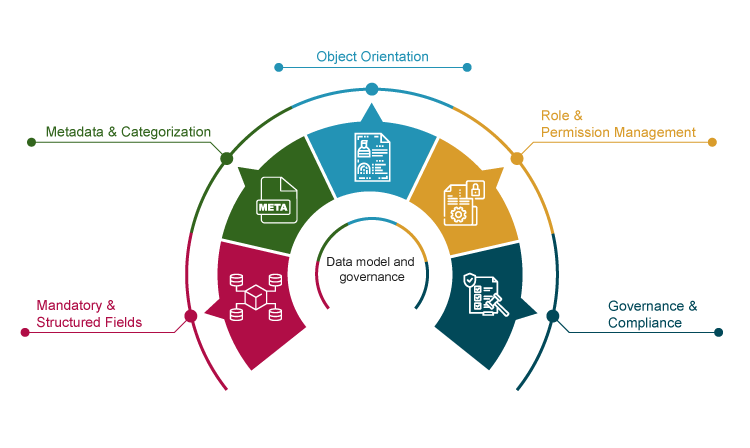
- Mandatory and structural fields: Clearly defined data fields for each contract type (e.g. contracting parties, term, notice periods, prices, SLA, annexes) as a requirement for investment, controlling and reporting.
- Metadata & categorisation: Collection of additional, structured data such as industry, subject, product group, region, risk score, responsible persons. The data is available for filter searches and evaluations.
- Object orientation: Contracts as independent, ID-based objects with unique assignment in CRM/ERP systems.
- Role/rights management: Fine-grained control: creator, reviewer, approver, signatory, viewer, etc. with clear RACI assignments and audit trail, including rights at clause, template and document level.
- Governance & compliance: Rules for data storage (e.g. GoBD/GDPR requirements), retention and deletion periods, and control mechanisms for change logs, versioning and archiving are stored.
Roles & Responsibilities (RACI)
- Key roles: Business unit (business owner), legal, purchasing/sales, finance/controlling, IT/CLM admin, data protection/info security
- RACI example (excerpt)
- Creation: R=business unit, A=business owner, C=legal, I=finance
- Clause deviation: R=legal, A=general counsel, C=business owner, I=info security
- E-signature/conclusion: R=Business Owner, A=Managing Director/Procuration (for thresholds), C=Legal, I=Finance
KPIs & control
- Throughput time
- Definitions: ‘Draft→Legal Review’, ‘Legal Review→Final’, ‘Final→Signature’, ‘Signature→ERP/CRM Sync’
- Target values by contract type (NDA < 24 hours, standard purchase < 7 days, complex > 14 days)
- Deviation rate
- Percentage of contracts with at least one clause deviation from standard; top three deviations
- Correlation between deviation and additional approval loops
- Quality and risk indicators Percentage of first-time-right
- (without renegotiation)
- Escalation rate, number of manually changed clauses
- Renewal rate/renewal risk, missed deadlines
- Transparency
- Dashboard (funnel with bottlenecks, SLA traffic lights, top blockers per team)
Practical blueprint – end-to-end CLM workflow
The CLM workflow begins with a structured intake process that covers mandatory fields and risk questions. This is followed by automated template selection, including rule-based clause configuration. Contracts are coordinated through collaboration via redlining, versioning and comparison before role-based approvals with SLA logic take effect. The e-signature concludes the contract in a legally compliant manner, after which the documents are archived in accordance with GoBD. Conditions and terms are fed back via ERP/CRM integrations, and SLA deadlines, milestones and changes are actively managed in obligation tracking.
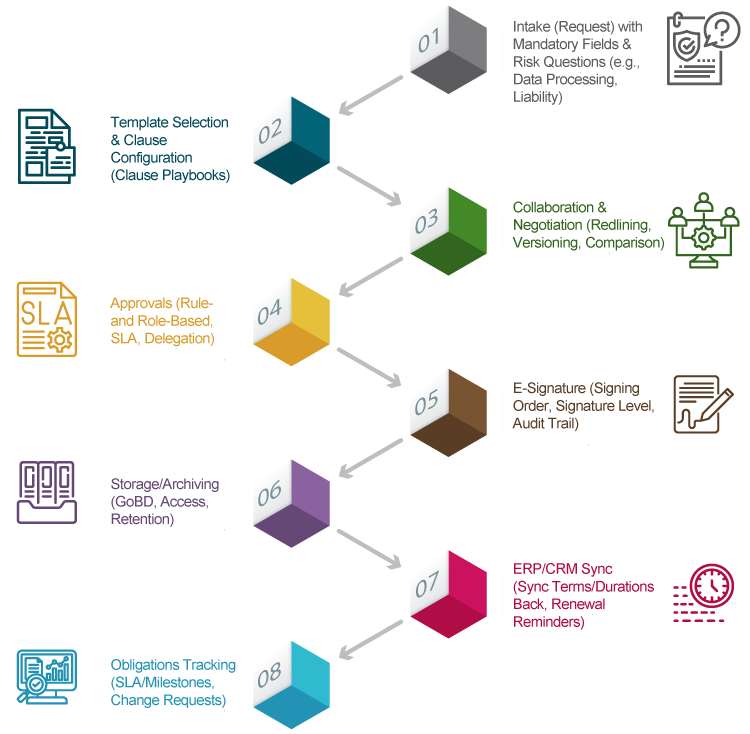
- Intake (request) with mandatory fields & risk questions (e.g. data processing, liability)
- Template selection & clause configuration (clause playbooks)
- Collaboration & negotiation (redlining, versioning, comparison)
- Approvals (rule/role-based, SLA, representation)
- E-signature (order, signature level, audit trail)
- Storage/archive (GoBD, access, retention)
- ERP/CRM sync (replay conditions/terms, renewal reminders)
- Obligation tracking (SLA/milestones, change requests)
Security, compliance & audit
- SoD (segregation of duties), authorisations, logging
- Data protection (DPIA for sensitive data), AVV/DPA, deletion and retention periods
- Supporting documents: process documentation, signature logs, change journal
Implementation in 4 phases (quick start)
- Phase 1 – Discover & Design: Current processes, contract types, KPI targets, RACI
- Phase 2 – Data & Integrations: Curate templates & clauses, ERP/CRM/DMS interfaces, roles/rights
- Phase 3 – Automate: Workflows, escalations, e-signature, playbooks, SLA dashboards
- Phase 4 – Rollout & Control: Training, hypercare, KPI review, continuous improvement
Risks & Countermeasures
- Shadow versions via email → Central editor, binding templates, redlining in CLM
- Approval backlog → SLA reminders, representative chains, parallel approvals
- Interface breaks → API-first, field mapping, end-to-end testing, appoint data controllers
- Unclear clause policy → Clause playbooks with ‘permissible/deviating/never’ + auto-routing to legal
FAQs about CLM / contract management
Which contract types are best suited for the initial introduction of a CLM?
A CLM should start with standardised, recurring contract types whose templates and approval logic are easy to map. Ideal examples are:
- NDAs (non-disclosure agreements): low risk, high throughput, well suited for initial automation steps.
- Service or work contracts: often similarly structured, but with clear price and term parameters.
- Standard purchase agreements and framework agreements: Particularly valuable for transparency regarding terms, deadlines and supplier data.
- SaaS or usage agreements: Well suited if CRM or ERP integration is available (e.g. for billing or renewal logic).
After a successful pilot run of these contract types, complex or international contracts (e.g. joint ventures or IP licensing) can be integrated step by step.
How deep should the integration into ERP and CRM be at the beginning?
A ‘lean start’ usually makes sense for medium-sized businesses. At the beginning, the following is sufficient:
- CRM integration for transferring contact, quotation and price data into the draft contract.
- ERP connection for feeding back essential contract key figures (cost centre, PO number, conditions).
- Webhook or API for automatic status updates (e.g. signature completed → status ‘active’ in ERP/CRM).
In later phases, additional synchronisation points (e.g. revenue allocation, renewal processes, KPIs) can be integrated. A structured ‘API-first’ approach prevents interface breaks later on.
When is a QES (qualified electronic signature) required and when is an AdES (advanced electronic signature) sufficient?
The choice of signature level depends on legal bindingness, contract type and risk class:
- AdES (advanced signature) is sufficient for most internal agreements, NDAs, purchasing or service contracts. It provides secure proof of identity and an audit trail.
- A QES (qualified electronic signature) is required if there is a legal requirement for written form. This applies, for example, to employment contracts, guarantees, consumer loans and certain leasing or real estate transactions (Section 126a of the German Civil Code (BGB)).
Recommendation: Store the signature levels in CLM in advance according to contract type in a matrix, including the responsible parties (legal/compliance).
How can the ‘deviation rate’ be measured systematically?
The deviation rate measures the proportion of contracts that deviate from standard clauses or templates. A consistent approach includes:
- Standard definitions in the CLM tool (reference clauses per contract type).
- Automated delta tracking (redlining, comparisons against standard text).
- Categorisation by cause (legal, business, risk) and responsible department.
- KPI evaluation:
- Deviation rate in % per contract type
- Connection to approval loops or term extensions
- Trend over time or regions
Typical target value for standard contracts in medium-sized businesses: ≤ 25% deviations after introduction of a mature clause playbook.
What belongs in a clause playbook?
A clause playbook is at the heart of legal standardisation in CLM. It defines which contract clauses are acceptable, negotiable or to be avoided. Important components:
- Owner: Responsible department (e.g. legal or compliance), responsible for maintenance and approvals.
- Purpose of the clause: Brief description of which regulatory or business risks are addressed.
- Standard text: Approved wording (ideally DE/EN version).
- Alternative variants: Permissible deviations for different scenarios with threshold values (e.g. liability amount, SLA duration).
- No-go variant: Unacceptable wording – automatically routed by the CLM system to Legal for review.
- Comments & precedents: Background information, legal references, lessons learned from previous negotiations.
A well-maintained playbook reduces renegotiations, strengthens governance and increases the ‘first-time-right’ rate.