Software > Human Resources > Shift Planner Scheduling > Crew OS
Work schedules, time tracking, and personnel files for businesses operating on a shift sch

Crew OS

Work schedules, time tracking, and personnel files for businesses operating on a shift sch


Updated on 16. Sep 2026 by Doc Phone GmbH
Demo version

What is Crew-OS?

Crew-OS is a web-based software solution for businesses with shift workers. It combines shift scheduling, time tracking, absence management, and payroll preparation into a single integrated system. It is designed for businesses where many organizational tasks related to employees must be completed daily under time pressure, such as in the restaurant industry, hospitality, retail, bakeries, event planning, fitness and leisure companies, or the beauty industry.

New employees can be added to the system via invitation. For onboarding, personnel questionnaires and a repository for required documents are available. Work schedules, pay types, and vacation entitlements can be configured with validity periods. Roles and permissions ensure that employees, location managers, and administrators each see only the information intended for them.

Schedule Planning for Rotating Teams

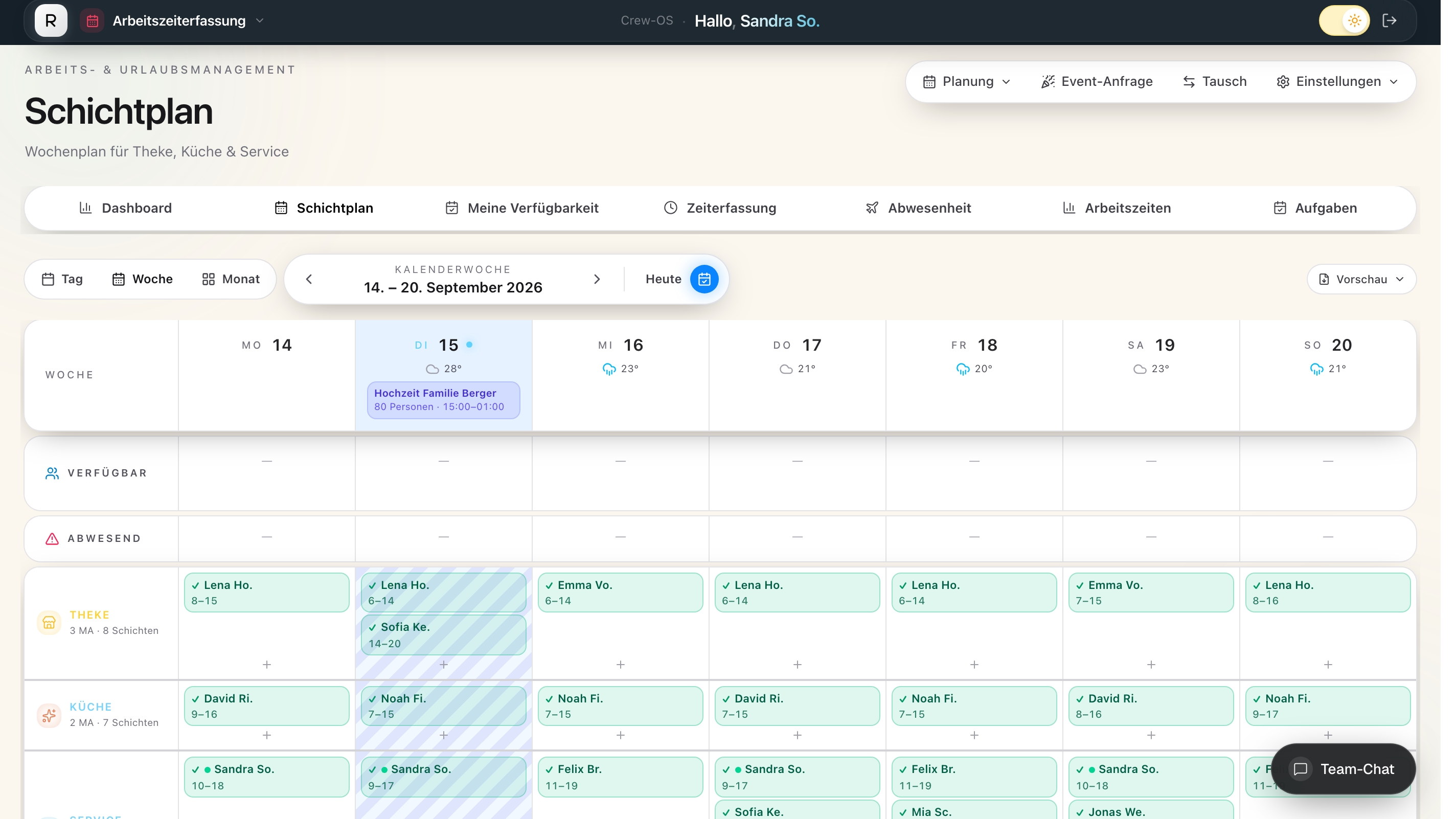
The shift schedule displays weeks, departments, and open shifts. Departments such as service, kitchen, sales, or reception can be scheduled separately. Skills can be taken into account during scheduling. Employees report their availability, take on open shifts, or swap shifts. Approved absences automatically block a shift assignment. Additionally, the ArbZG monitor checks for rest periods, maximum working hours, and mandatory breaks, among other things, and highlights any deviations.

Time Tracking at the Terminal, via App, or in the Browser

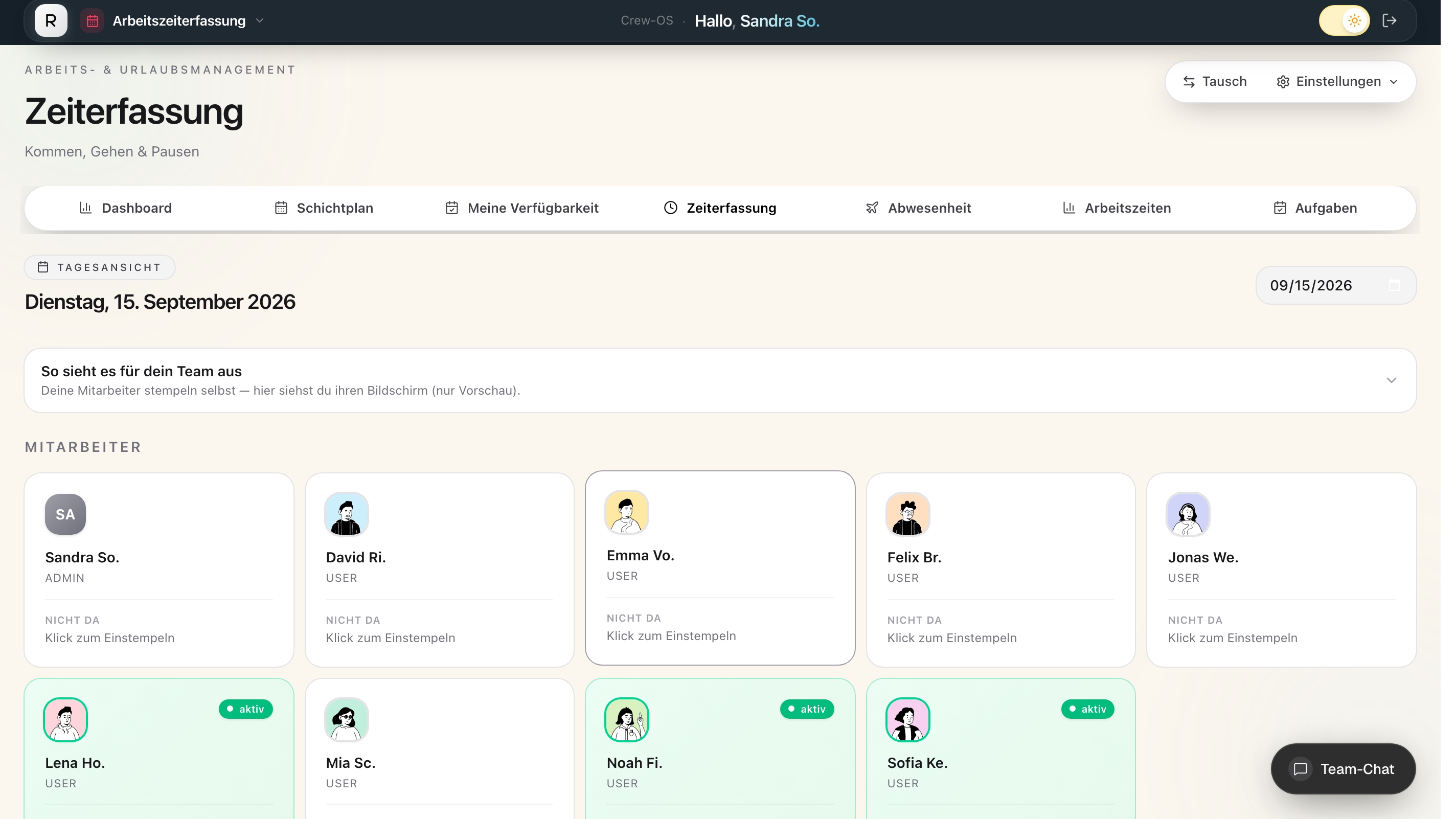
Work hours can be recorded on an iPad time clock, via the Team app, or entirely in a browser. The terminal also works offline and automatically transmits entries later. Live photos and location verification can be used optionally. According to the provider, the mobile location verification feature does not transmit movement profiles or coordinates; it only reports whether the clock-in occurred within or outside the designated area.

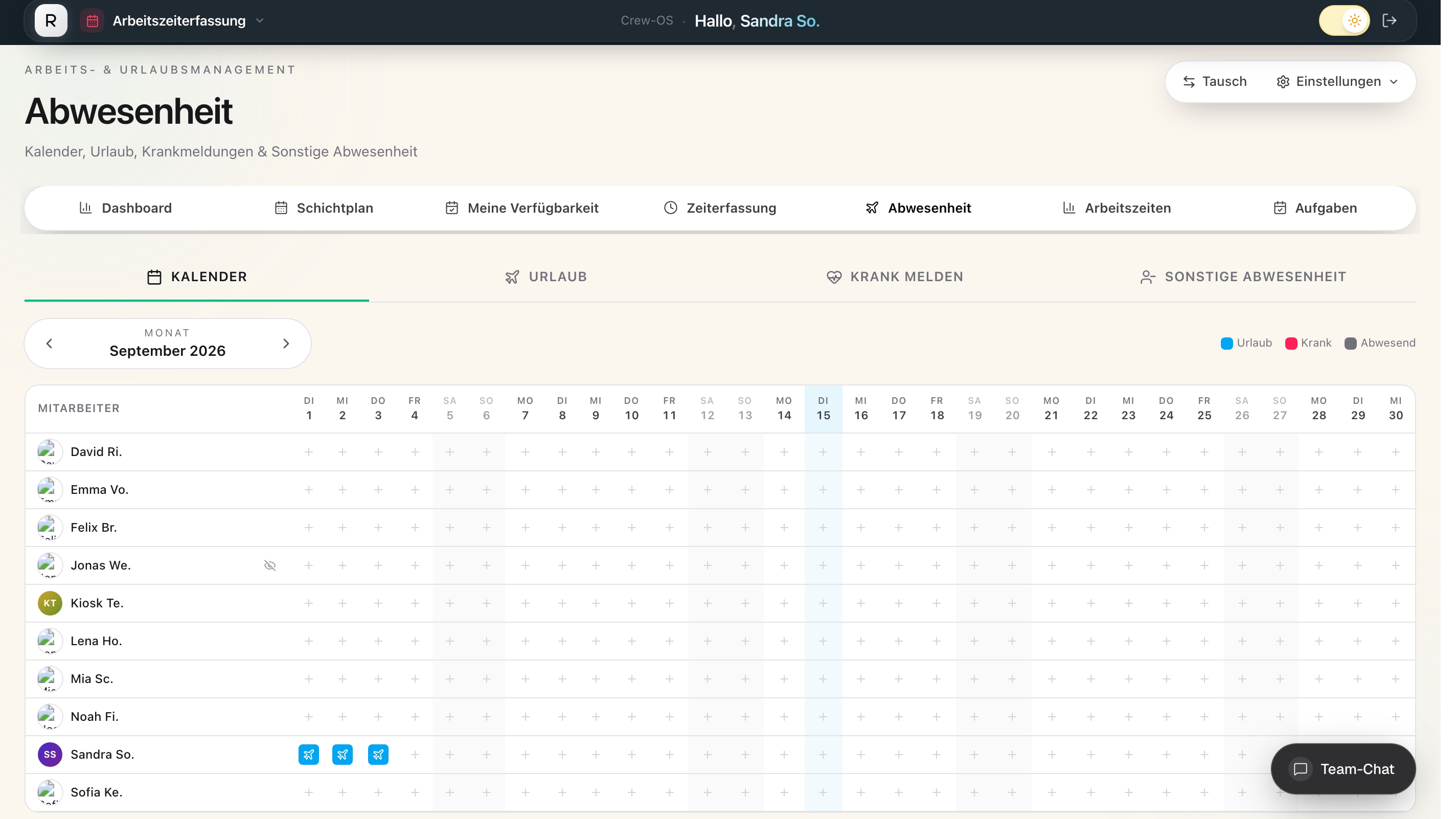
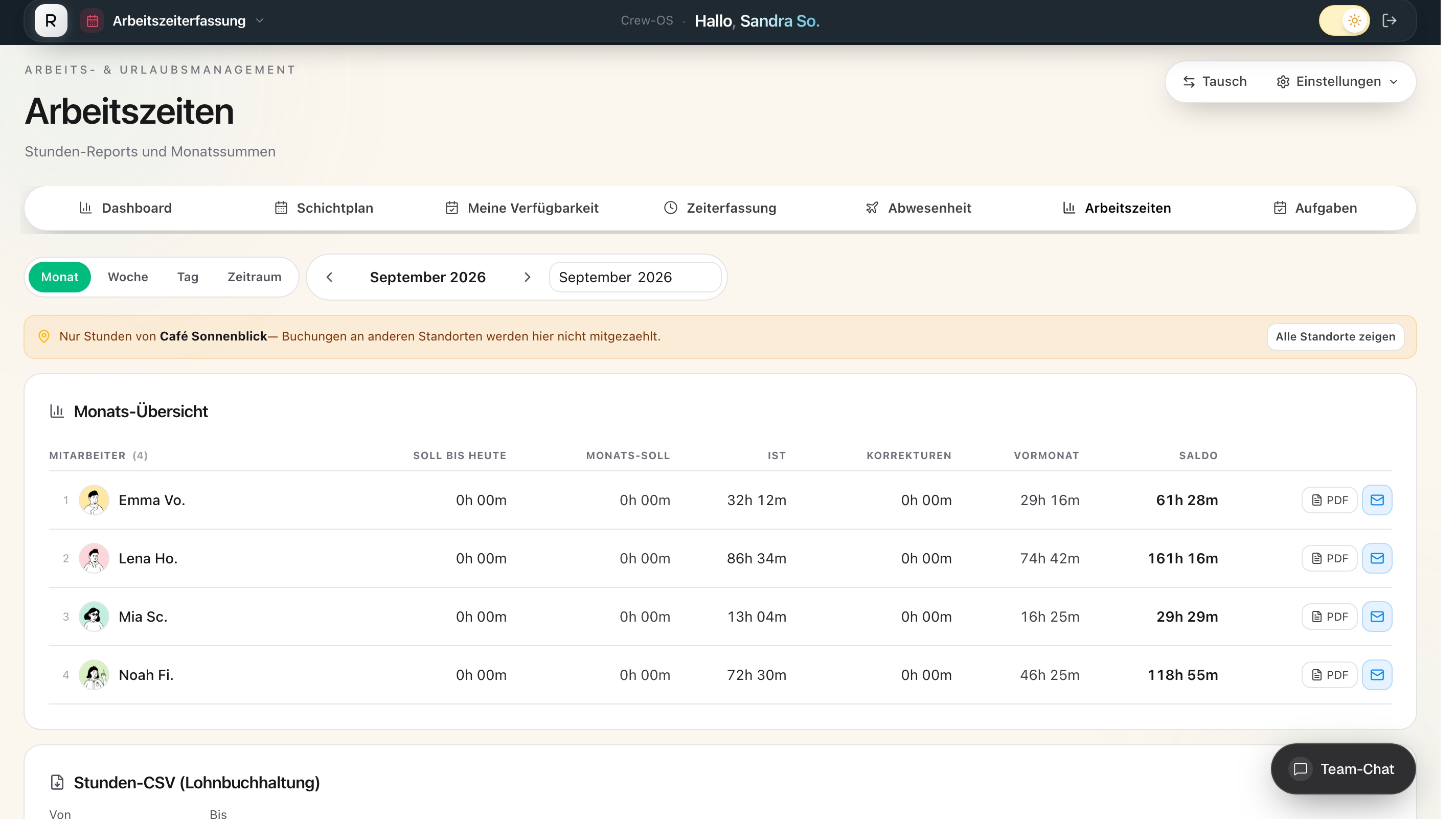
Employees can retroactively add any missed clock-ins. Changes go through an approval process and remain traceable in a history log. Vacation requests, sick leave notifications, and other absences are also managed centrally. For month-end closing, planned, actual, and balance figures, as well as overtime, premiums, bonuses, advances, and non-cash benefits, are available.

Highlights and Key Features

  • Weekly shift schedule with customizable time periods and open shifts
  • Availability, shift swaps, and automatic consideration of approved absences
  • Verification of rest periods, maximum working hours, and mandatory breaks during scheduling and time tracking
  • Time tracking via iPad terminal, smartphone app, and browser, including offline operation
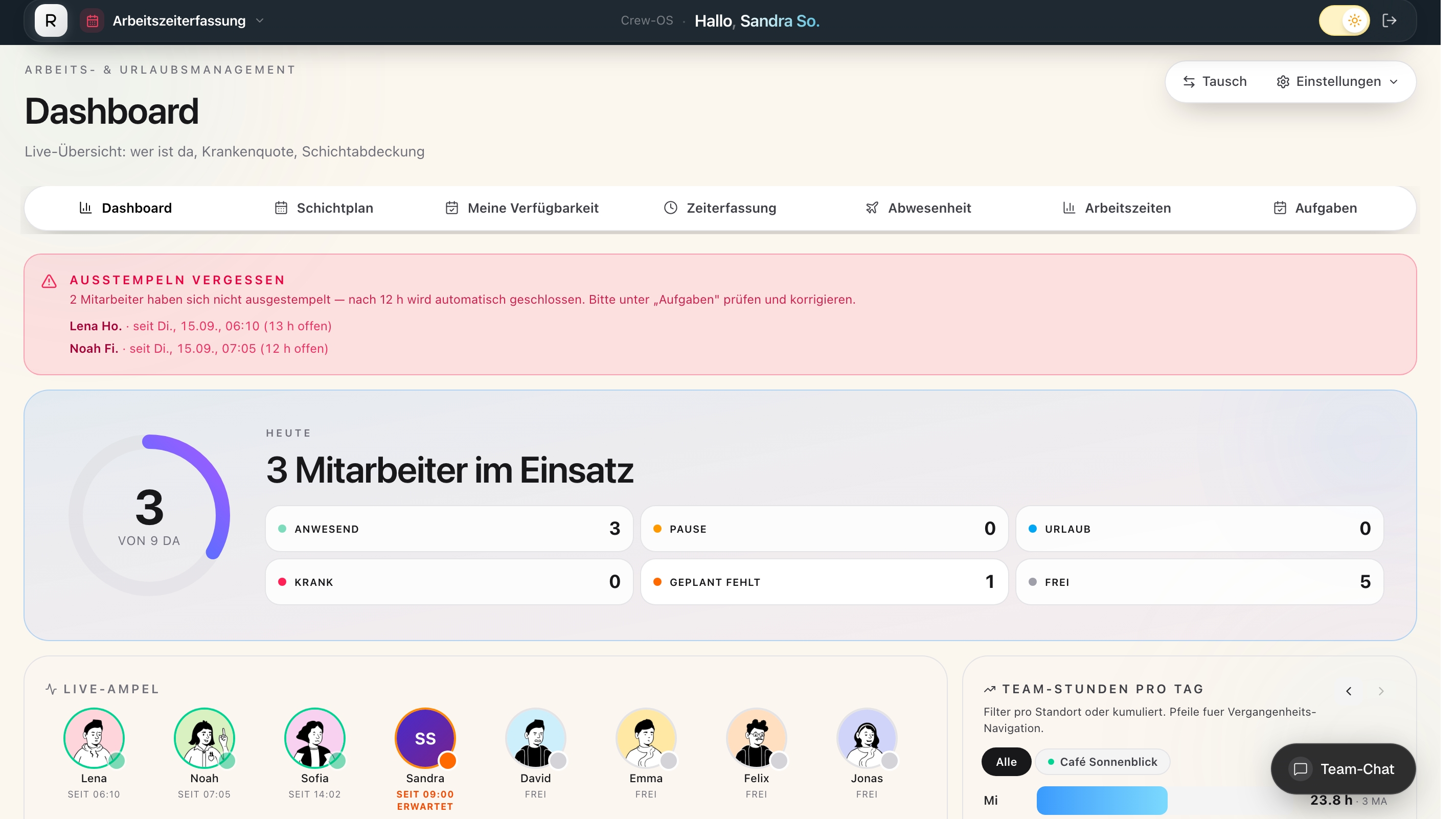
  • Live attendance overview with statuses for work, breaks, vacation, and sick leave
  • Digital timesheets with confirmation and correction process by employees
  • Vacation and absence management with requests and approvals
  • DATEV export for confirmed hours, overtime pay, and non-cash benefits
  • Import and personalized delivery of pay stubs
  • Payroll reconciliation via bank statement and SEPA file for advance and final payments
  • Multiple locations with their own schedules, terminals, operating days, and roles and permissions
  • Team chat, tasks, checklists, push notifications, and email reminders

From shift schedules to month-end closing

The main benefit of Crew-OS is that scheduling, actual working hours, and payroll-related data do not need to be maintained in separate lists. The published schedule forms the basis for the workday; recorded hours are automatically added to time accounts and timesheets, and the confirmed monthly data can then be exported for the tax advisor. Pay stubs can be imported back into Crew-OS and made available to the respective employees. By importing bank statements, you can also verify whether the actual payment matches the expected amount.

If you’d like to consolidate shifts, times, absences, and payroll preparation into a single system, you can try out Crew-OS during a trial period or request a demo from the provider.

Target groups:

Crew-OS is designed for businesses that operate on a shift schedule and do not have their own HR department—typically those with 5 to 250 employees, often with a high proportion of part-time, temporary, and mini-job workers. Particularly suitable for:
  • Food service: restaurants, cafés, bars, chain restaurants, and cafeterias
  • Hotels and lodging establishments with multiple departments (reception, housekeeping, kitchen, service)
  • Bakeries, pastry shops, and butcher shops with baking facilities, retail spaces, and branches
  • Retail and chain stores with long hours of operation and rotating staff
  • Catering and event companies with temporary staff for individual events
  • Fitness, recreational, and care facilities with early, late, and weekend shifts
  • Hair salons, beauty salons, and other service businesses with predictable shifts
  • Trades and service businesses with field technicians Particularly suitable if the business meets one of these criteria:
    • multiple locations or work areas under one roof
    • Staff who do not work at a desk and do not have a company laptop
    • Many part-time employees whose working hours must be recorded in accordance with Section 17 of the MiLoG
    • Preparation of payroll for an external tax advisor (DATEV)
      Transition to electronic payroll records by January 1, 2027 (Section 8 of the BVV)

References:

  • Doc Phone GmbH (Darmstadt)
  • Garden Villa / Green Events (Groß-Zimmern)

Screenshots

Functions (excerpt) of Crew OS:

Absence management
access controls
Archive access rights
Attendance management
Authorization profiles
Booking absenteeism
Briefings
Change documentation
Checklists
Contract management
Contract templates
DATEV export
DATEV interfaces
Deployment planning
Digital personnel file
Digital salary statement
Display of personnel attendance overviews
Document archiving
Document management
Document repository
Document signatures
Documentation and evidence management
Duty roster display
Edit History
Employee management
Employee profiles
Event planning
Import of bank statements
Messages
Mobile time recording
Monitoring functions
Non-cash remuneration values
Offline time recording
Onboarding
Overtime calculations
Payroll data
personnel communication
Personnel data management
personnel master data
Personnel planning
Personnel resource planning (PRP)
Personnel time recording
Planning calendar
Push messages
Real-time tracking
Reminder functions
SEPA
Shift planning
Shift staffing
Shift swap function
Site administration
Skills
Surcharge calculation
Target/actual comparisons
Task management
Time accounting rules
Time bookings
Time models, time accounts
Vacation entitlements
Vacation management
Vacation overviews
Vacation Request System
Wage and salary interfaces
Working time corrections
Working time management
Working time models
Working time monitoring
Working time recording
Contact information:
Mr. Dr. Ing. Michael Samman
06151 6790990
Explore more about the software:
Video appointment
request
Software exposé
request URL
Contact:
Send message

Get to know the software better! Request a video appointment for a personal presentation!

Technical specifications:

Web-based:
yes
SaaS, Cloud:
yes
On-premises (local installation):
no
AI Supported:
no
Multi-user (network-compatible):
yes
Multi-client compatible:
yes
Maintenance:
included in price
Customizing:
possible for a fee
Manufacturer based in:
Germany
Training:
for a fee
Hotline:
included in price
Installation support:
included in price
Documentation:
Online Help, Demo version
Dialogue language(s):
English, German
System requirements:
Compatible operating systems (runs with):
Win 11
Win 10
Win Server
Mainframe based
Unix based
Linux based
Mac OS
Mobile OSs (supports):
iOS
Android