The procurement and implementation of project management software can bring many benefits and be a guarantee of efficient project management. This is especially true when the integration of this software within the company runs smoothly. Integration with other business tools such as customer relationship management (CRM), time tracking, or financial software is crucial to ensure a seamless workflow and efficient collaboration within the company.
Brief guide with tips and considerations that can help you achieve successful integration
Tips for selecting project management software
Before deciding on project management software, it is important to carefully analyze the current business processes. This analysis forms the basis for identifying the key requirements for the future project management tool.
It is particularly important to define which functions are essential to support the company’s specific business processes. Which existing software (time tracking, financial software, CRM, etc.) needs to work together with the new project management software?
Evaluation of integration options
- Check the interfaces and APIs of the existing tools and the potential project management software. Make sure that the required interfaces and APIs for data exchange are available across all necessary tools.
- Prioritize project management solutions that already offer proven interfaces or integration options with a wide range of applications.
- Ensure that data is exchanged consistently between the integrated systems in order to avoid inconsistencies. When data is exchanged between systems, it is important to make sure that this data is up to date in all affected systems. For example, if a change is made in system A (e.g. the CRM), this change should also be updated accordingly in system B (the project management tool) to ensure that both systems contain the same current information. This consistent data exchange is crucial to avoid misinformation or inconsistencies in business processes that could arise from outdated or differing data in various systems.
- Consider security aspects when transferring data between different tools. The integration should comply with your company’s data protection policies.
- Check whether the software supports open APIs and standards. This not only ensures greater flexibility, but also facilitates integration with a broad range of tools.
- Check whether the software provides guides, documentation, and, where applicable, developer support for customizing and developing integrations. A supportive developer community can significantly simplify the customization process.
During integration
Evaluation of existing APIs
- Start with a thorough review of the API documentation of the tools involved. The quality and completeness of this documentation are crucial for developing a deeper understanding of how the APIs work.
- Make sure that the APIs are designed to be user-friendly. A well-structured and easy-to-understand API not only simplifies integration, but also reduces the likelihood of errors and misunderstandings during the integration process.
Testing phase before implementation
- Create a detailed test plan that covers the various aspects of the integration. This may include checking data transfer, synchronization of updates, and other important aspects.
- If available, use a simulation environment or a test environment to test the integration under controlled conditions. This makes it possible to identify potential issues before the integration is applied to the live environment.
- Pay particular attention to the data flow between the different tools. Make sure that data is transferred and updated correctly, without losses or delays.
- Simulate failure scenarios to test how the integration responds to unforeseen situations. This can help identify possible weaknesses at an early stage and enable appropriate measures to be taken.
- Assess the user-friendliness of the integrated solution. Make sure that team members who will work with the software do not encounter difficulties when using the integrated functions.
- If adjustments are made during the testing phase, make sure that the documentation is updated accordingly. This is especially important to ensure a consistent understanding of the integration for all team members.
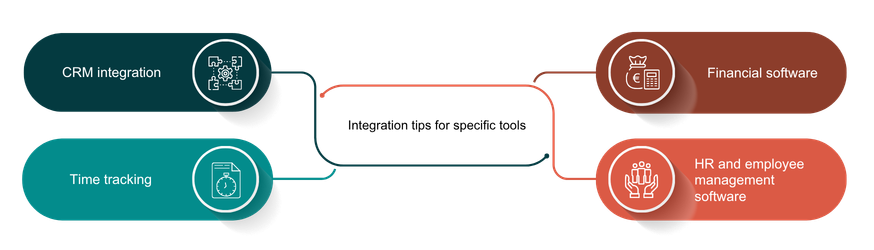
Integration tips for specific tools
It may be necessary for a project management tool to exchange data with a wide variety of other software applications in order to ensure a smooth workflow and comprehensive project management. The number and type of software applications vary depending on the company and organization. Below are tips for typical integrations.
CRM integration
- Ensure that projects and customer information are synchronized between the two systems. This makes it possible to view project activities in the context of the customer relationship and vice versa.
- Integrate communication functions that enable seamless collaboration between sales and project teams. This could include the ability to share comments, updates, and files between the systems.
- Take permissions and data protection policies into account to ensure that sensitive information can only be viewed by authorized persons.
Time tracking
- Check whether time tracking can be automated and linked directly to project management tasks.
- Ensure that the analytical capabilities of the time tracking system are integrated into the overall reporting of the project management software.
- Make sure that the time tracking function is simple and intuitive to ensure smooth use by team members.
- Consider mobile access options so that time tracking is also possible while on the go.
Financial software
- Check whether the integrated solution enables accurate tracking of project costs. Make sure that the project management software is able to synchronize budget information with the financial software.
- Check the possibility of automated invoicing based on project information.
- Check whether the integrated solution can generate meaningful financial reports that provide insights into project budgets, expenses, and returns.
- Ensure that financial analyses are integrated into the overall reporting of the project management software.
- Make sure that the integration supports monitoring of resources and liquidity in order to identify financial bottlenecks at an early stage.
HR and employee management software
- Check whether there are interfaces or APIs that allow seamless exchange of employee information (e.g. employee data such as names, positions, and roles).
- Integrate functions that make it possible to link tasks and project tasks directly with the corresponding employees in the HR system.
- Ensure that the project management software can take vacation and absence information from the HR system into account.
- Make sure that performance reviews and goal setting can be integrated into the project management software.
- Ensure that employee feedback and discussions can be captured directly in the context of projects.
Integration tips for IT and development projects
Development and version control tools
- Ensure that tasks and issues in the project management software can be linked directly to the corresponding commits, branches, or issues in the development and version control tool. This enables a clear assignment of development work to the underlying project tasks.
- Integrate functions that enable automated status updates between the systems. Changes in the development and version control tool should be automatically reflected in the project management software and vice versa.
- Check whether the integration supports code review functions. This makes it possible to conduct feedback and discussions on code changes directly in the context of project tasks.
- Check whether changes to project metadata or development data are synchronized automatically and in real time.
- Choose project management software that supports integrations with various development and version control tools to ensure flexibility for different development environments.
- Ensure that the integration takes access rights and data protection policies into account, especially when it comes to sensitive development data.
- Integrate notification and communication functions to ensure that team members are informed about development updates.
- Check whether the integration also offers the possibility to document development and version changes and support knowledge management within the team.
- Carry out regular security audits to ensure that the integration interfaces are secure and comply with your company’s data protection policies.
Conclusion
The seamless integration of project management software with other tools plays a crucial role in creating an effective workflow and improved collaboration within companies. Through careful planning, selection, and implementation, the integration of project management software with other tools can be successfully achieved, thereby optimizing overall efficiency and collaboration in your company. The evaluation of integration options highlights the importance of interfaces, data consistency, and security aspects. A thorough review of APIs and a diligent testing phase during integration are of critical importance. Employee training is equally important so that the integration can be used effectively. Good documentation of the integration ensures long-term and effective use.