Software > Standard Software, COTS > Presentation Software > SlideHub
Centrally manage presentations and company content.

SlideHub

Centrally manage presentations and company content.


Updated on 23. Sep 2026 by Software Vendor
Demo version

What is SlideHub?

SlideHub is a cloud-based platform for presentation management and the centralized management of corporate content. The software helps you organize PowerPoint presentations, individual slides, documents, and other digital materials in one place, keep them up to date, and make them available throughout the company.

Especially in companies where presentations for customers, business partners, or internal meetings are created regularly, finding the right content quickly becomes a time-consuming task. Often, there are multiple versions of the same slide, current figures have to be painstakingly updated, and previously created content is hard to find. This is exactly where SlideHub comes in. Instead of rebuilding presentations from scratch time and time again, your employees can access a central library of shared content.

The platform is closely integrated with Microsoft 365. Your teams can find and use company content directly in PowerPoint, Word, Excel, and Outlook. Access via a web browser and Microsoft Teams is also available. This allows you to continue working in familiar applications while SlideHub organizes the content in the background.

Central Slide Library and Presentation Management

At the heart of SlideHub is a searchable library for slides and presentations. Content can be organized by categories, keywords, and other attributes. An AI-powered search helps you find relevant slides even based on a natural-language description.

Centralized management also makes it easier to maintain existing presentations. If a shared slide is modified, updates can be applied to the associated presentations. Responsibilities, approvals, and version control help your teams work with the intended content.

Highlights and Key Features

  • Central Slide Library: Store and organize presentations, individual slides, and other company materials in one shared location.
  • AI-powered search: Find relevant content using search terms, categories, keywords, or a description of the slide you need.
  • AI-powered presentation creation: Create new slides and presentation drafts based on existing company content and approved templates.
  • Presentation Templates: Use your own company templates and an additional library with more than 4,500 pre-designed slide layouts.
  • Corporate Design: Ensure a consistent look and feel through approved templates, centrally managed design elements, and protected slide areas.
  • Automated Presentation Creation: Assemble presentations from existing slide groups and add customer-specific information using placeholders.
  • Version Management: Manage changes centrally and incorporate updated slides into other presentations.
  • Approval and Permissions Management: Define responsibilities, review proposed content, and control access to company materials.
  • Send & Track: Share presentations and documents via secure links and track which content recipients open.
  • Usage Analytics: Identify which slides are frequently used and what content your employees are searching for.
  • Microsoft 365 Integration: Access the central content library directly from within PowerPoint, Word, Excel, and Outlook.

Prepare presentations for sales and marketing faster

SlideHub is particularly well-suited for teams that regularly create similar presentations and need to customize them for different clients. A presentation builder allows you to combine shared slides. Dynamic placeholders automatically insert, for example, client names, numbers, or images into the corresponding sections of a presentation.

Collaboration between marketing and sales is also made easier. Marketing managers centrally maintain the shared content and design guidelines. Sales representatives access this content and use it to put together their client-specific presentations. This reduces repetitive design work and helps prevent outdated information.

For external distribution, SlideHub offers a feature for sharing and tracking presentations. You receive information on whether recipients have opened the provided materials and which slides were viewed for a particularly long time. This information can support the preparation of future client meetings.

AI Support and Centralized Content Management

SlideHub’s AI features support both searching for and creating new content. New slides can be generated from a description, taking into account existing company templates and approved materials. Existing slides can also be redesigned.

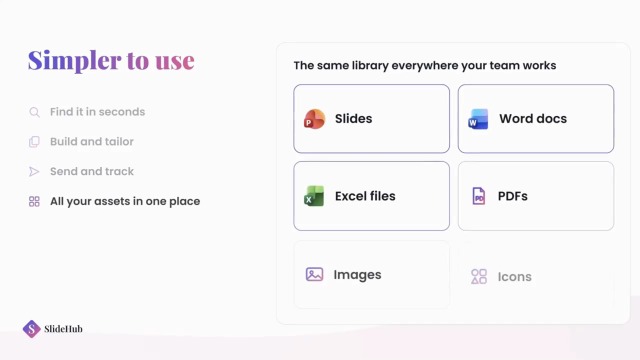
In addition to presentations, the platform also manages documents, PDF files, images, logos, icons, and text blocks. This creates a common foundation for creating and maintaining business documents.

SlideHub is delivered as a cloud solution and supports use on Windows, macOS, and in a web browser. For companies with specific requirements, features such as role-based permissions, single sign-on, and additional security functions are available. The provider allows customer data to be stored in a selectable AWS region within the EU or in the U.S.

Interfaces:

Microsoft 365
Microsoft Teams

Target groups:

  • Sales departments and sales enablement teams that regularly create customer presentations and proposals
  • Marketing and communications departments that want to centrally manage presentation templates and brand guidelines
  • Management consulting firms and professional services companies with extensive presentation libraries
  • Executive leadership and management who create corporate presentations and decision-making documents
  • IT departments and content managers who organize Microsoft 365 content, access rights, and approval processes

References:

  • Thyssenkrupp
  • KPMG
  • Netcompany
  • Siemens Advanta Consulting
  • Dentons Global Advisors
  • twoday
  • Cobham
  • Johns Hopkins University
  • H&Z
  • Valcon
  • RPC
  • Epinion
  • IG&H
  • KPS
  • Castle Biosciences
  • Arcondis
  • Bech-Bruun
  • Cannings Purple
  • Rud Pedersen Public Affairs
  • SKI Leverandør
  • NCARB
  • Holmris B8
  • Amsterdam Data Collective
  • Crescendo Partners
  • Accilium
  • Clinical Microbiomics
  • NorthCoast Asset Management

Videos


Functions (excerpt) of SlideHub:

Access rights
AI Assistance
AI Text Generator
AI Text Optimization
API interfaces
Approval workflow for drafts
Authorization management
Authorization profiles
Automation
Change documentation
Click and view tracking
Content Libraries
Content reuse
Corporate design
Custom branding
Digital Asset Management
Document classification
Document library
Document management
Document repository
Document templates
Document versioning
Document workflow
Engagement tracking
File import
File management
File sharing
Full text search
Image management
Integration of company logos and images
Integration of office software
Media library
Metadata search
Online access
Presentation
Process automation
Release management
Sample templates
Semantic search
Sharing options
Similarity search
Slide library
Statistics
Template management
Template-based document creation
Text module management
Tracking
Usage monitoring
Version control
Version management

Price

from 400.00
USD
plus 25% VAT
monthly
SMB & Growth
from 1,400.00
USD
plus 25% VAT
monthly
Enterprise
Explore more about the software:
Information
request URL
Success story
request URL
Software exposé
request URL
Prices
request URL
Contact:
Send message
Customers asked
SlideHub is a cloud-based software solution for presentation management and the centralized management of corporate content. The platform helps companies create, organize, update, and share PowerPoint presentations. In addition, documents, images, logos, icons, and other digital materials can be managed in a shared library.
SlideHub is designed specifically for companies that regularly create presentations using existing content. Typical areas of application include sales, marketing, management consulting, and professional services. The software is also suitable for larger organizations that want to make presentation templates and company content available across departments.
Yes. SlideHub offers an add-in for Microsoft PowerPoint. Your employees can search for shared slides, insert them into presentations, and reuse existing content without having to leave PowerPoint. Additional integrations are available for Word, Excel, Outlook, and Microsoft Teams.
SlideHub uses artificial intelligence to search for and create presentation content. The software helps users find suitable slides based on natural-language descriptions, creates slides from text prompts, and can build complete presentation drafts. It also allows users to redesign existing slides and rephrase text. In doing so, it can incorporate approved company content and presentation templates.
SlideHub centrally provides shared presentation templates, slides, and design elements. Companies can use their own templates and also access more than 4,500 pre-designed slide layouts. Specific slides or sections of slides can be protected against changes. This ensures that important design elements and mandatory content remain intact, while other areas can still be edited.
Yes. SlideHub supports the centralized updating of shared slides. When a central slide is modified, the updates can be applied to the associated presentations. Version control also allows you to track changes and restore previous versions. For example, updated key metrics or company information can be maintained across multiple presentations.
Yes. The Presentation Builder allows you to create new presentations from shared slide groups. Using dynamic placeholders, you can automatically insert items such as customer names, numbers, and images. Conditional content allows you to include or hide specific slides based on the information entered in a form. This is particularly helpful for recurring offers and sales presentations.
Yes. With the Send & Track feature, you can share presentations and other documents via secure links. Among other things, SlideHub tracks whether a recipient has opened the shared content and how long each slide was viewed. Additional security options are available for the sharing links, such as password protection, expiration dates, and download restrictions.
SlideHub is delivered as a cloud solution and is accessible via a web browser as well as through Microsoft 365 add-ins. The provider uses Amazon Web Services and allows customer data to be stored in a selectable region within the EU or in the U.S. Documented security features include role-based permissions, two-factor authentication, and single sign-on. The provider also holds SOC 2 Type II certification.

Technical specifications:

Web-based:
yes
SaaS, Cloud:
yes
On-premises (local installation):
no
AI Supported:
yes
Multi-user (network-compatible):
yes
Multi-client compatible:
yes
Maintenance:
included in price
Customizing:
included in price
Manufacturer based in:
Denmark
Training:
included in price
Hotline:
included in price
Installation support:
included in price
Documentation:
Manual, Online Help, Demo version, Technical documentation
Dialogue language(s):
English
System requirements:
Compatible operating systems (runs with):
Win 11
Win 10
Win Server
Mainframe based
Unix based
Linux based
Mac OS
Mobile OSs (supports):
iOS
Android