What is SendSeven?
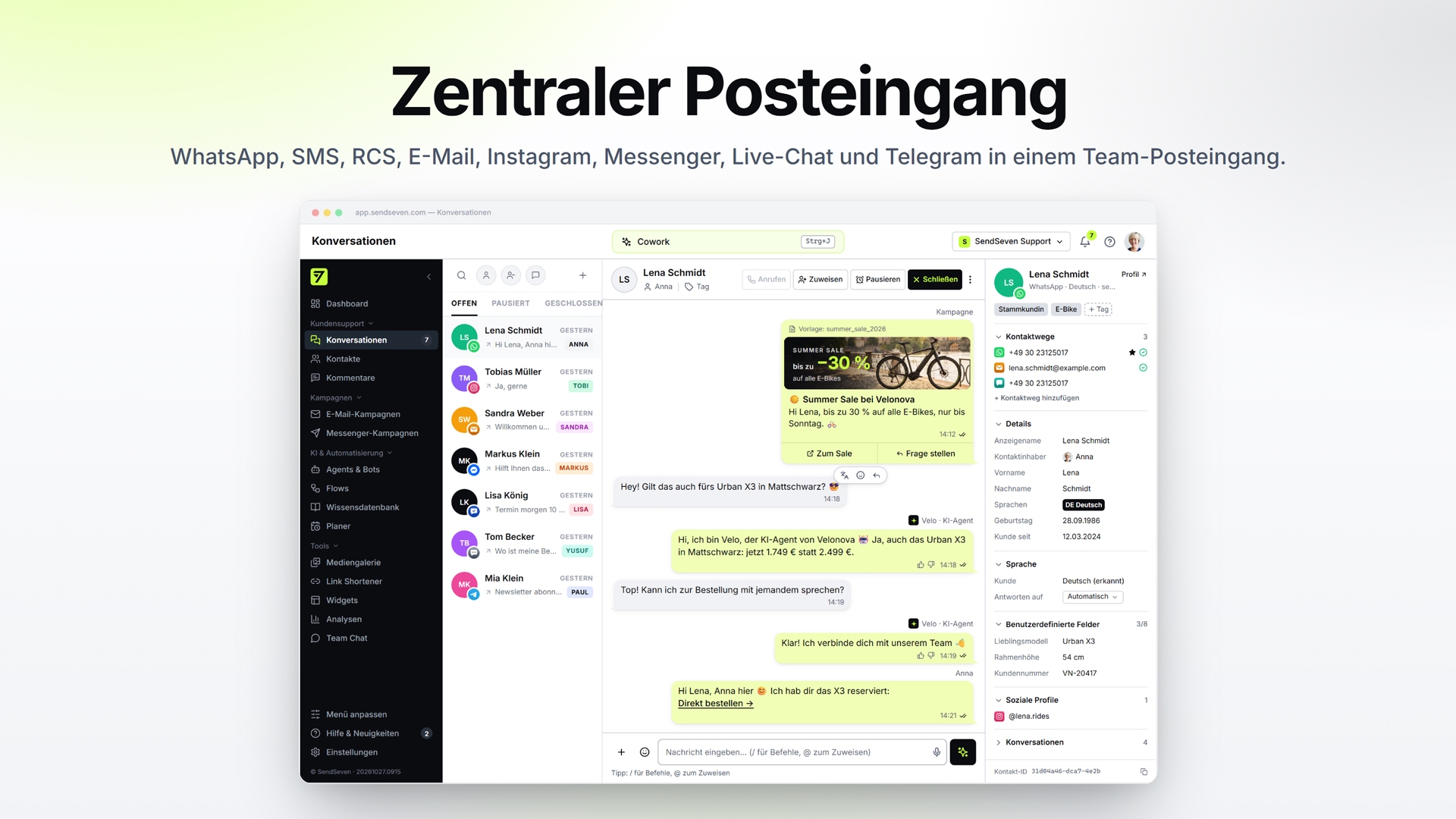
SendSeven is a platform for customer communication via messaging apps and other digital channels. Marketing, customer service, and sales teams collaborate on the platform: inquiries from WhatsApp, SMS, email, Instagram, Facebook Messenger, live chat, and Telegram are routed to a central team inbox. Browser push notifications are added as an eighth channel for outbound campaigns. In Germany, RCS is also available. It is the successor to SMS, with verified senders, images, and buttons. Instead of managing a separate tool and login for each channel, the team can view every conversation and the entire contact history in one place.
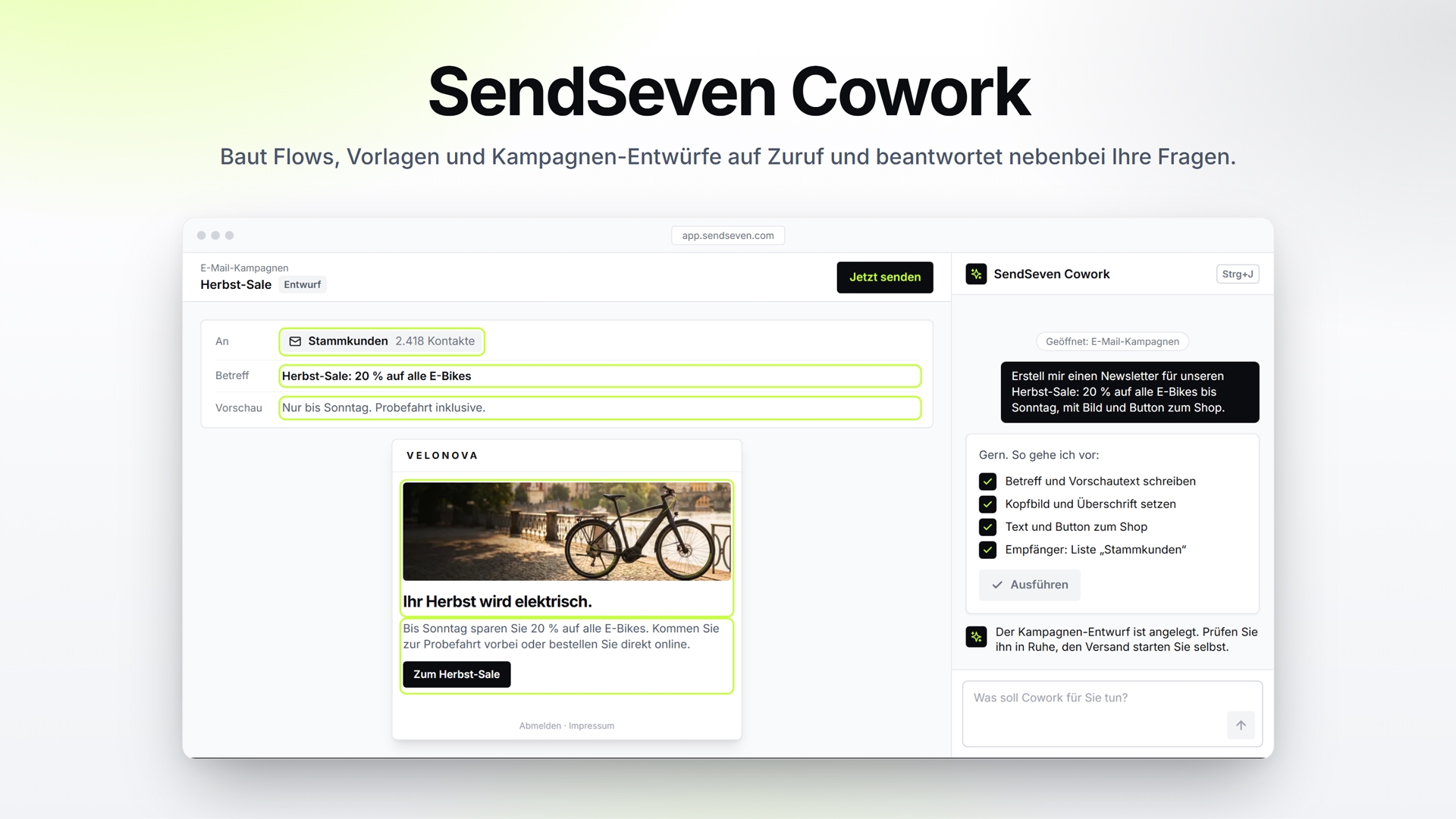
With SendSeven Cowork, the AI assistant within the app, you describe what you need in your own words: Cowork uses this to build flows, WhatsApp templates, email content, and campaign drafts, and answers any questions you have about the platform along the way. Before making any changes, Cowork shows you its plan and waits for your confirmation.
The software runs entirely in the browser (SaaS) and requires no installation. It is GDPR-compliant, hosted in the EU (Frankfurt), and developed in Germany. The provider is an official Meta Business Partner, so WhatsApp runs via the official WhatsApp Business API.
All plans include an unlimited number of users. There are no per-user licensing fees, and incoming messages are always free.
Modules: Central Team Inbox
- WhatsApp, SMS, email, Instagram, Messenger, live chat, and Telegram in a single inbox; in Germany, RCS is also included
- Assign conversations to an employee, leave internal notes, add tags, and schedule follow-ups
- Bulk actions: close, assign, or tag multiple conversations at once
- Custom inboxes by location, department, brand, or language, controlled via rules based on channel, tags, contact fields, and contact language (starting with the Professional plan)
- Specify which contacts an employee is allowed to view
- Absences and working hours for each employee, including coverage and out-of-office replies
- Translation of messages into over 100 languages, including emails (available starting with the Professional plan)
- HTML email signatures for the workspace and for individual employees
- Internal team chat (available starting with the Professional plan)
Contact management with conversation history
- One profile per contact, including all contact methods and all conversations across all channels
- In the profile: details, activities, notes, files, lists, subscriptions, and tickets
- Custom contact fields, tags, and lists; filter segments by tags, fields, subscription status, and channel
- Import via CSV with field mapping; export as CSV or Excel
- Find and merge duplicate contacts; edit multiple contacts at once
- Deals and sales pipeline remain in your CRM, integrated via Zapier, Make, n8n, or the API
AI agents (chatbots) and knowledge base (starting with the Professional plan)
- AI agents answer customer inquiries around the clock on WhatsApp, Instagram, Messenger, Telegram, live chat, email, and SMS; in Germany, also via RCS
- Responses are drawn from your own knowledge base: website content (including multilingual content), FAQs, texts, and documents
- Source citations in responses, customizable per agent
- Handoff to a team member with the full conversation context if the AI agent is unable to help
- Three modes per conversation: off, assistance (the AI writes drafts, an employee sends them), or auto
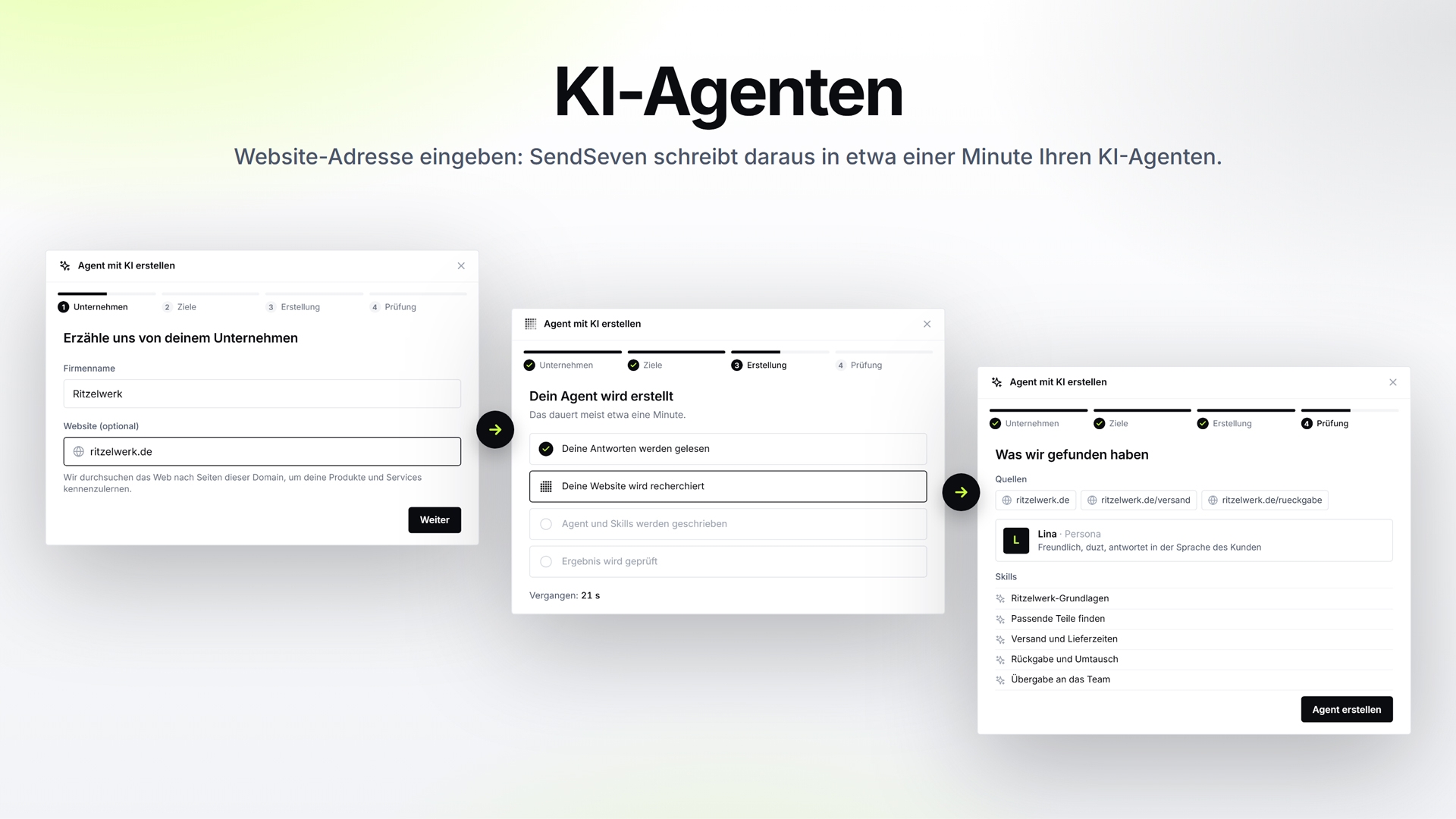
- Agent based on your own website: Enter the website address and describe the goal. SendSeven researches the public website and, in about a minute, creates an AI agent with a persona and skills based on that information. You review everything before it goes live
- Without a website, the agent is created based on a description in your own words, without any knowledge of prompts
- Agents can qualify leads and automatically tag conversations or contacts, for example, as hot, warm, or cold
- At the start of a conversation, the AI agent identifies itself as AI with a customizable notification text (transparency in accordance with the EU AI Act)
- If desired, the AI learns from closed tickets: Their summaries are incorporated into your knowledge base and apply only to your workspace
- The AI can be disabled at any time for the entire team or individual employees
SendSeven Cowork, your AI assistant in the app
- Builds on demand: You describe what you need, and Cowork creates it. Open with Ctrl+J
- A brief description generates workflows, WhatsApp flows, WhatsApp templates, and email content
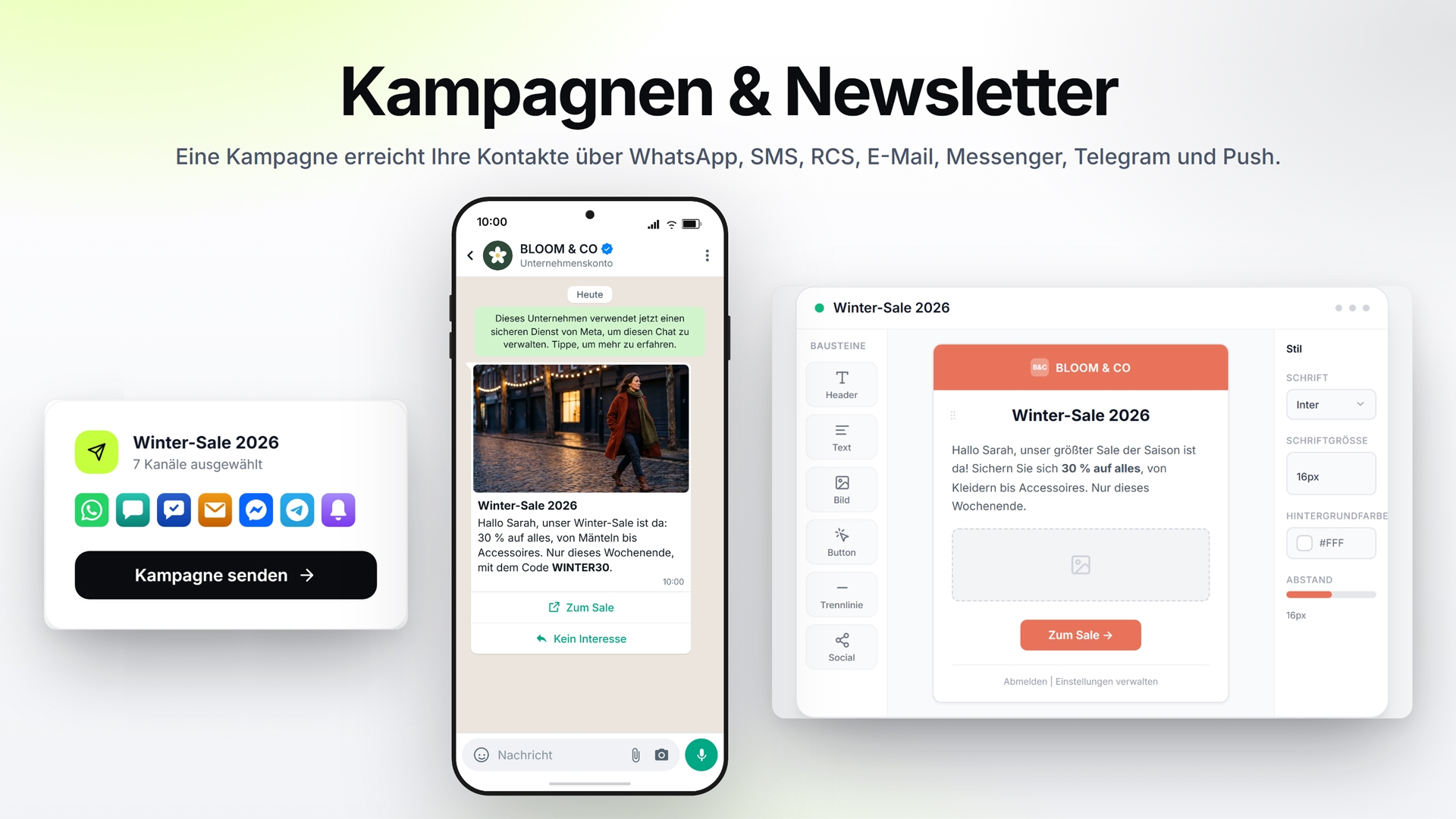
- Designs campaigns and newsletters for WhatsApp, SMS, Messenger, Telegram, browser push notifications, and email. Messages aren’t sent until you approve the campaign yourself
- Creates tags, contact fields, lists, and text blocks, and manages up to 1,000 contacts in a single step
- Helps you set up your AI agent and edit existing automations
- Before every change, Cowork displays a plan with all the steps. Actions are executed only after your confirmation and only within the scope of your role’s permissions
- Also answers any questions about features, channels, and billing, and opens the relevant page, such as your invoices
- Included in every plan. The full scope is available starting with the Professional plan; in the Basic plan, Cowork answers questions, guides you through the app, and handles simple tasks
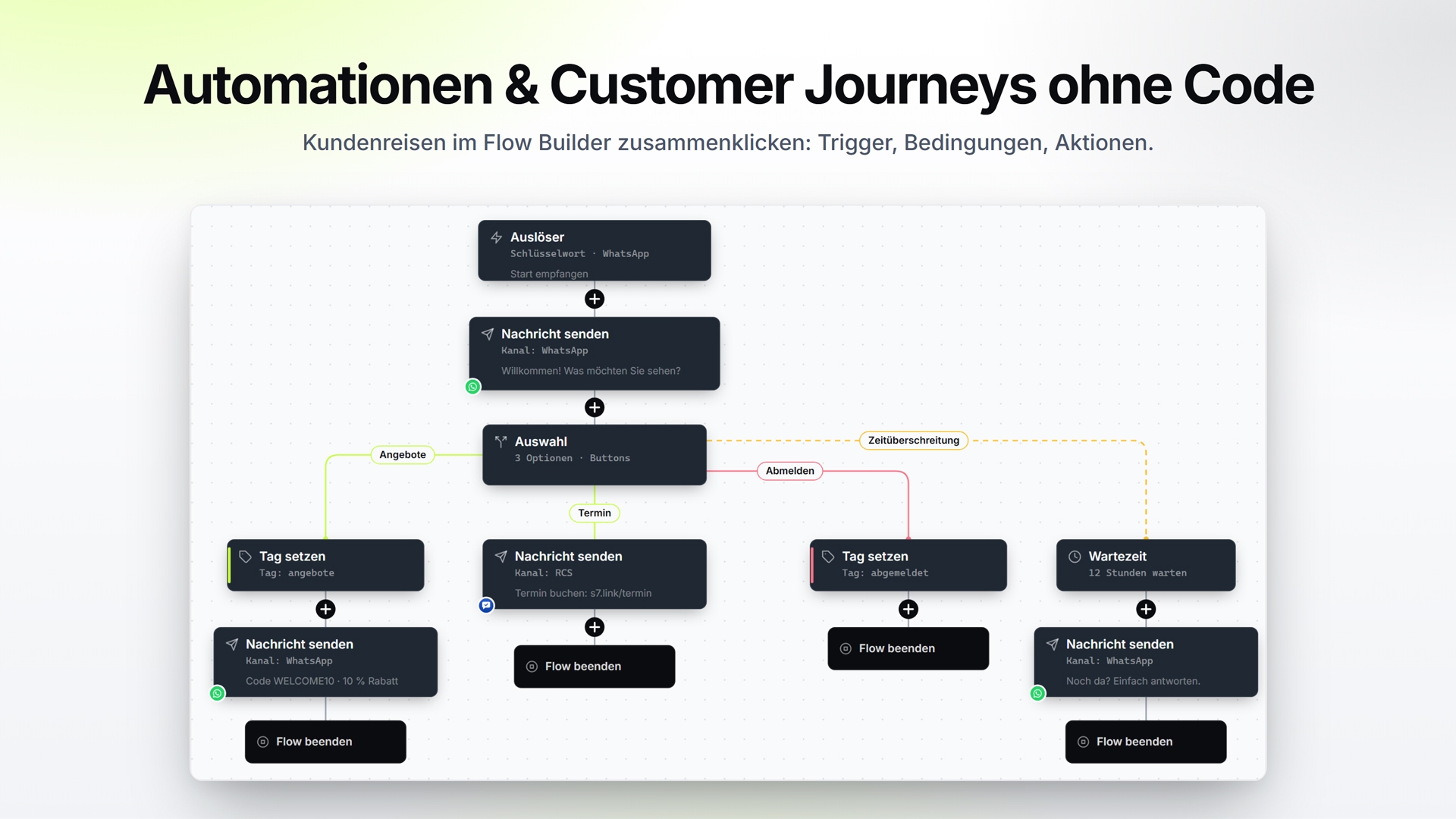
Flow Builder: No-code automations (available starting with the Professional plan)
- Visual editor for customer journeys and automations, requiring no programming knowledge
- Triggers include: keyword, incoming message, Instagram comment, click on a “Click-to-WhatsApp” ad, tag, or list entry
- Building blocks: Send a message, wait, branch, check conditions, request inputs and files, set tags, trigger a webhook, run the AI assistant
- Typical uses: Welcome sequences, appointment reminders, lead qualification, review requests, follow-ups on open inquiries
- Flows stop as soon as a contact unsubscribes from the list
- Version history with up to 200 versions per flow; restore older versions
- Flows can also be created and edited as JSON via the API
Campaigns and newsletters
- Campaigns via WhatsApp, SMS, email, Messenger, Telegram, and browser push notifications; in Germany, additionally via RCS
- WhatsApp newsletters with templates approved by Meta
- Drag-and-drop email editor with clean, mobile-optimized HTML
- Scheduled delivery (starting with the Professional plan)
- Shared media library for images, videos, and documents
- Links are automatically shortened and clicks are tracked
Consent management (opt-in)
- Newsletter lists: static, dynamic, and subscription lists
- Source of each consent per contact: widget, keyword, double opt-in, import, API, or manual
- START and STOP keywords are automatically processed on WhatsApp, Telegram, Messenger, Instagram, and SMS
- Double opt-in and one-click unsubscribe for email
- Newsletter widgets for your own website
WhatsApp Business API
- Official WhatsApp Business API via a Meta Business Partner
- Coexistence: Connect your existing WhatsApp number without transferring it. The number and the WhatsApp Business app can be used simultaneously
- Template Management: Templates are synced with Meta and are available in campaigns, flows, and the API
- Multiple WhatsApp numbers in a single workspace
- Status display for each number with alerts for connection issues
RCS: the successor to SMS (in Germany)
- Your company appears as a verified sender with its name and logo, directly in the smartphone’s messaging app
- Images, videos, rich cards, and carousels with buttons can be sent to contacts who have given their consent, without an approved template
- Replies land in the team inbox. AI agents, flows, and campaigns also run via RCS
- You request RCS within the app. SendSeven verifies your company with Google and the mobile carriers and sets up access for you
- Billing via a prepaid balance
- Currently available for customers with a German billing address
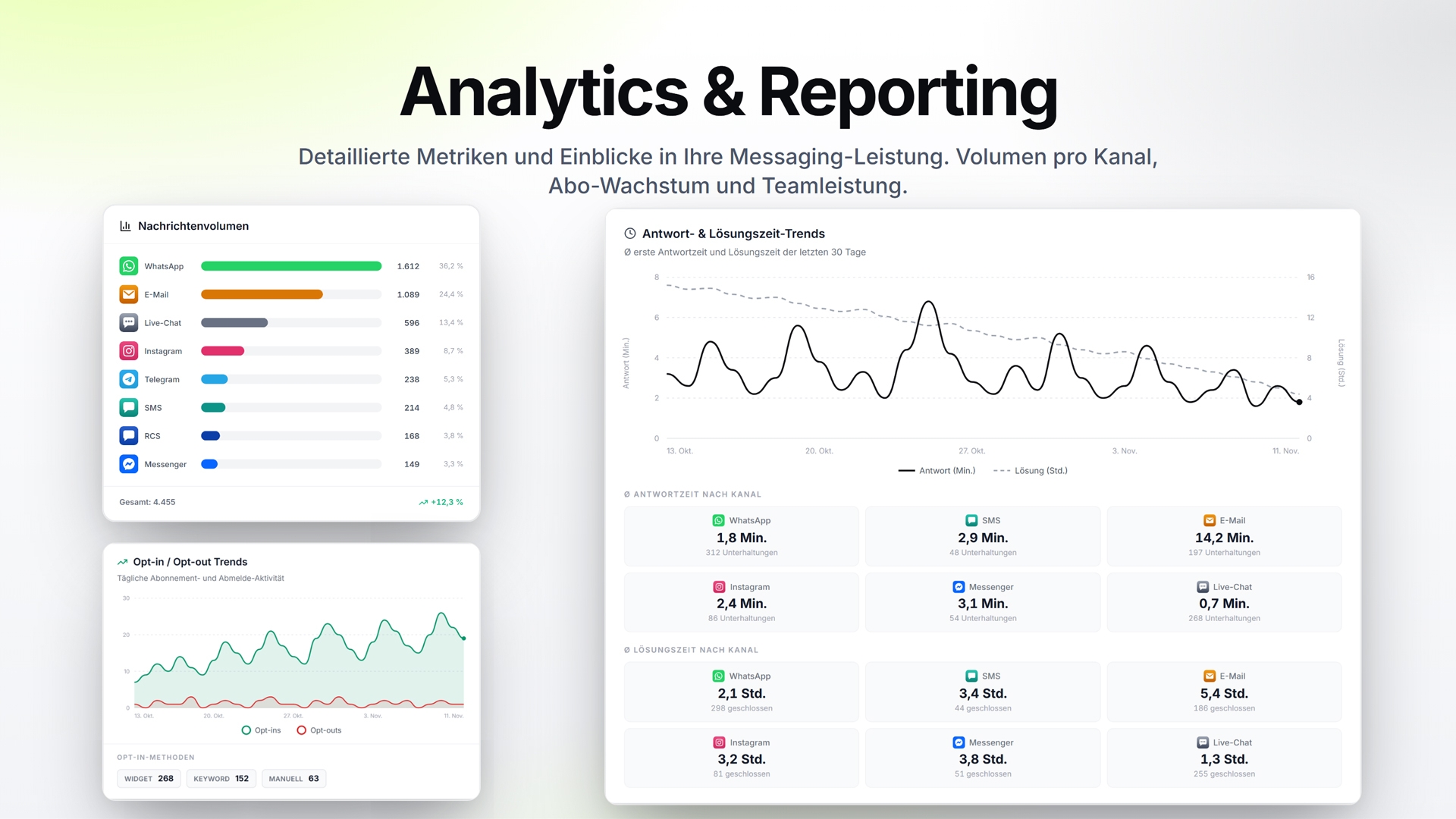
Analytics and Reports
- Message volume per channel with history
- First response time and resolution time by channel and employee
- Trends in opt-ins and opt-outs
- Delivery and costs
- Clicks on sent links
- Export contacts as CSV or XLSX; export entire conversations as PDF or as an offline archive (ZIP)
Integrations and APIs
- Documented REST API and webhooks with automatic retries
- Zapier, Make, and n8n (official community node)
- HubSpot integration (beta)
- MCP server, so AI assistants like Claude can work with conversations, contacts, and campaigns
- Live chat widget for your own website
- Browser push SDK for your own domain
- Android app for on-the-go use; can also be installed as a web app
- Client management for agencies and companies with multiple brands
Privacy and Security
- GDPR-compliant, hosted in the EU (Frankfurt). The AI also runs in the EU
- No model training: Your conversations, messages, and documents are never used to train AI models. Each account has its own, separate AI resources
- Data Processing Agreement (DPA) included in every package
- 99.9% uptime according to the SLA
- Roles and finely granular permissions, including custom roles
You can try the software for free for 14 days with full functionality, including 100 test messages to get started and no credit card required. Online help, in-app tutorials, and detailed API documentation make it easy to get started.
Small and medium-sized businesses, as well as companies in the retail, e-commerce, services, healthcare, hospitality, insurance, education, and social sectors that handle marketing, customer service, and sales via WhatsApp and other messaging apps. This also includes agencies that manage multiple clients or brands.
Small and medium-sized enterprises (SMEs) in retail and e-commerce, services, healthcare, hospitality, insurance, education, and the social sector, as well as agencies.