Software > Controlling and Cost Accounting > Business Intelligence (BI) > elKomBI
Controlling software for analysis, planning and reporting with IBM Planning Analytics TM1

elKomBI

Controlling software for analysis, planning and reporting with IBM Planning Analytics TM1


Updated on 05. Jan 2026 by Software Vendor

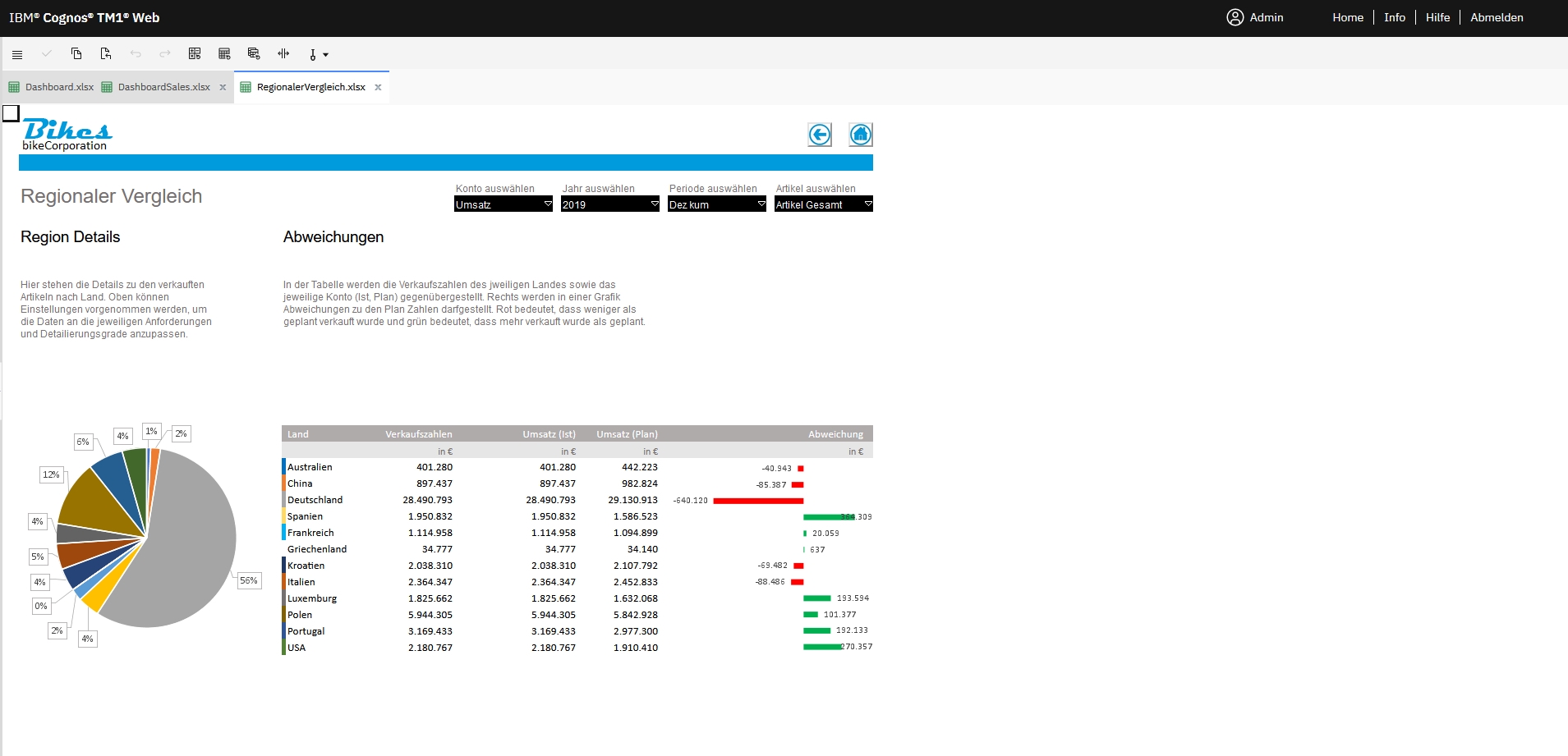
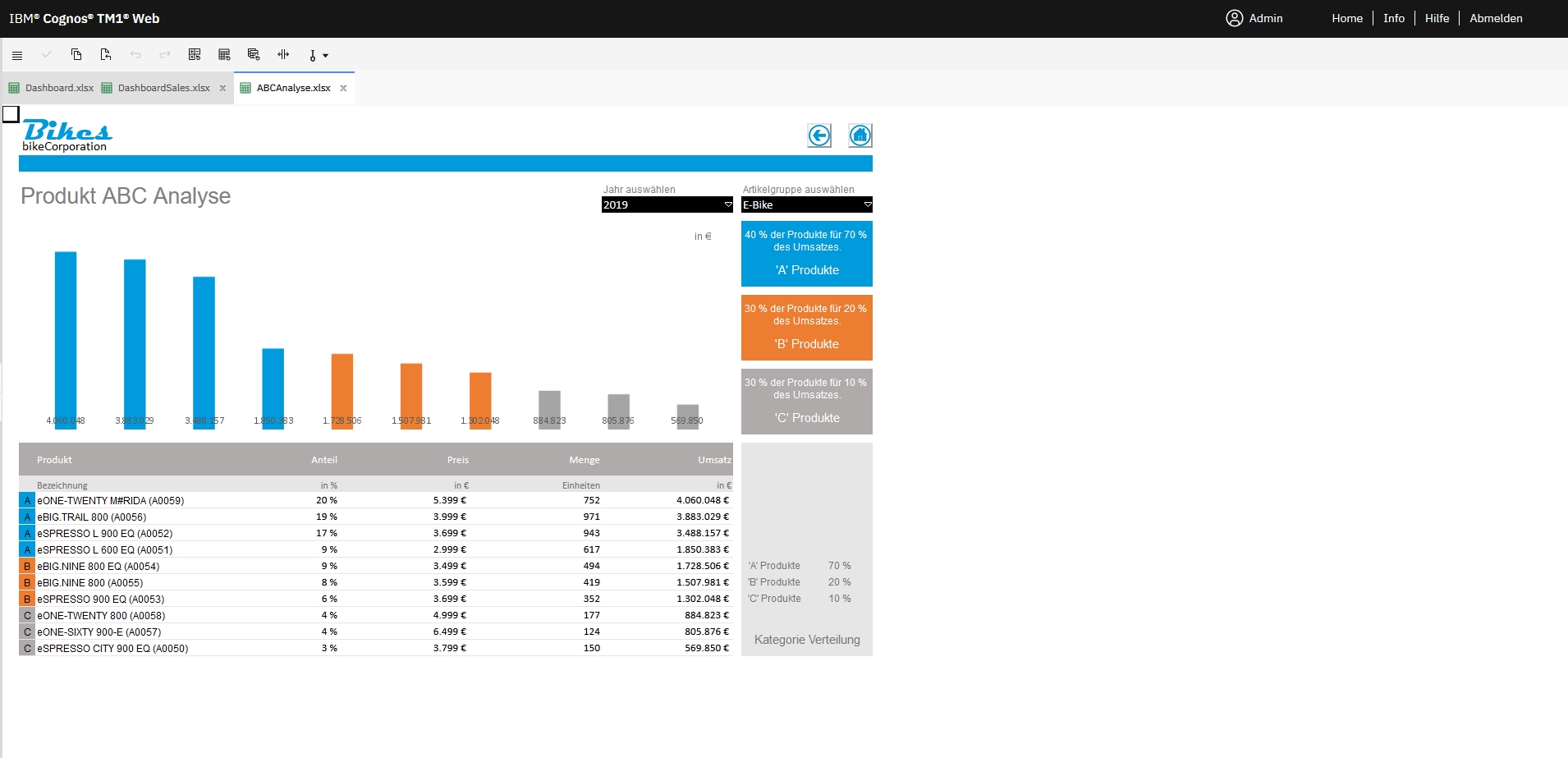
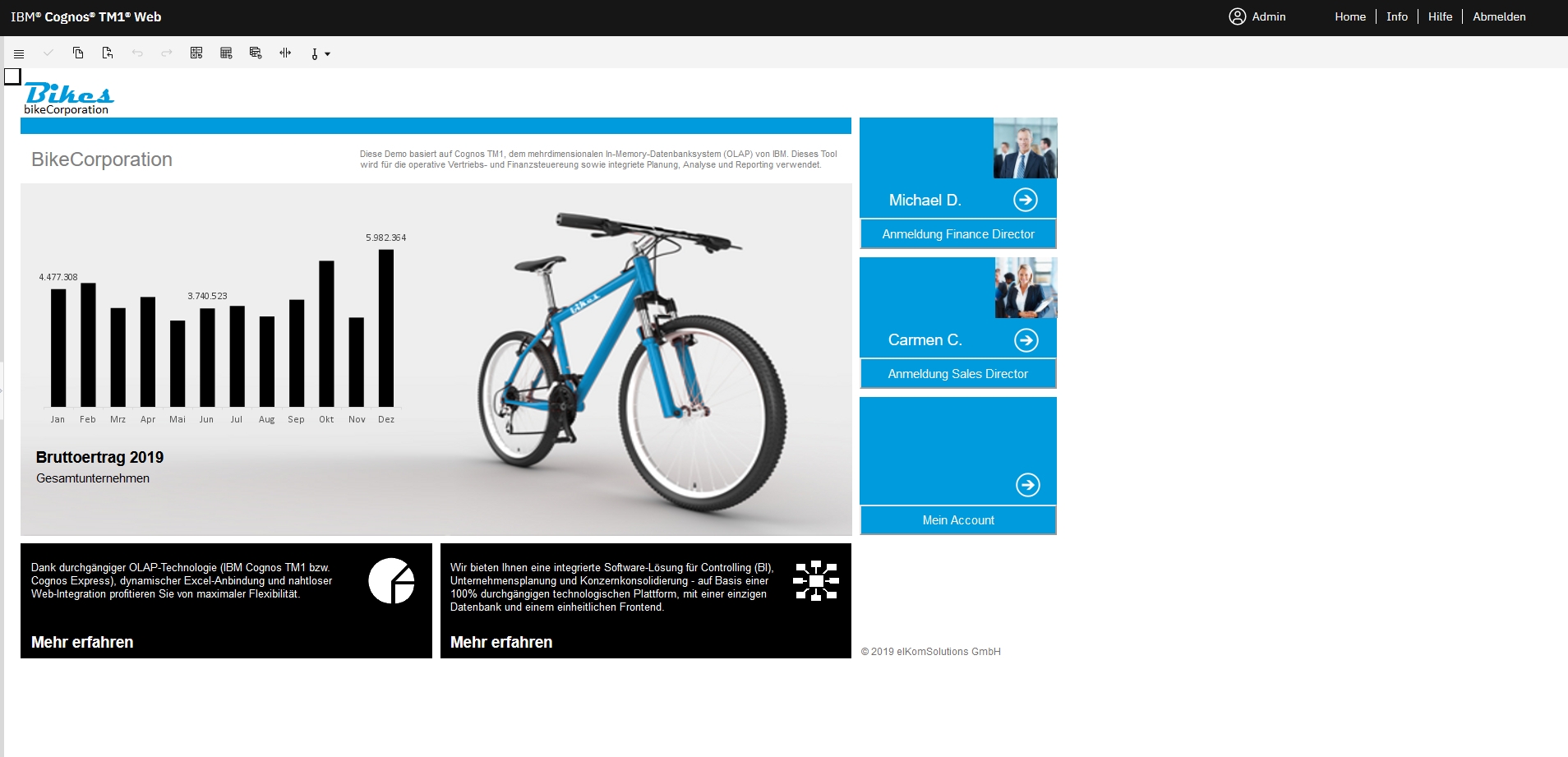
Decision-makers in companies in particular need business intelligence software that is as easy to use as it is individually scalable and provides them with meaningful and reliable information. Only in this way can these groups of people react promptly to current market conditions and make the right decisions. The elKomBI solution is a powerful business intelligence software which, as a flexible platform, creates precisely the conditions required to make structured, well-founded and future-proof decisions in the course of the company's targeted development.

The software is based on the OLAP databases of IMB-Planning-Analytics TM1 as well as Analytics Express and Microsoft Excel. It is the Turbo Integrator of IBM Planning Analytics TM1 in particular that enables rapid data integration from existing systems and at the same time guarantees extremely short implementation times. The software is the right BI software for companies for internal analyses, controlling tasks and comprehensive reporting.

Your advantages when using it:

  • the respective specialist departments create individual data and evaluation structures intuitively and without programming
  • can be used in various areas, such as logistics and sales controlling, cost unit and cost center accounting, finance and reporting for accounting, P&L and more, investment analysis and planning, project and production controlling, key figure systems, EVA, Basel II, profit and loss and database accounting and more
  • the software is structured as a multidimensional OLAP database IBM Planning Abnalytics TM1
  • is particularly suitable for enormous amounts of data
  • offers particularly high performance from analysis to visualization of all collected data and information
  • all data can be automatically imported from existing systems
  • can be used in a variety of ways in controlling, planning and consolidation
  • allows dynamic web and Excel integration
  • the data management and analysis layer is prepared and displayed consistently in TM1 OLAP
  • based on the analyses, the reports are clearly structured and can be generated in any desired form
  • only short implementation times are required

Interfaces:

CSV
Excel
ODBC
Interface to financial accounting

Looking for the right software? Trust SoftGuide!

Our experts will find the perfect solution for you - independently and at the cutting edge of software trends.

Similar Software:

Screenshots

Functions (excerpt) of elKomBI:

1:n reports
access controls
Accounting of different time models
Activity planning
actual cost and planned cost methods
Ad hoc reports
Allocation key
allocation of internal activities
Analysis
Analysis functions
Analysis results
Area marketing
Article hit and rivet lists
Balance sheet
Balance sheet analysis
Basel II and III
Before-and-after comparisons
big data
Bill of material processing
Budgeting
Business Charts
Business Intelligence (BI)
Business valuation
Calculation
Calculation of cost prices
Calculation of planned costs
Calculation of production costs
Calendar and appointment management
Calendar functions
Capacity planning
Cash flow statement
Catchment areas
Change documentation
Classification of cost types
Cloud
Collaboration
Collaborative Demand Planning, SCM
Comment function
Commissions
comparative statistics
Compliance management
Component monitoring
Consolidation
Construction wages
Contribution margin accounting
Control system
Controlling functions
Corporate planning
Correction of payrolls
Cost accounting system
Cost allocations
cost and activity accounting
cost and quantity distribution
Cost center allocation
Cost center variances
Cost centers
Cost determination
Cost estimates
Cost estimation
Cost of sales planning
Cost recording
Costing for single and serial producers
Costing templates and overhead rates
Costs and services
Cross-platform
Currency conversion
Customer - article income statements
Customer and sales data analysis
Customer statistics
Dashboards
Data analysis
Data and structures
Data Collection
Data extraction
Data import
Data indexing
Data maintenance
Data management
Data Mapping
Data operations
Data queries
Data warehouse
Database interfaces
Database types
Debit/credit posting entry
Deduction for wear and tear
Diagrams
Digitization
Discounts
Distribution values
DMS
Drill-down analysis
Early warning functions
Early warning indicators
Effort estimation
employment planning
Enterprise management
Escalation management
ETL Processes
Export functions
Extension options (plugins etc.)
Extrapolation procedure
Fee accounting
Financial accounting interface
Financial controlling
Financial planning
Financial ratios
Fixed asset movement schedule
Forecasting
Forecasting and planning
Foreign currencies
Full and marginal costs
Graphical disposition
Graphical visualizations
Grouping of cost centers
HelpDesk
Import interfaces for bills of quantities
Imputed costs
Indicators
Information management
Interest and amortization
Interfaces to operational data
Internal audit functions
Investment planning
Job planning
Key figure reports
Key figure simulations
Key figures and key figure systems
KPI
Lead management
legal holidays
liquidity analysis
Liquidity planning
Liquidity ratios
Macros and configuration files
Management Cockpit
Material and wage prices
Material cost planning
Message system
Messages
Metadata
Milestones
Monitoring functions
Monitoring of workflows
Multi-level overhead costing
Multi-user capability
Multilingualism
Multiple data sources
Multitenancy
Net-gross calculation
Notes
OEE Dashboard
OLAP
Online performance monitoring
Operating calendar
Operating results
Order data
Organization chart
Overhead cost planning
P&L
Performance analysis
Performance trends
Periodization of subplans
Personnel controlling
Personnel cost centers
Personnel cost planning
Personnel key figures
Personnel planning
personnel requirements
Personnel resource planning (PRP)
Piece Rate Payroll Processing
Piecework wage calculation
Plan variants
Planned balance sheets
Planned prices, planned quantities
Planning
Planning aids
Planning documents
Planning period
Planning sections
Planning variants and perspectives
Pre- and post-calculation
Problem management
Process cost accounting
Process management
Process monitoring
Process tracking
Product costing
Product data
Product range analysis
Profitability planning
Project budgeting
Project costing
Project ID
Project statistics
Purchasing lists
Queries
Quotation prices
Receivables management
Report management
Reporting
resource monitoring
Resubmissions
Return on equity and debt ratio
Revenue analyses
Reviews
Risk assessment
Risk management
Role-based reporting
Rolling Planning
Sales comparisons
Sales functions
Sales planning
Sales planning
Sales statistics
Sales statistics
Sales taxes
Scalability
Scenario comparison
Scenario planning
Scheduled workflows
Scheduling
Scorecarding
Search
Service specifications
Simulation
Single-level overhead costing
Sorting options
Spreadsheet
Standard reports
Statistics
Storage
strategic controlling
Subplans
Subsidy and bank loans
Success controlling
Surcharge calculation
Target and task tracking
Target group marketing
Target management
Target/actual comparisons
Tax and commercial balance sheet
Territory allocation
Time accounting rules
Time models, time accounts
Time off accounts
Time recording
Time series analyses
Top-down or bottom-up procedure
Trade tax
Traffic light system
Trend analyses
User management
Visualization
Visualization tools
What-if analyses
Workflow management
Working time calculation

Looking for the right software? Trust SoftGuide!

Technical specifications:

Manufacturer:
elKomSolutions GmbH
Web-based:
yes
SaaS, Cloud:
yes
On-premises (local installation):
yes
Multi-user (network-compatible):
yes
Multi-client compatible:
yes
Maintenance:
for a fee
Customizing:
possible for a fee
First installation (year):
1997
Number of installations:
> 150
Manufacturer based in:
Germany
Training:
for a fee
Hotline:
for a fee
Installation support:
for a fee
Documentation:
Manual, Online Help, Technical documentation
Dialogue language(s):
English, German
System requirements:
Compatible operating systems (runs with):
Win 11
Win 10
Win Server
Mainframe based
Unix based
Linux based
Mac OS
Mobile OSs (supports):
iOS
Android
Old Compatible Operating Systems:
Win 8
Win 7
Win Vista
Win XP
Win 9x/ME
Min. memory requirements:
2 GB RAM, 500 MB Hard disc
Data storage medium:
DVD
CD-ROM
Download
Flash memory

Alternatives

elKomBI
myPARM - Multi-project management software
PST-BI
OCT planning
GEBRA-Suite
Voracity
BCS (Business Coordination Software)
FACTON EPC
Corporate Planner
antares analyzer
LEEGOO BUILDER
INVEST for EXCEL
Board
WissIntra
Unit4 Financials
NeoCPQ
elKomBI
myPARM - Multi-project management software
PST-BI
OCT planning
GEBRA-Suite
Voracity
BCS (Business Coordination Software)
FACTON EPC
Corporate Planner
antares analyzer
LEEGOO BUILDER
INVEST for EXCEL
Board
WissIntra
Unit4 Financials
NeoCPQ
Elevator Pitch
Controlling software for analysis, planning and reporting with IBM Planning Analytics TM1
Multi-project management and PPM software
Data warehouse, cost accounting, planning, reporting, business analytics for SMEs
Unlimited possibilities for corporate planning at operational level
Customized business applications with flexible modules
The most powerful platform for end-to-end data management
BCS – ERP for service providers with a focus on project management
Software solution for company-wide standardized product cost calculation
Software for Corporate Performance Management
The analysis and reporting software
CPQ system with calculation, product configuration and document output
Best Practice in the valuation of investments
Programming-free toolkit for analysis, reporting, planning & forecasting
for your process documentation, measures, risk and audit management
International solution for financial accounting, accounting and controlling
The Solution for Product Configuration, Price Calculation and Quote Generation (CPQ)
Multi-user (network-compatible)
yes
yes
yes
yes
yes
yes
yes
yes
yes
yes
yes
yes
yes
yes
yes
yes
Multi-client compatible
yes
yes
yes
yes
yes
yes
yes
yes
yes
yes
yes
no
yes
no
yes
yes
Compatible with


Interfaces
CSV
Excel
ODBC
Interface to financial accounting
Abacus
Atlassian Jira
confluence
iExtension
IN:ERP
JD Edwards
LDAP
Microsoft 365
Microsoft Active Directory
Microsoft Azure
Microsoft Business Central
Microsoft Dynamics
Microsoft Dynamics NAV
Microsoft NAVISION
Microsoft Office365
Microsoft SharePoint
Microsoft SQL Server
MS Project
Oracle
Oracle Primavera
PARM-Middleware
Power BI
Qlik View
Sage
SAP
SAP Business One
SAP BW
SAP HANA
SAP R3
Tableau
UNIT4
Unit4 (Coda)
Xpert.Line
SAP
confluence
DATEV online
E-Mail-Server
Eclipse BIRT
HCL
IBM
ilink TeamCall Telephony Access Platform
JDBC
JIRA
Microsoft Office
OAuth
OpenID
SAP
Termin-Abo 365/Exchange
WebDAV
Web services REST/SOAP
Microsoft Dynamics
Salesforce
SAP C4C
Other requirements for soft- and hardware
Microsoft SQL Server
Hardware and operating system independent
From Windows 2000/XP.
MS Excel 2007, 2010, 2013, 2016, 2019, Office 365
Dialogue language(s)
English, German
English, Czech, German, Spanish, Finnish, French, Italian, Lithuanian, Polish, Portuguese, Russian
English, German
English, German
English, German, French
English
English, German, French
English, German
English, German
English, German
English, German
English, German, Spanish, French, Italian, Japanese
English, Czech, German, Spanish, French, Hungarian, Italian, Dutch, Polish, Portuguese, Swedish, Chinese
English, Danish, German, French, Dutch, Norwegian
English, German
Documentation
Manual
Online Help
Demo version
Technical documentation
Manual
Online Help
Demo version
Technical documentation
Manual
Online Help
Demo version
Technical documentation
Manual
Online Help
Demo version
Technical documentation
Manual
Online Help
Demo version
Technical documentation
Manual
Online Help
Demo version
Technical documentation
Manual
Online Help
Demo version
Technical documentation
Manual
Online Help
Demo version
Technical documentation
Manual
Online Help
Demo version
Technical documentation
Manual
Online Help
Demo version
Technical documentation
Manual
Online Help
Demo version
Technical documentation
Manual
Online Help
Demo version
Technical documentation
Manual
Online Help
Demo version
Technical documentation
Manual
Online Help
Demo version
Technical documentation
Manual
Online Help
Demo version
Technical documentation
Manual
Online Help
Demo version
Technical documentation
Number of installations
> 150
230
zwischen 100 und 999
20
800
350
> 4.000 Unternehmen
>3000
3.500
3.000
300
2.500
500
First installation (year)
1997
1996
2001
2013
2017
2016
2001
2001
1994
1999
1995
1995
1997
1979
1989
Functions
258/258
171/258
144/258
132/258
97/258
86/258
79/258
34/258
33/258
20/258
19/258
14/258
12/258
12/258
8/258
6/258
Compare other alternatives to elKomBI