In many small and medium-sized businesses, sales are at the heart of customer relationships. Yet many teams still rely on Excel spreadsheets, email inboxes, or outdated systems that no longer meet today’s requirements. This not only costs time, but may also result in lost revenue.
Modern sales software can automate processes, create transparency, and strengthen customer loyalty. But which solution is the right fit for your business? Our practical 5-step guide helps you systematically select and successfully implement the right sales software.
Brief Excursus: Sales Software vs. CRM
Definition of Sales Software
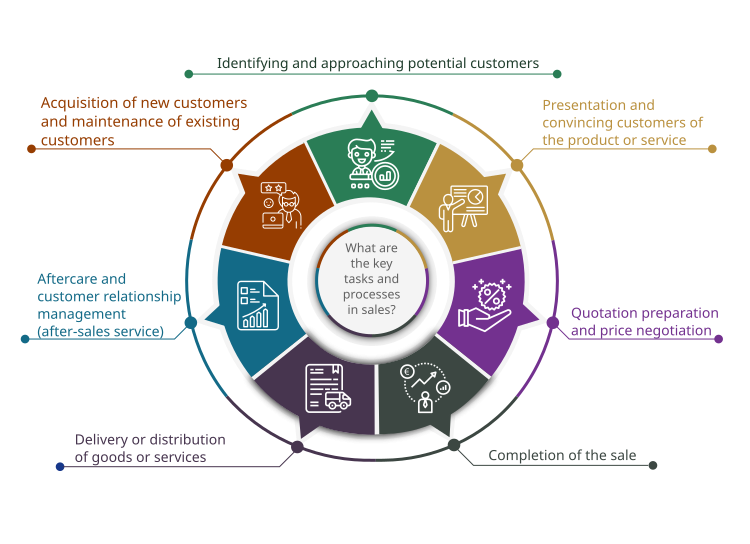
Sales software is designed to support and optimize all sales-related activities within a company. It helps structure, automate, and analyze sales processes in order to make closing deals more efficient.
Definition of CRM (Customer Relationship Management)
A CRM is a system that places customer relationship management at the center of attention. CRM software manages and analyzes customer contacts, interactions, and the entire customer history in order to improve customer loyalty and satisfaction.
Similarities Between Sales Software and CRM
The two systems overlap in many areas, especially when it comes to managing contacts and tracking sales opportunities:
-
Contact management: storing and maintaining customer and contact data.
-
Lead management: tracking and qualifying prospects.
-
Document management: centralized storage of quotes, contracts, and other documents.
-
Task and appointment management: planning and tracking activities throughout the sales process.
-
Reports and analytics: evaluating sales activities and performance.
Differences Between Sales Software and CRM Systems
| Sales Software | CRM System |
|
Focus on sales processes: e.g. quote management, pipeline management, forecasting, sales opportunities, automation of sales tasks. |
Focus on customer relationships: e.g. history of all customer interactions, after-sales service, support, marketing integration. |
|
Often specialized tools for sales teams (e.g. lead scoring, sales planning, sales forecasting, sales funnel visualization). |
A comprehensive platform for the entire company, often with modules for sales, marketing, and service. |
|
Can be used as a standalone solution or as part of a CRM or ERP system. As a rule, interfaces to ERP or inventory management systems are available. |
CRM is usually modular in structure, with sales being one part of it. |
|
Goal: Increase efficiency in the sales process and maximize revenue. |
Goal: Holistic customer support and long-term customer loyalty.
|
Brief summary of the comparison between sales software and CRM systems:
Sales software is often a specialized subset or form of a CRM system, but it can also be used independently. CRM systems are generally broader in scope and, in addition to sales, also cover marketing, service, and support. In practice, however, the boundaries are often fluid. Modern CRM systems offer extensive sales functions, while specialized sales software provides additional tools and automation to support more comprehensive customer relationship management.
Tip: The right choice depends on your individual requirements: if you only want to optimize sales, specialized sales software can be a good starting point. If you want to manage customer relationships holistically, you should opt for a CRM system with a sales module.
A 5-Step Guide to Choosing the Right Sales Software
Step 1: Needs Analysis – What Does My Sales Team Really Need?
Before you start looking at specific vendors or tools, you should systematically identify your internal requirements. A thorough needs analysis provides the foundation for every well-informed software decision and helps prevent costly missteps.
The goal is not just to collect general wishes, but to understand your actual business processes and anticipate future requirements.
Analyze the status quo
Start with a critical review of your current setup:
-
Which processes are working well at the moment, and where are the bottlenecks?
-
Which tools or Excel-based solutions is your sales team already using, and why?
-
Where do inefficiencies arise, for example due to duplicate data entry, lack of transparency, or manual effort?
💡 SoftGuide Info Box
Typical challenges in sales operations without suitable software:
- 📁 Customer history is not centrally available
- 📝 Quotes are created manually and inconsistently
- ⏰ Follow-ups and reminders are missed
- 🔍 The sales pipeline is difficult to assess
- 📊 Key figures (e.g. close rate, revenue by region) can only be evaluated with considerable effort
Structure requirements by functional area
Group your requirements into key subject areas. This will help later when evaluating vendors.
Typical functional areas in sales:
-
Customer management (CRM): master data maintenance, history, touchpoints, segmentation
-
Sales opportunities & pipeline tracking: phase-based sales processes, forecasting, lead scoring
-
Quote and order management: creation, versioning, follow-up
-
Appointment and task management: calendar integration, follow-ups, reminders
-
Reporting & KPIs: dashboards, revenue and activity analysis, sales targets
-
Mobility & integration: app access, integration with ERP, email, telephony, or accounting
Capture the requirements of all involved roles
Even the best solutions will only succeed if they fit your employees’ actual workflows. Be sure to gather perspectives from the different stakeholders involved:
|
Role |
Possible Requirements |
|
Sales staff |
Fast access to customer data, easy quote creation |
|
Sales management |
Transparent pipeline, team KPIs, forecasts |
|
Executive management |
Strategic reports, revenue development, scalability |
|
IT department |
Interfaces, data protection, hosting (cloud/on-premises) |
Step 2: Budgeting – What Can I Afford?
A frequently underestimated aspect is realistic budget planning. Here, it pays to take a holistic view of the total cost of ownership (TCO). In addition to license costs, implementation, customization, training, and support should also be taken into account.
Capture all relevant costs
Cost components at a glance:
-
License costs: one-time purchase or subscription model (SaaS)
-
Setup & customization: configuration, interfaces, individual workflows
-
Training & support: one-time or ongoing
-
Maintenance & updates: particularly relevant for on-premises solutions
-
Operating costs: hosting, data backup, data protection measures
Compare subscription vs. purchase models
| Criterion | Subscription Model (SaaS) | Purchase Model (On-Premises) |
|
Initial costs |
Low |
High |
|
Flexibility |
High |
Lower |
|
Maintenance |
Included |
Your responsibility |
|
Updates |
Automatic |
Manual / effort-dependent |
Check funding opportunities
Many German federal states and regions offer digitalization grants for SMEs. Check the following:
-
KfW programs or regional innovation funding
-
Tax deductibility of software investments
-
Grants for training or consulting
Build in a buffer
Allow for a contingency buffer of 10–20% for unforeseen expenses, such as customizations, longer project timelines, or additional training.
Step 3: Research & Shortlist – Where Can I Find the Right Software?
The market for sales software is diverse. That makes it all the more important to take a structured approach.
Use information sources strategically
Possible research options:
-
SoftGuide marketplace for sales software solutions
-
Industry directories and professional associations
-
Recommendations from partners, customers, or networks
-
Trade journals, market analyses, review platforms
Create a longlist and shortlist systematically
-
Longlist: initial selection of suitable vendors (5–8 systems)
-
Shortlist: reduce to 3–5 candidates after comparing them against your must-have criteria
Tip: Create a table with evaluation criteria (e.g. functions, price, integration, references).
Check vendor quality
Make sure potential vendors are reliable long-term partners as well:
-
How long has the company been on the market?
-
Do they have customers in your industry?
-
What does support look like (availability, language versions, training options)?
-
Are there regular updates and ongoing product development?
Step 4: Testing & Demos – Put the Software Through Its Paces
The testing phase is crucial to ensure that the selected solution also proves itself in practice.
Use test systems and demos
-
Request access to a demo or test environment using your own data
-
Test typical use cases under realistic conditions (e.g. creating a quote, maintaining a new customer record)
Involve stakeholders selectively
Include users from different roles (sales, IT, assistant staff, management) to capture a broad range of perspectives.
Define evaluation criteria
Set consistent criteria for evaluating the systems:
-
User-friendliness (intuitiveness, navigation)
-
Coverage of the most important processes (e.g. sales cycle)
-
Flexibility and adaptability
-
Quality of support (response time, availability)
Capture feedback in a structured way
Use an evaluation scheme with grades or a points scale to support objective decision-making.
Step 5: Implementation & Training – A Successful Start with the New Software
The successful use of new sales software depends to a large extent on proper implementation and training.
Define the project structure
-
Appoint a project team (internal + external if needed)
-
Define a timeline with realistic milestones
-
Clarify responsibilities and communication channels
Prepare data migration
-
Identify data sources (CRM, Excel, ERP)
-
Check for duplicates and review data quality
-
Import and validate test data in advance
Train employees effectively
-
Use a mix of training formats (in-person, e-learning, webinars)
-
Build up key users as multipliers
-
Provide documentation and video tutorials
Plan change management
-
Communicate goals and benefits early on
-
Address concerns and resistance openly
-
Demonstrate quick wins (e.g. faster quote creation)
💡 SoftGuide Info Box
Key success factors for implementation:
- 👥 Early involvement of users
- 📅 Realistic project goals and timelines
- 🤝 Ongoing support from the vendor
- 🎓 Combine training formats (in-person, e-learning, tutorials)
Tip: Schedule a feedback session 4–6 weeks after go-live to identify optimization opportunities.
Conclusion: A Systematic Path to the Right Sales Software
For SMEs, selecting new sales software is a strategically important decision. Those who approach the process in a structured way not only save time and money, but also improve sales efficiency in the long term.
Use the steps outlined above as a practical guide for your software selection. Whether you need CRM, order management, or reporting, the key is choosing a solution that fits your requirements and goals.
Compare numerous sales software solutions for small and medium-sized businesses on SoftGuide.com.