What FMEA is and why process discipline matters
Failure Mode and Effects Analysis, or FMEA, is a structured method for identifying potential failures, assessing their effects and causes, and defining actions to reduce risk. It is used in product development, manufacturing, process design, and quality management to make risk prevention more systematic and less dependent on individual experience.
In practice, however, FMEA is not just an analytical exercise. It is also a documentation and coordination process. The quality of that process matters for several reasons:
Documentation quality supports consistent decisions
An FMEA only creates value when it is complete, understandable, and kept current. Poorly maintained documents lead to repeated discussions, inconsistent scoring, and unclear responsibilities.
Traceability reduces operational and audit risk
Organizations often need to show what changed, why it changed, who approved it, and whether actions were completed. Without traceability, the FMEA becomes difficult to defend internally or externally.
Collaboration is essential in real-world FMEA work
Effective FMEA is usually cross-functional. Engineering, quality, production, maintenance, and sometimes suppliers all contribute. That means the tool must support shared work, not just individual data entry.
Where Excel still works well
Excel for FMEA is not automatically the wrong choice. In many situations, it remains a practical and efficient tool.
Smaller teams with direct communication
If a company has a limited number of users and the FMEA is managed by a small, stable team, spreadsheet-based work can remain manageable. Version confusion is less likely when only a few people are involved and communication is straightforward.
Low process complexity
Excel works well when the number of products, variants, process steps, or interdependencies is still limited. If there are only a few FMEAs to maintain and they are updated infrequently, a spreadsheet may be fully adequate.
Early-stage or occasional use
Some organizations use FMEA only for selected projects, new product introductions, or isolated customer requirements. In these early-stage or occasional scenarios, the setup effort of dedicated software may not yet be justified.
Limited compliance and documentation requirements
If the company operates in an environment with modest audit expectations and relatively simple documentation needs, Excel may provide enough structure. A disciplined team with a clear template can still produce usable results without a specialized system.
Excel also offers practical strengths: low entry barriers, broad user familiarity, flexible formatting, and fast customization. For organizations that value simplicity over formal process control, those benefits are real.
FMEA software vs Excel: where spreadsheets become a bottleneck
The limits of spreadsheets usually do not appear all at once. They emerge gradually as FMEA moves from isolated documentation to an operationally relevant management process.
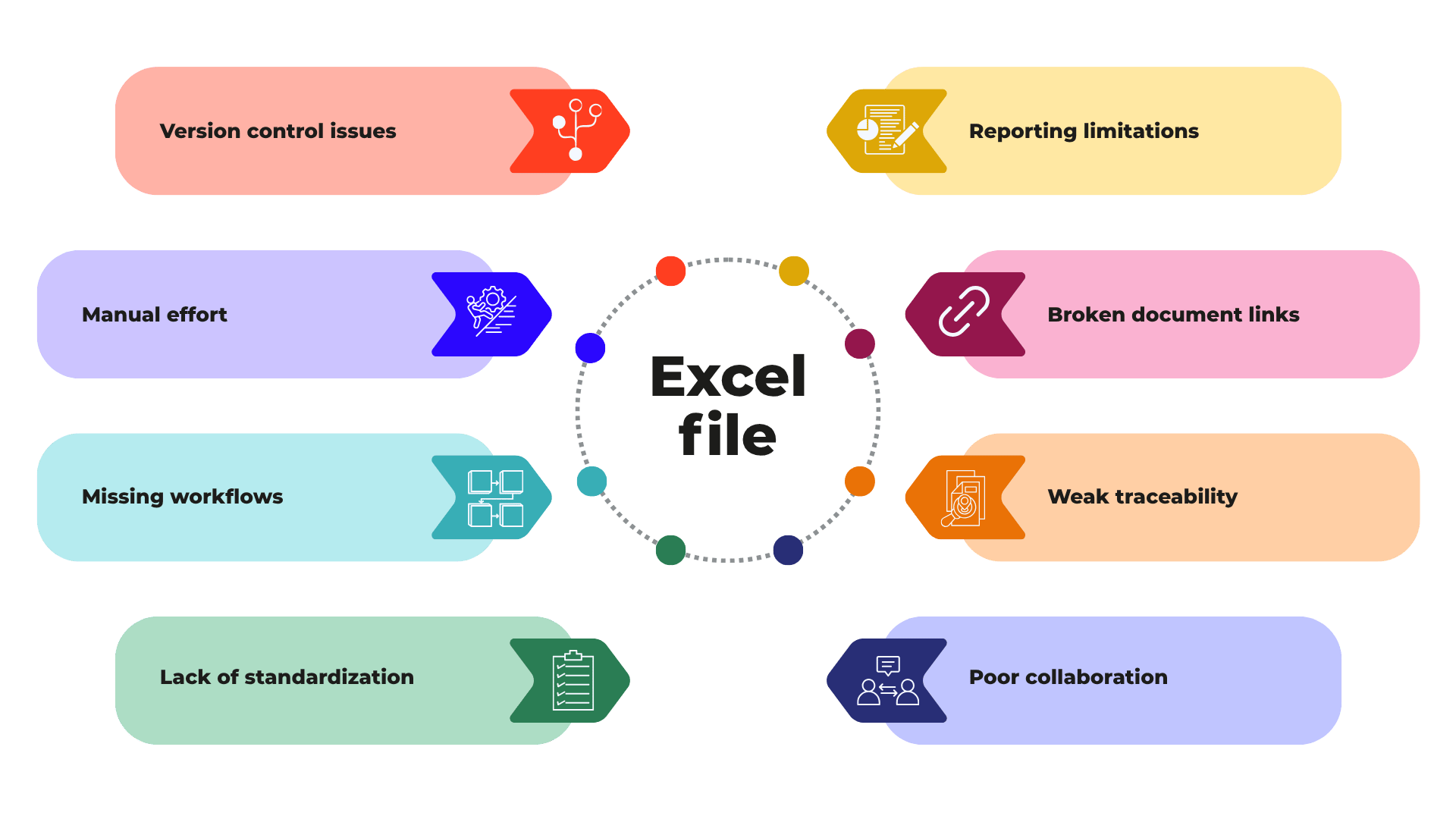
Version control becomes unreliable
Once multiple people edit or review the same file, spreadsheet governance quickly becomes fragile. Teams end up with file copies, email attachments, local variants, and uncertain “latest” versions. Even with shared drives or cloud folders, control is often procedural rather than built into the tool.
Manual updates consume time and create inconsistency
In Excel, many changes must be entered manually across worksheets, templates, or related documents. That increases the risk of outdated information, duplicate effort, and inconsistent risk data.
Workflow support is missing
Spreadsheets do not natively manage review cycles, approvals, escalations, or task routing in a structured way. Companies often compensate with email, meetings, or informal rules, but that makes the process dependent on individual follow-up.
Standardization is hard to enforce
Even when a company defines a template, local modifications tend to accumulate. Different teams may interpret fields differently, add columns, change formulas, or use inconsistent scoring logic. Over time, comparison across plants, business units, or product lines becomes difficult.
Collaboration remains limited
As mentioned earlier, collaboration is essential for FMEA. Excel supports shared editing to a degree, but it is not designed as a full collaboration environment for governed quality processes. Comments, responsibilities, review status, and cross-functional input are harder to coordinate when the file itself is the process container.
Traceability of actions, changes, and approvals is weak
A major weakness of spreadsheet-based FMEA documentation is the limited auditability of who changed what, when, and with which approval. That is especially relevant in regulated industries, customer audits, and internal quality management reviews.
Links between related documents are fragile
In mature quality environments, DFMEA, PFMEA, control plans, lessons learned, process characteristics, and corrective actions should not exist in isolation. In Excel, these connections are often manual and therefore error-prone. Weak linkage makes it harder to keep the overall quality documentation aligned.
Reporting quickly reaches its limits
Once management asks for cross-project status views, open action lists, overdue items, recurring failure patterns, or site-level comparisons, spreadsheet reporting becomes labor-intensive. At that point, the issue is no longer convenience. It is decision quality and reporting speed.
Key advantages of dedicated FMEA software
Dedicated FMEA tools are designed to address exactly these operational limits. Their main value is not that they “replace Excel,” but that they turn FMEA into a more controlled, reusable, and scalable process.
Central database instead of isolated files
A central database reduces duplication and creates one controlled source of truth. Users access current information directly, rather than relying on distributed file versions.
Role-based collaboration
Specialized tools usually support user roles, permissions, and responsibilities. That helps companies separate editing, reviewing, approving, and viewing rights in a structured manner.
Workflow and approvals
Formal workflows help standardize review cycles and approval steps. This can improve accountability and reduce delays caused by informal coordination.
Audit trail and change history
An audit trail is one of the most important FMEA software benefits. It provides transparency on changes, timestamps, user actions, and approvals, which is valuable for governance, customer requirements, and internal control.
Action tracking
Open actions can be assigned, monitored, escalated, and reported more systematically. That makes it easier to ensure that risk-reduction measures are not only defined, but completed.
Reuse of structures and knowledge
Dedicated systems often allow teams to reuse product structures, process elements, historical failure modes, and proven controls. This reduces repetitive work and helps preserve organizational knowledge.
Consistency across teams and sites
Standard templates, shared logic, and central governance improve comparability across departments and locations. That is particularly important for larger organizations or companies with multiple production sites.
Import and export options
Modern systems typically support data exchange with spreadsheets and, in some cases, other quality or engineering systems. This helps during transition phases and mixed-tool environments.
Dashboards and reporting
Dedicated reporting functions make it easier to monitor overdue actions, status by plant or product line, common risk areas, and documentation completeness. This turns FMEA from a static document into a more useful management instrument.
Costs and trade-offs: when software is not automatically the right answer
A balanced FMEA tool comparison must also acknowledge the costs.
Licensing and implementation create direct expense. Depending on the organization, there may also be costs for configuration, migration, validation, and integration. Training is another factor. Teams need to understand not only the software, but also the standardized process behind it.
Change management should not be underestimated. A new tool often exposes inconsistent practices that were previously hidden in spreadsheets. That can be positive, but it requires leadership support and process discipline.
For very small organizations, dedicated software may indeed be more than they need. If the FMEA workload is limited, the team is small, and compliance expectations are moderate, the return on investment may be difficult to justify. In such cases, a well-managed Excel approach can remain the more pragmatic option.
5 Signs Your Company Has Outgrown Excel for FMEA
- Your team spends too much time managing files instead of managing risk
When document coordination takes more effort than the analysis itself, the tool is becoming part of the problem. - Different departments use different templates or scoring logic
If FMEA documentation cannot be compared reliably across teams, standardization has likely reached its limit in Excel. - Actions are tracked outside the FMEA
When action lists live in emails, meeting notes, or separate spreadsheets, follow-up becomes fragmented and harder to control. - Audits or customers increasingly ask for proof of changes and approvals
Once formal traceability becomes a recurring requirement, spreadsheet workarounds often become inefficient and risky. - You need links between DFMEA, PFMEA, control plans, and reporting
If related quality documents must stay aligned across multiple products or sites, manual linking is rarely sustainable.
Comparison table: Excel vs FMEA Software
|
Aspect |
Excel |
FMEA Software |
|
Setup effort |
Very low; usually available immediately |
Higher; requires selection, configuration, and rollout |
|
Flexibility |
High for custom layouts and quick edits |
Structured flexibility within defined data models |
|
Collaboration |
Basic; works best in small teams |
Designed for multi-user, role-based collaboration |
|
Version control |
Often manual and error-prone |
Centralized and system-controlled |
|
Traceability |
Limited; difficult to document full change history |
Strong audit trail for changes, approvals, and actions |
|
Scalability |
Suitable for limited scope |
Better suited for growth across teams, products, and sites |
|
Compliance support |
Depends heavily on discipline and local templates |
More consistent support for governed documentation |
|
Reporting |
Mostly manual, time-consuming to consolidate |
Built-in dashboards, filters, and status reporting |
|
Action management |
Often tracked separately or manually |
Integrated tracking, ownership, and status monitoring |
Conclusion: making a realistic FMEA software vs Excel decision
The debate around FMEA software vs Excel is not about replacing a familiar tool for the sake of modernization. It is about matching the tool to the maturity, complexity, and governance needs of the organization.
Excel remains a practical option where FMEA activity is limited, teams are small, and documentation requirements are manageable. Dedicated software becomes more compelling when FMEA must support collaboration, consistency, traceability, and scalable quality management across multiple stakeholders or sites.
A sound decision starts with business reality: how many people are involved, how often the documents change, how strongly the process is audited, and how important it is to connect FMEA documentation with action tracking and related quality records. Once spreadsheets begin to create avoidable control gaps or reporting effort, the case for specialized software becomes much stronger.
Final checklist: Should you stay with Excel or move to FMEA software?
Stay with Excel if:
-
Your FMEA work is occasional or limited in scope
-
Only a small number of users contribute
-
Documentation and audit requirements are modest
-
Templates are stable and easy to govern
-
Reporting needs are simple
Consider FMEA software if:
-
Multiple teams or sites work on FMEA regularly
-
Version control is becoming difficult
-
You need stronger FMEA documentation and approval traceability
-
Actions, reviews, and approvals must be managed systematically
-
You want better reuse, standardization, and reporting across the organization