Who Should Be Involved in the Selection Process?
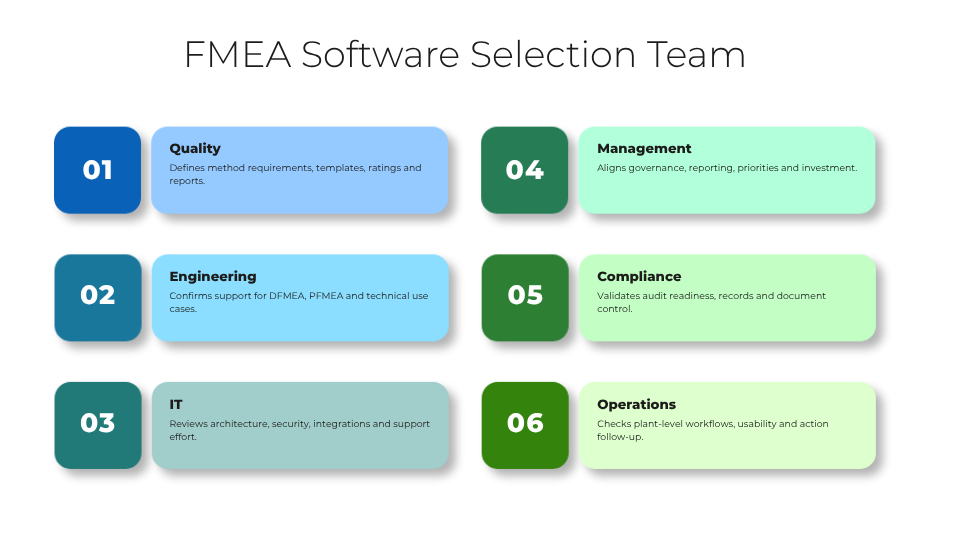
A sound FMEA software selection should be cross-functional from the start. Quality teams usually define the methodological requirements, but they are not the only stakeholders. Engineering must confirm support for design and process use cases. Operations should assess whether the solution fits plant-level workflows and corrective action follow-up. IT needs to review architecture, security, integration, and support effort. Management should confirm reporting, governance, and investment priorities.
At a minimum, the selection team should include representatives from quality, engineering, IT, operations, and management. In regulated or highly audited environments, compliance or document control should also be involved. This avoids a common failure pattern: one department selects a tool that is later rejected by the functions that must actually use or support it.
1. Functional Fit for DFMEA, PFMEA, FMECA, or Company-Specific Methods
This criterion checks whether the software supports the exact risk analysis methods your company uses. Some organizations need classic DFMEA and PFMEA. Others require FMECA, AIAG/VDA logic, sector-specific forms, or internal templates built around their own terminology and scoring models.
This matters because a tool that only partially reflects your method forces users into workarounds, duplicate fields, or manual side calculations. That weakens consistency and increases training effort. In manufacturing environments, this often becomes visible when engineering, production, and supplier quality each maintain different structures for similar risks.
If this capability is missing, companies may end up with a technically modern system that still preserves spreadsheet-based side processes.
Buyer questions:
-
Can the system support our required FMEA types without custom development?
-
How are company-specific scoring models, columns, and workflows configured?
2. Ease of Use and Adoption Across Departments
Ease of use is not just about a clean interface. It means users from quality, engineering, production, and management can work efficiently without extensive support. Navigation, terminology, filtering, and task handling should match the way teams actually work.
This matters because FMEA is a collaborative process involving occasional users and subject matter experts, not just power users. If the software is hard to learn, participation drops, data quality suffers, and updates are delayed.
If usability is weak, the formal system may exist, but real work will continue in local files, email threads, or meetings without documentation.
Buyer questions:
-
How quickly can a first-time user update a risk entry or assign an action?
-
Can different user roles see simplified views relevant to their tasks?
3. Standardization and Template Management
Standardization means the software helps define common structures, rating schemes, naming conventions, and templates across plants, products, or business units. Template management should support controlled reuse without losing local flexibility where justified.
This matters because FMEA quality often depends less on the tool itself than on process discipline. Standard templates make evaluations more comparable, reduce setup time, and support corporate governance. For global manufacturers, they also help align expectations between central quality and local production teams.
If this is missing, every department may create its own FMEA logic. That makes benchmarking, audits, and cross-site learning much harder.
Buyer questions:
-
How are templates created, approved, versioned, and distributed?
-
Can global standards and plant-specific additions coexist without confusion?
4. Collaboration and Multi-User Support
FMEA work is inherently cross-functional. A suitable tool should allow multiple users to contribute, review, and update content without file conflicts. Ideally, it supports concurrent editing, role-based access, comments, notifications, and shared visibility of open topics.
This matters because failure modes often sit between functions. Engineering may define the design intent, production knows the actual process risks, and quality understands detection and control weaknesses. The software should make that interaction easier, not harder.
If collaboration support is weak, teams fall back to sending spreadsheets or PDFs back and forth. Version conflicts and incomplete action follow-up are typical consequences.
Buyer questions:
-
How does the software manage simultaneous work by engineering, quality, and operations?
-
Are comments, change notifications, and user responsibilities clearly visible?
5. Workflow, Approvals, and Action Tracking
Workflow capability determines how FMEAs move from draft to review to approval, and how improvement actions are assigned, tracked, and closed. In mature environments, this includes reminders, escalation rules, due dates, and approval records.
This matters because FMEA should not stop at risk identification. Its business value comes from driving action. A tool that documents risks but does not manage mitigation activities leaves the most important step outside the system.
If workflow and action tracking are missing, overdue measures, unclear ownership, and weak follow-up become recurring problems, especially across plants or supplier-related processes.
Buyer questions:
-
Can we configure review stages, approvals, and escalation rules?
-
How does the system track actions from assignment through evidence of completion?
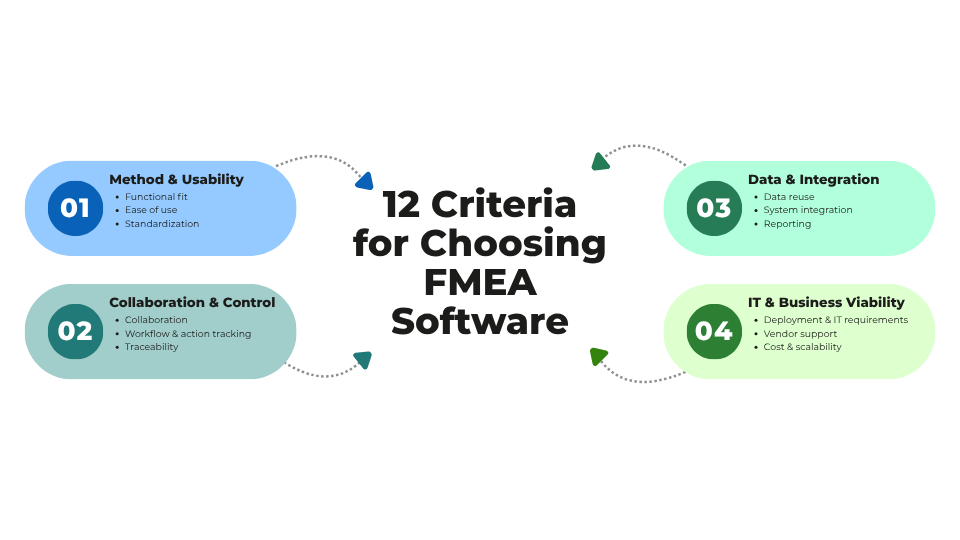
6. Traceability and Audit Readiness
Traceability means the software records who changed what, when, and why. Audit readiness also includes version history, approval evidence, linked actions, and retrievable records for internal or external reviews.
This matters because many organizations use FMEA outputs to support audits, customer requirements, compliance reviews, or investigations after quality incidents. In sectors with strong documentation expectations, traceability is not optional.
If this capability is missing, teams may struggle to explain why risk ratings changed, whether actions were approved, or which version was valid at a specific time. That creates audit exposure and weakens confidence in the process.
Buyer questions:
-
Is there a complete audit trail for edits, approvals, and score changes?
-
How easily can we retrieve historical versions for an audit or customer review?
7. Data Structure, Reuse, and Knowledge Management
Strong FMEA software should not treat each analysis as an isolated document. It should support structured data, reusable libraries, linked process elements, and search functions that help teams reuse existing knowledge.
This matters because repeated failure modes, causes, controls, and actions appear across products, lines, and sites. Reusing proven content improves consistency and reduces analysis time. It also turns FMEA from a documentation obligation into a knowledge asset.
If data structure is poor, companies repeatedly rebuild FMEAs from scratch and lose lessons learned when staff change roles or leave the organization.
Buyer questions:
-
Can we reuse approved failure modes, controls, and actions across projects?
-
How does the system prevent uncontrolled copying of outdated content?
8. Integration with ERP, PLM, QMS, MES, or Document Systems
Integration determines whether FMEA software connects to the rest of the application landscape. Relevant systems may include ERP for master data, PLM for product structures, QMS for nonconformities and CAPA, MES for process context, or document management systems for controlled records.
This matters because isolated tools create duplicate maintenance effort and reduce process visibility. For example, if engineering changes in PLM do not trigger FMEA review, or corrective actions in QMS remain disconnected from risk analysis, process gaps emerge.
If integration is ignored during selection, the rollout may later stall because manual synchronization becomes too costly.
Buyer questions:
-
Which standard connectors or APIs are available for our target systems?
-
What data can be synchronized automatically, and what remains manual?
9. Reporting, Dashboards, and Export Options
Reporting should support both operational and management use. Teams may need detailed worksheets, action lists, overdue measures, risk trends, or summaries by plant, product family, or business unit. Export options remain important because many organizations share content with customers, auditors, or internal review boards.
This matters because software selection should consider not only how data is entered, but also how it is used for decisions. Management wants transparency, while operational teams need actionable detail.
If reporting is weak, users export data to spreadsheets again, which undermines standardization and creates parallel reporting structures.
Buyer questions:
-
Can the system provide both detailed working views and management-level dashboards?
-
Which export formats are available for audits, customer communication, or internal reporting?
10. Deployment Model and IT Requirements
Deployment model covers cloud, on-premises, or hybrid operation, along with authentication, security, browser support, backup, data residency, and administrative effort. IT requirements should be assessed early, especially in multi-site manufacturing environments.
This matters because a tool that is functionally strong can still fail approval if it does not meet internal infrastructure and security standards. Plants with limited local IT support may also need simpler administration and reliable remote access.
If deployment issues are discovered too late, procurement delays, security objections, or expensive project redesigns can follow.
Buyer questions:
-
What are the infrastructure, security, and identity management requirements?
-
What internal IT effort is needed for implementation, updates, and support?
11. Vendor Support, Onboarding, and Product Maturity
Even in a neutral evaluation, vendor capability matters. Buyers should assess onboarding quality, implementation guidance, training materials, support responsiveness, roadmap stability, and customer references in relevant industries.
This matters because FMEA software often requires process alignment, template setup, role definition, and integration planning. A capable product without practical onboarding support may still lead to a poor rollout.
If product maturity is low, buyers may face missing functions, unstable releases, or unclear development direction. If support is weak, user adoption drops when early questions remain unresolved.
Buyer questions:
-
What onboarding support is included for configuration, migration, and training?
-
How mature is the product in industrial, quality-driven environments similar to ours?
12. Total Cost of Ownership and Scalability
Total cost of ownership includes license fees, implementation services, integration effort, training, administration, and ongoing change management. Scalability refers to whether the solution can expand across plants, departments, and use cases without a major redesign.
This matters because the lowest initial price is not always the lowest long-term cost. A basic tool may appear attractive for one team, but become expensive when templates, user numbers, integrations, and reporting needs grow.
If scalability is poor, companies may need to replace the system after only a few years or accept a fragmented setup with multiple tools.
Buyer questions:
-
What are the expected costs over three to five years, including rollout and support?
-
Can the system scale from one pilot area to enterprise-wide use?
Common Buying Mistakes
Many buyers make the same avoidable mistakes during FMEA tool evaluation. One is focusing too heavily on the user interface. A polished UI helps, but it does not compensate for weak method support, poor traceability, or missing integration.
Another mistake is ignoring integration needs until late in the project. In manufacturing and quality management, disconnected data quickly creates duplicate work and weakens process control.
A third mistake is underestimating rollout effort. Even strong software requires template design, governance rules, training, and ownership decisions.
Finally, some companies choose tools that are too complex for their actual maturity level, while others choose overly limited tools that cannot support future standardization. The right fit is not the most feature-rich option, but the one that matches present needs and realistic growth.
Questions to Ask in a Demo
A useful demo should test real working scenarios, not just polished navigation. Ask vendors to show how the software handles practical situations such as engineering changes, audit preparation, or overdue actions.
-
Show how a DFMEA and a PFMEA are created from templates.
-
How are company-specific fields, scales, and form structures configured?
-
Demonstrate how multiple users work on the same FMEA and how conflicts are prevented.
-
Show the approval flow from draft to released version.
-
How are actions assigned, escalated, and closed with evidence?
-
Demonstrate the audit trail for a changed severity, occurrence, or detection rating.
-
Show how existing failure modes or controls are reused in a new project.
-
How does the system respond when a product or process change requires FMEA review?
-
Demonstrate reporting for open actions, risk priorities, and management summaries.
-
What export formats are available for customer, auditor, or management use?
-
Show how user roles differ for quality, engineering, operations, and management.
-
What standard integrations exist with PLM, ERP, QMS, MES, or document systems?
-
How is template governance handled across multiple plants or business units?
-
What does the first 90 days of onboarding typically look like?
Conclusion: How to Choose FMEA Software with Lower Risk
Companies that want to choose FMEA software successfully should evaluate more than features. The decision should reflect process fit, usability, collaboration, governance, integration, and long-term operating model. A well-chosen solution helps standardize risk analysis, improve action follow-up, support audits, and preserve organizational knowledge. A poorly chosen one often leads to shadow spreadsheets, inconsistent methods, and disappointing adoption.
The most reliable approach is to treat FMEA software selection as a cross-functional business project, not a simple tool purchase. When buyers use clear criteria and test real scenarios, they are far more likely to choose FMEA software that supports both current requirements and future growth.