In today’s hospitality industry, software plays a crucial role in making operational processes more efficient. Restaurant software is used to streamline and automate key processes such as order management, staff scheduling, billing, and inventory control. By using these systems, restaurants, cafés, and bars can optimize their workflows and improve customer service. Especially in an environment where speed and accuracy are essential, well-implemented software provides valuable support.
1. Analyze Your Business’s Individual Requirements
Before you begin your software search, it is essential to thoroughly analyze the specific needs of your business. Every hospitality business is unique, and requirements vary depending on the type of establishment, its size, and its business model.
Business Size and Concept
Choosing the right software depends heavily on how large and complex your business is, as well as on the hospitality concept you operate.
Small cafés or snack bars
Smaller businesses generally need a simpler solution focused on core functions such as managing orders, providing POS functionality, and handling basic billing. In this case, an easy-to-use, cost-effective solution is essential, especially if complex administrative features or inventory management are not required.
Mid-sized restaurants
In a typical restaurant, requirements are often more diverse. The software must be able to manage table reservations, coordinate orders, and notify the kitchen, while also supporting inventory management, billing, and staff scheduling. Features such as table layout management and tighter integration of ordering and payment processes are also important here.
Large restaurants, chains, or franchise businesses
Larger businesses or chains require more sophisticated systems that support multiple locations, provide company-wide reporting, and enable centralized management of all branches. These businesses need software with advanced inventory management, in-depth analytics, comprehensive delivery service integration, and robust workforce management features. Cloud-based systems are especially beneficial here, as they can be accessed from anywhere and offer a scalable solution.
Specific Requirements of the Hospitality Concept
Quick-service restaurants and fast-food chains
In quick-service restaurants, speed is everything. The right software should therefore enable fast and simple ordering processes, ideally through self-service kiosks or mobile ordering systems. It must be able to process high volumes of orders efficiently and forward them automatically to the kitchen to avoid delays. Integration with delivery services and online ordering platforms is also essential.
Fine dining
Here, the focus is often on delivering an exceptional customer experience. Software that allows staff to record special guest requests (e.g. dietary preferences, allergies) and supports professional guest management (e.g. VIP guests) is indispensable. In addition, comprehensive wine cellar management and the handling of customized menu offerings can play a major role.
Future Readiness: Growing Requirements
It is important to choose software that can grow with your business. Even if your current requirements are still manageable, the software should be scalable and able to support future expansion without difficulty.
A flexible software solution allows you to add functions as your business grows or as your requirements change. For example, a small entry-level solution can later be expanded with modules for inventory management, staff scheduling, or marketing tools.
Integration of Existing Systems
If systems are already in use, it is important to assess how well the new software can be integrated into existing workflows and infrastructure. If you already have a POS system, the new software must be compatible with it. Seamless integration with existing accounting software is particularly important for fast and error-free billing. If you already use external platforms for delivery services or reservations, the restaurant software should be able to manage these interfaces efficiently.
2. Must-Have Features of Restaurant Software
Good restaurant software should offer a wide range of features tailored to the specific needs of a hospitality business. These functions not only help make operations more efficient, but also improve customer satisfaction and save costs over the long term.
- Mobile order management
- POS system
- Payment options
- Inventory management
- Recipe management
- Online reservations
- Table assignments
- Guest management
- Shift scheduling
- Time tracking
- Payroll
- Sales analytics
- Cost control
- Forecasting and optimization
As a general rule, you should create a list of must-have and nice-to-have features for your business before beginning your search for suitable software. This will make it much easier to compare different software solutions.
3. Important Additional Features of Restaurant Software
In addition to the must-have functions, there are a number of extra features that can make restaurant software even more powerful and improve operational efficiency. These features are particularly useful for specialized hospitality businesses or businesses looking to take their service quality and operational performance to the next level.
-
Integration of online ordering and delivery services
-
Customer loyalty programs and voucher systems
-
Marketing and promotion tools
-
Mobile app for guests
-
Allergen and nutritional information management
-
Multi-location management
-
Integration with accounting and ERP systems
4. Usability and Support
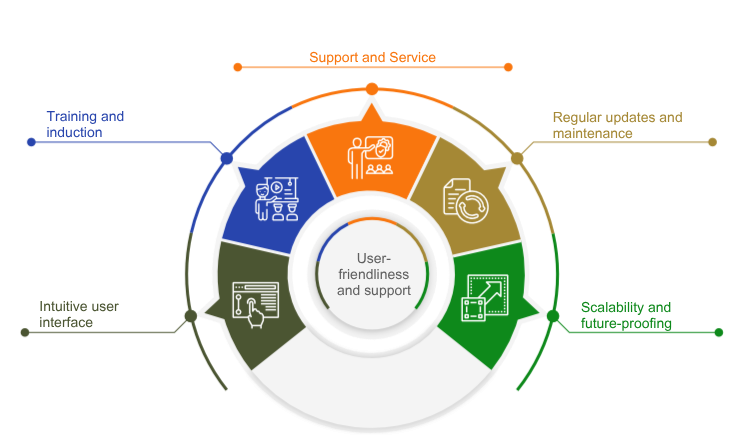
The usability of restaurant software is one of the key factors in the selection process, since the software is used in a dynamic and often stressful environment. Technical support is equally important to ensure smooth operations and provide fast assistance when problems arise.
Intuitive User Interface
The software should be designed in such a way that even new employees can use it effectively without a long training period. A clear and logical arrangement of menu items and functions, along with as few clicks as possible to complete key tasks such as taking orders or processing payments, is essential. User-friendly software also allows the interface to be adapted to the specific needs of the business.
Training and Onboarding
The software provider should offer training, whether in the form of online tutorials, on-site training, or webinars. These training sessions should be designed to familiarize staff with the software quickly so that operations are not disrupted. Detailed documentation should also be available to help resolve questions or uncertainties efficiently. Since different employees use different functions of the software, it is helpful if training is tailored to specific roles within the restaurant, such as managers or service staff.
Support and Service
In hospitality in particular, where many businesses operate in the evenings, on weekends, and on public holidays, it is important that support is available around the clock. 24/7 support can help resolve technical issues quickly and minimize downtime. It is also beneficial if support can be reached through multiple channels, such as phone, email, live chat, or a ticketing system. Many software providers also offer remote support, allowing a technician to connect directly to the POS system and fix issues remotely.
Regular Updates and Maintenance
Good restaurant software should receive regular updates to introduce new features and close security gaps. Ideally, this happens automatically and outside peak business hours so that day-to-day operations are not disrupted.
Especially in the area of POS software, legal requirements often change due to new legislation (e.g. cash register security regulations). User-friendly software is updated by the vendor as quickly as possible to reflect new requirements, ensuring ongoing compliance.
The software should create regular backups to prevent data loss. It is also important that maintenance work is planned and communicated transparently so the business can prepare accordingly.
Scalability and Future-Proofing
Restaurant software should have a modular structure so that new functions can be added easily without having to overhaul the entire business setup. For example, a small business might start with core functions and later add features such as online reservations, delivery management, or customer loyalty programs.
Cloud-based restaurant software offers a high degree of flexibility and future-proofing, as it can be accessed from anywhere and does not require costly investment in local servers. In addition, the system always stays up to date because updates are deployed automatically.
5. Value for Money
When choosing restaurant software, value for money plays a central role. This is not just about the software’s price, but also about how well it meets the business’s requirements and the value it delivers. Software that appears inexpensive at first glance can quickly turn out to be a costly mistake if it lacks essential features or offers poor support. On the other hand, a high price does not automatically mean better software.
Types of Costs and Pricing Models
Restaurant software is offered under a variety of pricing models. It is important not only to look at the purchase price, but also to consider all ongoing and potential additional costs.

One-Time License Fees vs. Subscriptions
Some software providers offer their products as a one-time purchase, while others prefer a subscription model with monthly or annual payments. A subscription can be advantageous for smaller businesses because the upfront costs are lower and updates and support are often included. License models, by contrast, are often more cost-effective in the long term, but they require a higher initial investment.
Cloud-Based vs. On-Premises Solutions
Cloud-based solutions usually involve lower upfront costs because no expensive hardware is required. However, they do come with ongoing fees for the use of cloud services. On-premises solutions often require a larger initial investment in hardware and licenses, but they can offer greater control over data and lower ongoing costs over time.
Additional Costs
In addition to base fees, there may be extra costs for add-ons, extensions, or special features. Maintenance contracts, regular updates, and additional cloud storage should also be factored into the overall cost calculation.
Avoid Hidden Costs
Some software solutions appear affordable at first glance, but hidden costs can put pressure on the budget.

Upgrade Costs
Some vendors charge additional fees for new versions (upgrades) or feature updates. A clearly defined update policy helps avoid unexpected costs.
Support Fees
While basic support is included with many providers, premium support or faster response times may incur additional charges. It is worth clarifying in advance what type of support is covered by the fees and whether there are more cost-effective alternatives.
Hardware Requirements
Especially with on-premises solutions or complex systems, hardware requirements should be reviewed carefully. Higher investments in tablets, terminals, or servers can quickly drive up the initial costs.
Conclusion
Restaurant software plays a key role in making hospitality operations more efficient and seamless. Choosing software carefully - so that it meets both current requirements and future growth plans - is essential. From order and inventory management to staff scheduling and integration with existing systems, the right software can significantly simplify daily operations in hospitality and help optimize processes. It is important that the software is user-friendly, scalable, and cost-effective in order to ensure long-term success and efficiency.