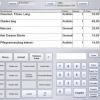
Software > Construction- and Craftsmen Software > Barbershop, Hairdressers, Beauty Salons > BeautyTrack®
Salon POS, scheduling and inventory software for beauty businesses.

BeautyTrack®

Salon POS, scheduling and inventory software for beauty businesses.


Updated on 21. Aug 2026 by SoftGuide

What is BeautyTrack®?

BeautyTrack® is a salon management software solution for hair salons, nail salons, day spas, beauty studios and tanning salons that want to organize their daily business in one structured system. The software combines Point of Sale processes, appointment scheduling, client information, employee data, commissions, inventory and reporting. This makes it suitable for businesses that sell services and retail products while also needing reliable customer records, staff planning and operational transparency.

The program is designed for practical salon workflows. Users can manage appointments, track sales, maintain client profiles, record visits, store personal client information, manage inventory and review business activity through a wide range of reports. BeautyTrack® also supports optional retail hardware such as cash drawers, receipt printers, barcode scanners, customer displays, magnetic stripe readers, touch screens and fingerprint readers. For salons that work with several stations, the full BeautyTrack® version supports multiple users and network operation, while BeautyTrack Express is positioned for single user or single stylist environments.

A key benefit of BeautyTrack® is that salon teams can reduce manual paperwork and gain faster access to important operational information. Appointment planning helps keep service capacity organized. POS functionality supports sales at the counter. Inventory features help monitor products, values and reorder requirements. Client reporting and marketing tools support customer communication, loyalty activities and targeted follow-up. Employee tools assist with scheduling, commissions, security and time clock information.

Highlights and important features

  • Point of Sale functionality for service and product sales.
  • Appointment scheduler for salon bookings and efficient daily planning.
  • Client records with sales, visit history, personal details, notes and photos.
  • Full inventory system with product, vendor, stock level and reorder reporting.
  • Employee scheduling, employee information, commissions and time clock functions.
  • Password-based employee security and access control.
  • Reports for clients, sales, products, services, suppliers, employees, coupons, gift cards and refunds.
  • E-mail marketing and direct marketing support for client communication.
  • Support for cash drawers, receipt printers, barcode scanners and other optional POS hardware.
  • Network-capable BeautyTrack® version for multiple stations and users.

Business value for salons

BeautyTrack® helps salon owners and managers bring customer service, checkout, stock control, staff management and reporting together. Instead of switching between separate lists, paper calendars and manual calculations, teams can work with a centralized salon system. This can improve visibility into sales, product performance, employee activity and customer behavior. For growing salons, the network-capable version provides a practical foundation for multiple workstations. Businesses that want to professionalize salon operations, improve counter processes and make better decisions from daily business data should consider contacting the provider for a demo.

Functions (excerpt) of BeautyTrack®:

access controls
Address and contact lists
Address management
Article barcodes
Article management
Authorization profiles
Backup
Barcode scanner
Calendar and appointment management
Cash book
Cash box
Cash drawer control
Commissions
Cover letter, advertising
CRM
Customer - article income statements
Customer bonus system
Customer cards
Customer data
Customer display
Customer management
Customer statistics
Diagrams
Discount system
E-Mail dispatch
Encryption
Fingerprint reader
Inventory
Inventory management
Inventory visibility
Invoices
Invoicing
Key figure reports
Label printing
Mailing lists
merchandise management
Notes
Payment entry
Payment methods
Personnel data management
Personnel planning
Personnel resource planning (PRP)
Personnel time recording
Posting transactions
Product management
Receipt printing
Receipt printing
Report management
Revenue analyses
Sales statistics
Sales statistics
Scheduling
Serial appointments
Service reservations
Standard reports
Stock and inventory lists
Time recording
Touchscreen
Voucher function

Looking for the right software? Trust SoftGuide!

Our experts will find the perfect solution for you - independently and at the cutting edge of software trends.

Similar Software:

Looking for the right software? Trust SoftGuide!

Technical specifications:

Manufacturer:
Nichesoft LLC. BeautyTrack
Web-based:
no
SaaS, Cloud:
no
On-premises (local installation):
no
AI Supported:
no
Multi-user (network-compatible):
yes
Multi-client compatible:
no
Manufacturer based in:
United States
Dialogue language(s):
English
System requirements:
Compatible operating systems (runs with):
Win 11
Win 10
Win Server
Mainframe based
Unix based
Linux based
Mac OS
Mobile OSs (supports):
iOS
Android

Alternatives

BeautyTrack<sup class="trademark">®</sup>
Salonify
LaCash Hair Salon &amp; Beauty Salon
BeautyTrack®
Salonify
LaCash Hair Salon & Beauty Salon
Elevator Pitch
Salon POS, scheduling and inventory software for beauty businesses.
Salonify combines online booking, POS, CRM, and marketing for salons.
Modular POS Solution for Hair and Beauty Salons
Multi-user (network-compatible)
yes
yes
yes
Multi-client compatible
no
yes
no
Compatible with


Other requirements for soft- and hardware
Screen resolution of 1024×768 or higher
Dialogue language(s)
English
English, German, Chinese, Dutch, French... +5
German
Documentation
Manual
Online Help
Demo version
Technical documentation
Manual
Online Help
Demo version
Technical documentation
Manual
Online Help
Demo version
Technical documentation
First installation (year)
2002