Software > Transport and Logistics > Transportation > Mileon
Mileon manages drivers, routes, and the vehicle fleet in a single application.

Mileon

Mileon manages drivers, routes, and the vehicle fleet in a single application.


Updated on 03. Nov 2026 by Software Vendor
Demo version

What is Mileon?

Mileon is a web-based software solution for transportation companies, courier services, and delivery firms. It combines dispatch, workforce scheduling, HR management, and fleet management into a single application. A clear overview is especially important in day-to-day operations: Who is available, which van can be used, and which route is still unassigned? With Mileon, you’ll find all this information in one place, instead of having to cross-reference multiple Excel spreadsheets.

At the heart of the system is the Dispatch Autopilot. You enter the requirements for each route, and the system assigns suitable drivers and vehicles. When planning, Mileon takes into account stored weekly hours, workdays, rest periods, vacation, sick leave, preferred routes, and driver’s license classes. If a driver is not eligible, the software displays the reason. Suggestions can be manually adjusted at any time. If staff are unavailable, Mileon can suggest overtime or approved temporary help from another station—including a vehicle, if needed.

Highlights and Key Features

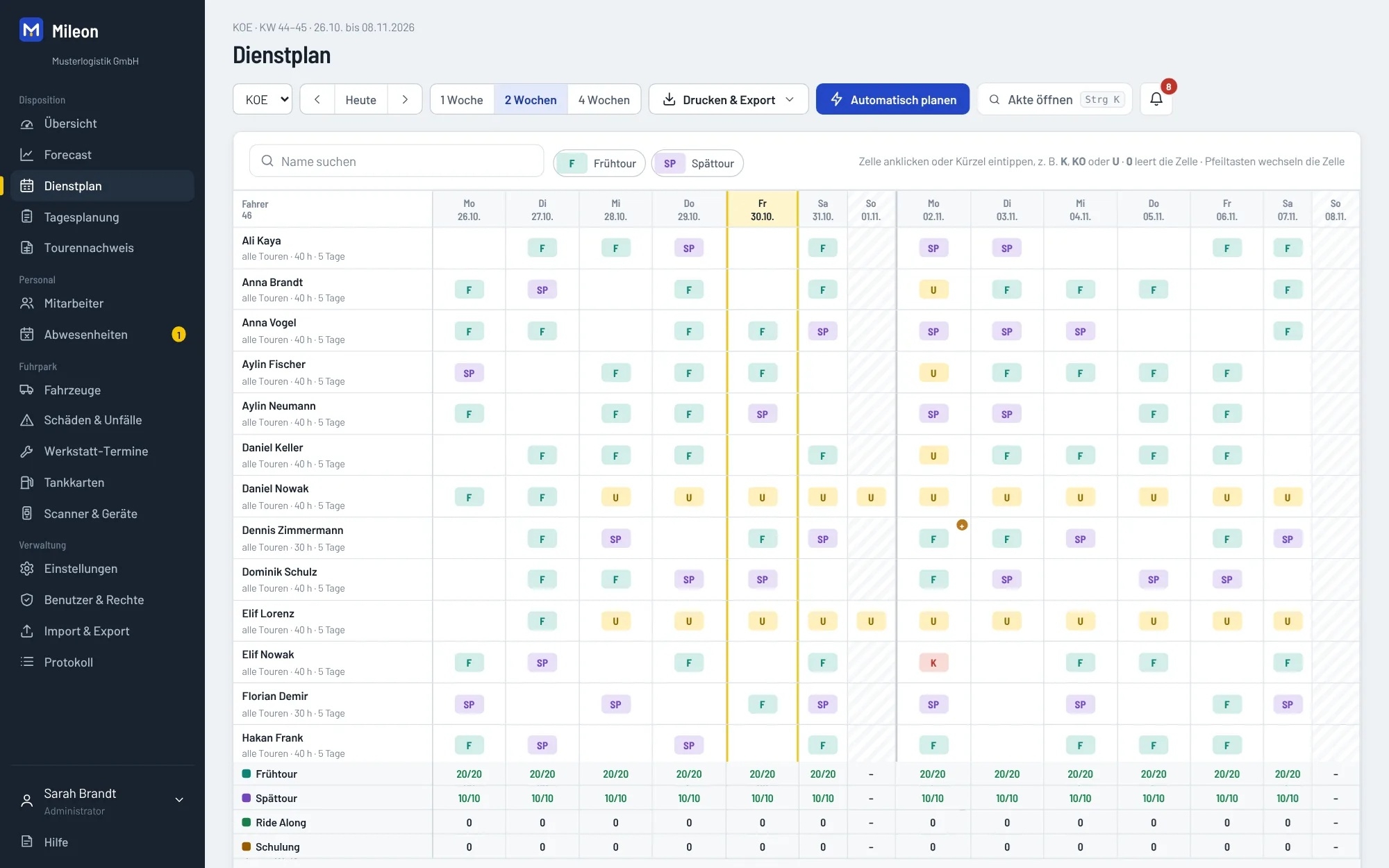
  • Duty and Shift Scheduling: Create weekly schedules based on route requirements, account for absences, and identify open shifts.
  • Daily Scheduling: Assign drivers, vehicles, fuel cards, and scanners to a route and export the schedule as a PDF or Excel file.
  • Cross-location planning: Balance staffing shortages across stations and define permissions by location.
  • Fleet management: Maintain vehicle records including mileage, financing, repair shop appointments, maintenance, and damage.
  • Deadlines and Documentation: Set reminders for TÜV inspections, UVV compliance, driver’s license checks, training sessions, contract expirations, and expiration dates.
  • Employee records: Manage employee data and sensitive information with tiered access rights.
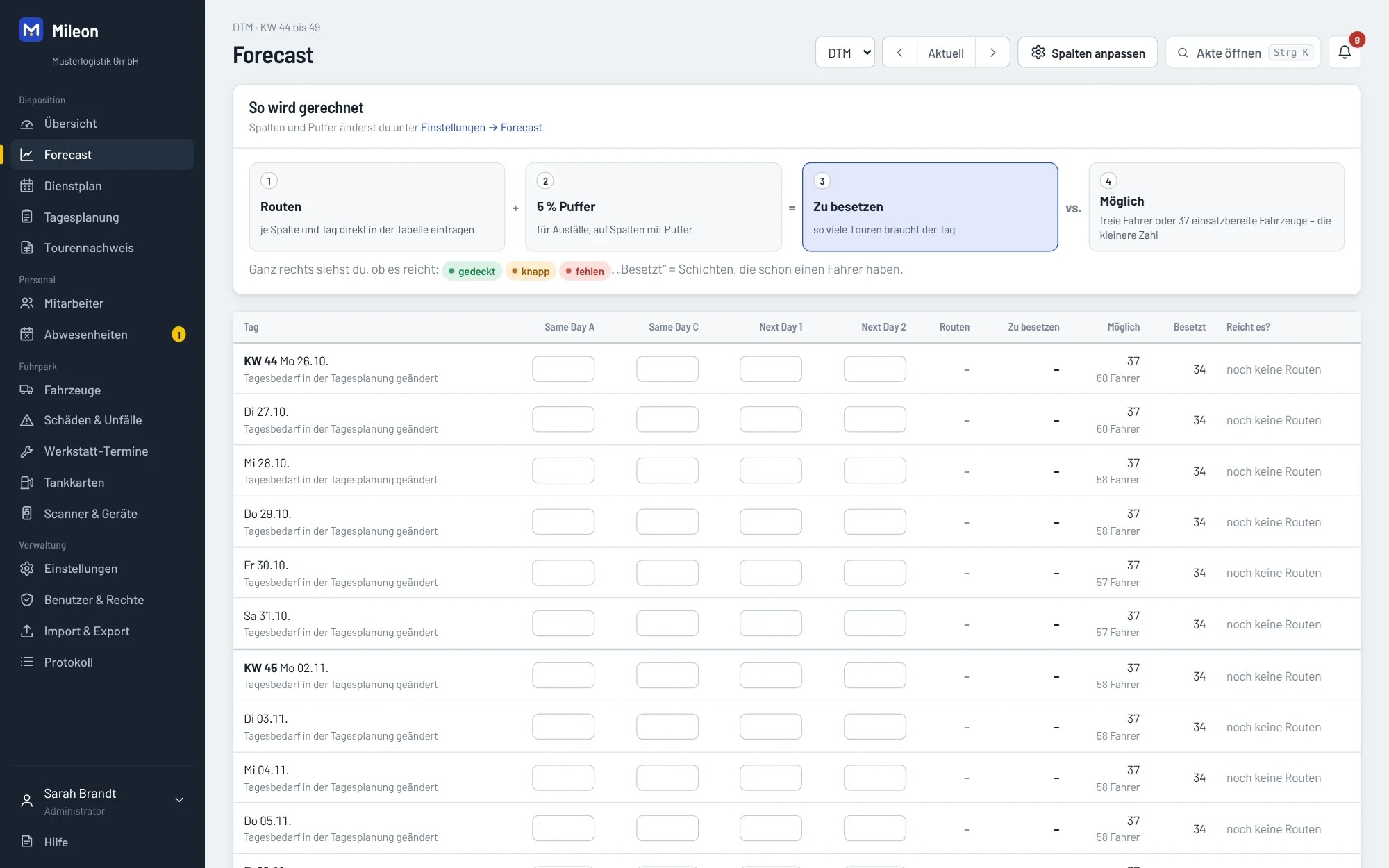
  • Demand Forecasting: For delivery companies, incorporate route counts and peaks into a forecast and compare them with available capacity.
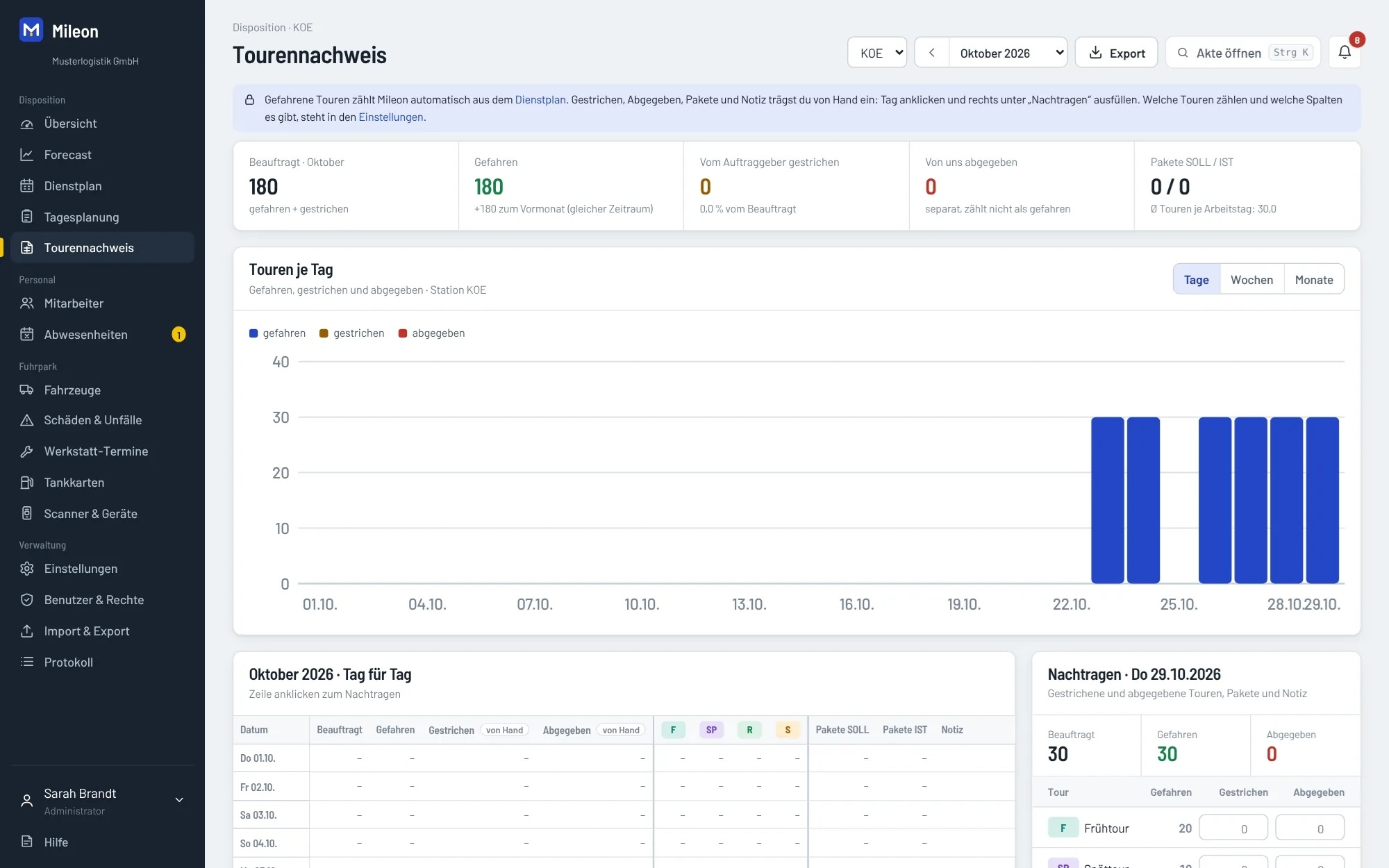
  • Route Log: Analyze planned, completed, canceled, and handed-over routes for reconciliation with clients.

Flexible for everyday use

You define route types, start times, and vehicle classes to suit your business, such as for early and late routes, shuttle services, or package delivery. For delivery companies, templates with same-day and next-day waves are available. Existing employee and vehicle lists can be imported from Excel. The application runs in a browser and can also be used on a smartphone. To use it as a home screen app on iPhone or Android, no installation via an app store is required; an internet connection is still necessary.

You can view Mileon in a live demo using a sample company or test it for 14 days with your own data. If you’d like to combine schedule planning and vehicle management, it’s a good idea to speak with the provider to discuss your route types, locations, and processes.

At the heart of the system is AUTO-Planning. This feature allows for numerous different variables to be taken into account, including, for example, route type, driver’s license class, vehicle configuration, vehicle class, contracted hours, shift preferences, preferred vehicles, and other individually configurable factors.

Based on this information, the system automatically generates the best possible or most suitable shifts at the push of a button.

In addition, the software offers a wide range of structured notifications and alerts that help identify planning errors early on and largely prevent them.

Vehicle damage can also be easily documented: Drivers can report it directly via a provided link. The reports are then permanently stored in the system and can be tracked at any time.

Additional features include:

Scheduling 

  • Automatic daily scheduling (“Dispo-Autopilot”): automatically assigns drivers and vehicles
  • Duty and shift scheduling for the entire team
  • Scheduling across multiple locations/stations
  • Recommended default settings that you can revert to at any time

Fleet 

  • Centralized vehicle management
  • Vehicle status (e.g., available, in the shop, out of service)
  • Fuel Card Management
  • Scanner management (vehicle-specific)
  • Reminders for deadlines and appointments
  • Archive for returned vehicles

Personnel 

  • Employee and Driver Management
  • Digital personnel file (including payroll and bank information, for authorized roles only)

Users & Permissions 

  • Roles such as Admin, HR Manager, Station Manager, Dispatcher
  • Tiered access rights by role and location

Overview 

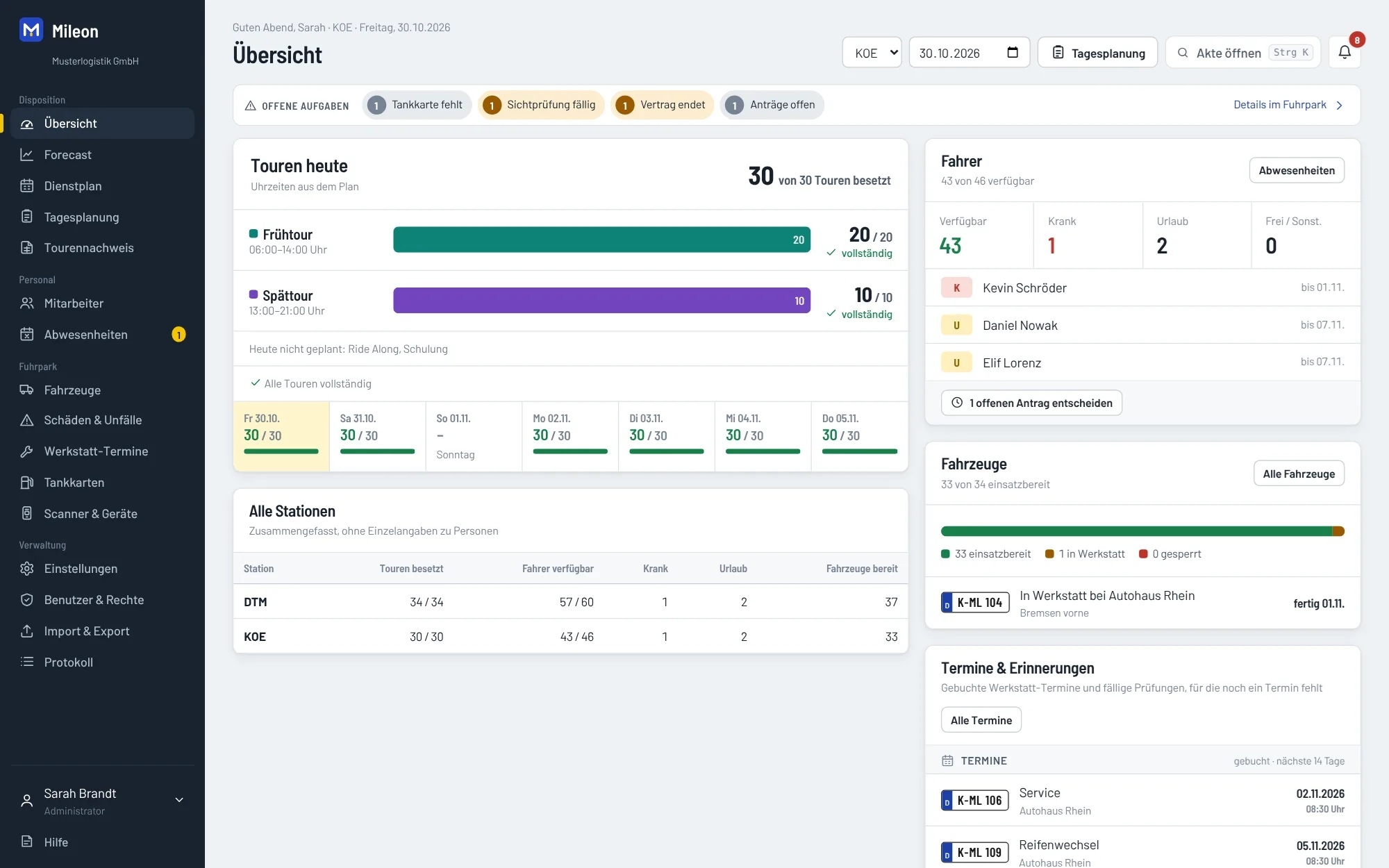
  • Dashboard with a daily overview of staff, vehicles, and scheduling

Technology & Security 

  • Runs in the browser; no installation required
  • Optimized for desktop and smartphone
  • Interface available in German and English
  • Hosted in the EU, with a separate instance for each customer
  • GDPR-compliant Data Processing Agreement (DPA)

Subscription 

  • 14-day free trial
  • Monthly billing via credit card, Apple Pay, Google Pay, or Link

Target groups:

  • Transportation and logistics companies with their own drivers and vehicles
  • Courier, express, parcel, and delivery services
  • General cargo and distribution transport, as well as shuttle and plant transport
  • Delivery partners and subcontractors with one or more depots or stations
  • Dispatchers, fleet managers, HR managers, and operations managers at transportation companies

Screenshots

Functions (excerpt) of Mileon:

Absence management
Availability check
Availability display
Booking absenteeism
Capacity planning
Change documentation
Cost recording
Damage management
Data export
Data import
Deadline management
Deadline monitoring
Deployment planning
Device management
Digital personnel file
Disposition
Driver's license check
Duty roster display
Duty rosters
Dynamic disposition
Employee and vehicle assignment
Employee capacities
Employee file
Employee management
Excel export
Excel import
Fleet Capacity Management
Fleet management
Fleet management
Holiday management
Instruction dates
Instruction history
Instruction management
Logging
Maintenance
Mapping of predefined work shifts
Multi-user capability
Notification system
PDF creation
Personnel data management
personnel master data
Personnel planning
personnel requirements
Personnel resource planning (PRP)
Photo documentation
Reminder function for TÜV appointments
Reminder functions
Resource allocation
Rights management
Role Management
Shift models
Shift planning
Shift staffing
Site administration
User management
Vacation management
Vacation overviews
Vacation Request System
Vehicle management
Working time models
Explore more about the software:
Information
request URL
Software exposé
request URL
Prices
request URL
Contact:
Send message
Customers asked
Mileon is designed for transportation and logistics companies, courier and express services, parcel and delivery companies, as well as businesses in the shuttle, general cargo, and plant transportation sectors. The software is suitable for companies with their own drivers and vehicles, regardless of whether they operate a single location or multiple sites.
The Dispatch Autopilot helps automatically assign open routes to suitable drivers and vehicles. Among other factors, it takes into account weekly hours, rest periods, absences, preferred routes, and driver’s license classes. The dispatch team can review each suggestion and make manual changes if necessary.
Mileon creates duty and shift schedules based on the stored route requirements. Early, late, and special routes can be staffed with available employees. Vacation, sick leave, and other absences are taken into account. Finalized daily and weekly schedules can be exported as PDF or Excel files.
After an absence is recorded, the affected route is displayed as open. Mileon suggests suitable available drivers, authorized overtime, or approved temporary help from other stations. Among other things, the system checks rest periods, weekly hours, and driver’s license classes.
Yes. Mileon supports the joint management of multiple stations with their own staff, vehicles, and routes. User permissions can be assigned on a per-location basis. In the event of staff shortages, drivers—and, if necessary, vehicles—can be temporarily assigned to other stations.
Fleet management includes vehicle master data, odometer readings, financing, repair shop appointments, maintenance intervals, damage reports, fuel cards, and scanners. Mileon sends reminders for upcoming TÜV and UVV inspections as well as service appointments. Vehicles that are in the shop are taken into account accordingly when scheduling operations.
Yes. Mileon manages driver's license classes, expiration dates, and regular visual inspections. Completed inspections can be documented with the date and the name of the person who performed the inspection. The software sends reminders for upcoming inspections and takes the required driver's license class into account when assigning vehicles.
Yes. To get started, Mileon offers import templates and the option to import existing Excel lists. These include, among other things, employees, vehicles, absences, maintenance, fuel cards, and scanner data. Various data can later be exported back to Excel or CSV.
Yes. Mileon is web-based and works in a browser on computers, tablets, and smartphones. The mobile view is designed for use on small screens. On iPhone and Android devices, you can also add the app as an icon to your home screen. An internet connection is required.
You can try Mileon for free for 14 days. According to the manufacturer, subsequent use costs 8.73 euros per vehicle and 2.74 euros per employee per month, with a minimum of ten for each. The administrator account is included; each additional user account costs 9.99 euros per month. All prices are exclusive of sales tax. All features are included in the price. The contract can be canceled on a monthly basis. A live demo is also available.

Technical specifications:

Web-based:
yes
SaaS, Cloud:
yes
On-premises (local installation):
no
AI Supported:
no
Multi-user (network-compatible):
yes
Multi-client compatible:
no
Manufacturer based in:
Germany
Dialogue language(s):
English, German
System requirements:
Compatible operating systems (runs with):
Win 11
Win 10
Win Server
Mainframe based
Unix based
Linux based
Mac OS
Mobile OSs (supports):
iOS
Android