Software > Business Management > Forms Management Software > MakeProtocol
Digital inspection and handover reports with photos and signatures

MakeProtocol

Digital inspection and handover reports with photos and signatures


Updated on 17. Nov 2026 by Software Vendor
Video appointment

What is MakeProtocol?

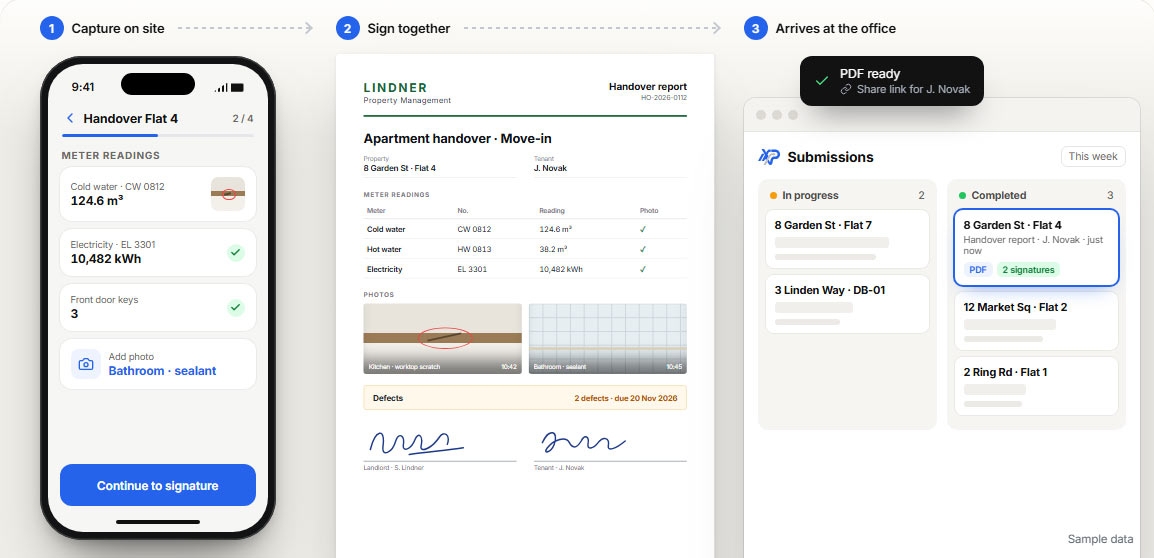
MakeProtocol is a cloud-based software solution for creating and managing digital inspection reports, handover reports, and safety checklists. It was developed for companies whose employees regularly need to collect information on-site, document conditions, and have completed work verified. Typical applications include apartment handovers, technical inspections, property inspections, and skilled trade services.

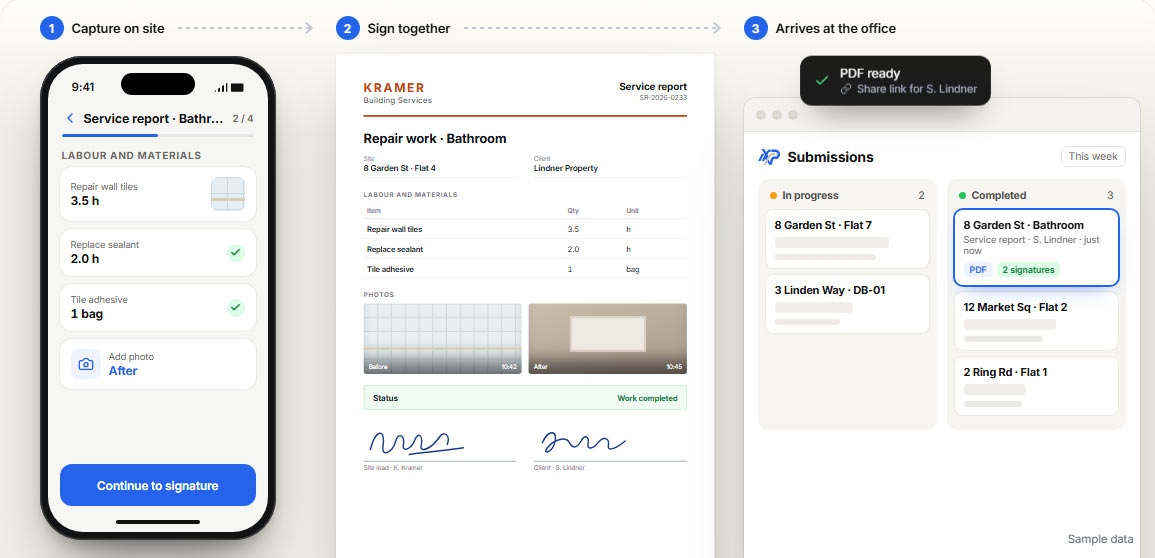
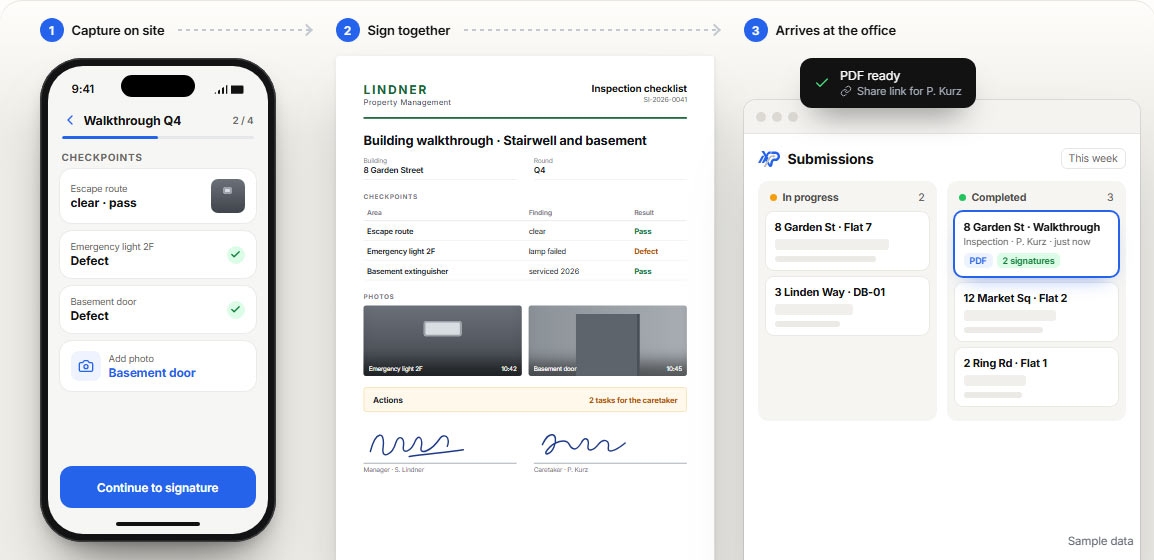
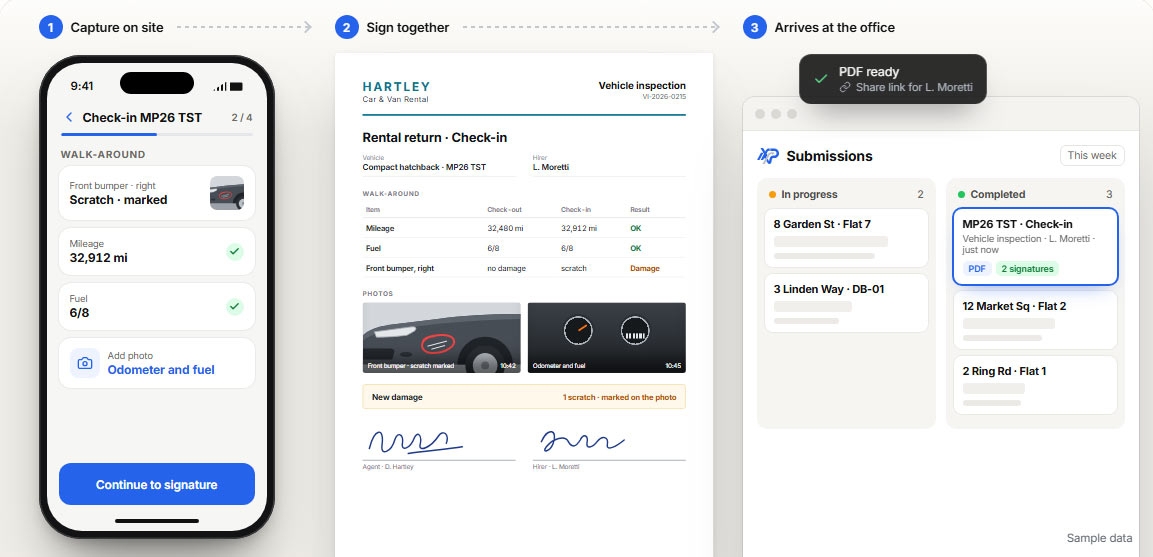
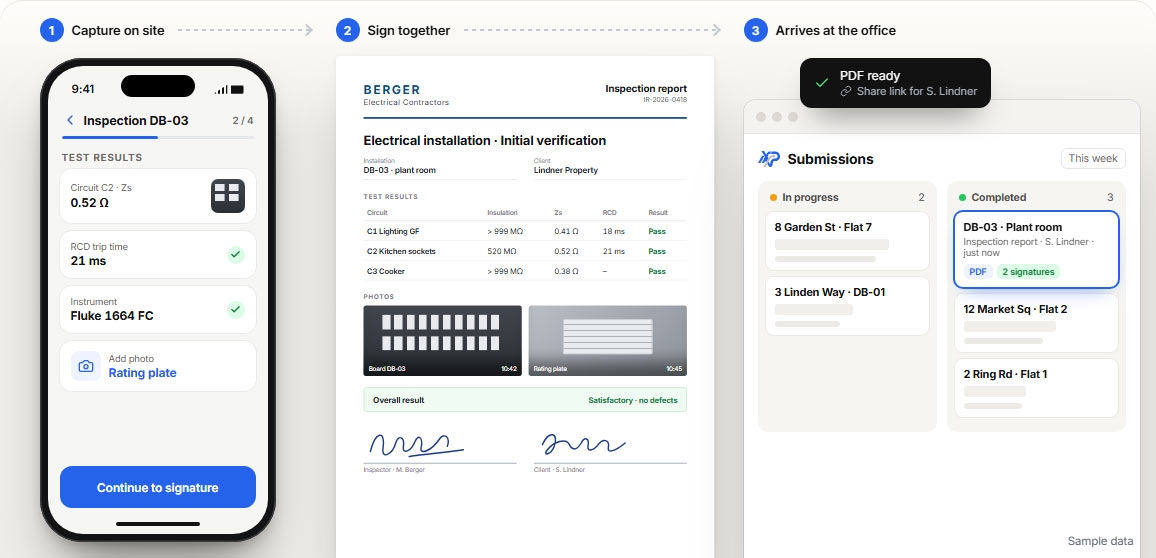
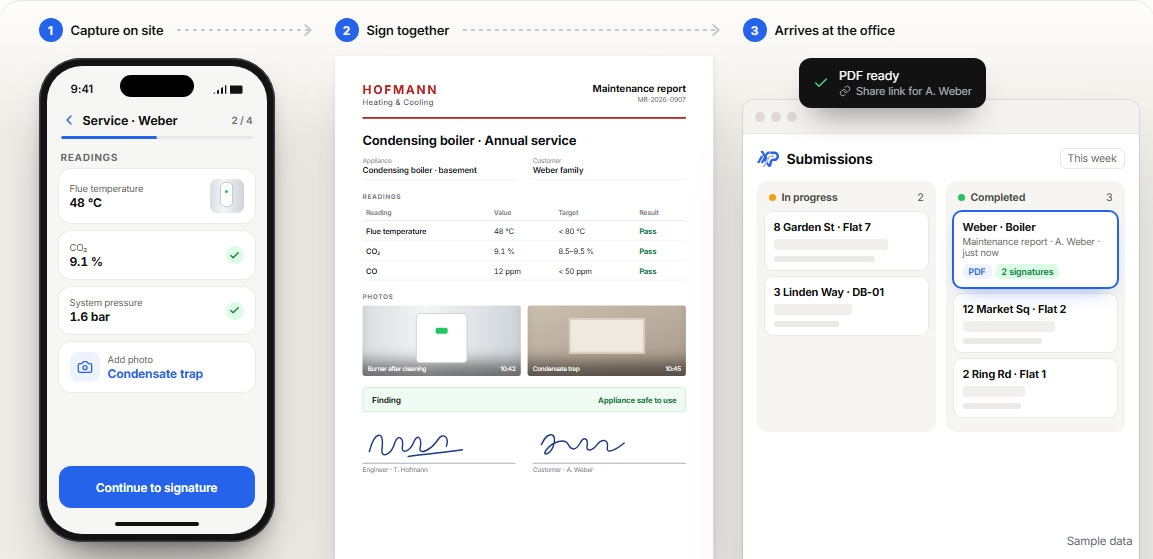
Instead of preparing paper forms for each assignment or creating reports from handwritten notes afterward, you set up your reports digitally once. Your employees fill them out directly on-site, add photos, and collect the necessary signatures. The submitted data is compiled into a PDF document that you can share, for example, with clients, customers, or other project stakeholders.

A visual editor is available for designing your own forms. Individual elements can be arranged using drag-and-drop. Even more complex reports with tables, repeatable sections, calculations, and conditional queries are possible. For example, during an apartment handover, multiple rooms can be documented within the same form without having to create a separate template for each room.

Features and Highlights of MakeProtocol

  • Custom Report Builder: Create your own digital forms for various inspections, handovers, and documentation tasks.
  • Mobile Data Collection: Employees capture information directly on-site using mobile devices. There’s no need to re-enter handwritten entries.
  • Photos and file attachments: Supplement your reports with images of damage, documented conditions, or additional documents.
  • Intelligent Form Logic: Control the display of input fields based on previously entered responses and define calculations.
  • Electronic signatures: Capture multiple signatures within a single report. External parties do not need their own user account to sign via a sharing link.
  • Sharing via Link and QR Code: Make forms available to customers, subcontractors, or other external parties.
  • Reusable data collections: Store frequently needed information in collections so you can reuse it in different forms.
  • Centralized report overview: Organize submitted reports based on processing stages and keywords. Drafts, ongoing reviews, and completed processes remain clearly organized.
  • PDF Generation: Generate digital records from completed forms. PDF files can be password-protected if needed.
  • Automation: The Business plan offers rule-based workflows for assignment, forwarding, and notifications.
  • Roles and Permissions: Organize collaboration within the shared workspace. Depending on the plan, various options for rights management and logging user activities are available.
  • External integrations: Webhooks allow information to be transmitted to other applications.
  • Offline Use: In MakeProtocol Mobile, forms that have been made available for offline use can be filled out without an internet connection. Measurements, photos, and signatures are stored on the device and synchronized later once a connection is reestablished.

Less Follow-Up Work for Inspections and Handoffs

Especially during field assignments, a significant portion of the documentation effort doesn’t arise until after the actual work is completed. Photos must be assigned, notes transferred, and missing signatures obtained. MakeProtocol shifts these steps as directly as possible to the scene of the action. Everyone involved works based on the same form structure, which also makes it easier to review the submitted information later.

For recurring tasks, it’s particularly worthwhile to reuse protocols once they’ve been created. The results remain accessible in the workspace and are available for future reference. Locking responses after a mandatory signature also prevents confirmed information from being changed without a new signature.

MakeProtocol is available in a free starter plan as well as paid plans for individual users and teams. The application is available in German, English and Italian. If you’d like to know how your existing inspection and handover forms can be digitized, please feel free to contact us. Together, we can determine which features best suit your workflows.
Target groups:

  • Property management companies, housing companies, and facility management service providers
  • Trades businesses, electricians, and technical service providers
  • Construction companies, site managers, and subcontractors
  • Quality control managers, safety officers, and inspection personnel
  • Companies with regularly recurring inspections, walk-throughs, and handoffs

Screenshots

Functions (excerpt) of MakeProtocol:

access controls
Authorization management
Authorization profiles
Automation workflows
Checklist creation
Checklists
Construction acceptance protocol
Data export
Data import
Defects log
Delegation functions
Document signatures
Documentation systems
eSignature
File sharing
Form and document processing
Form controls
Form Designer
Form dispatch
Form entries
Form generator
Form management
form templates
Locking of form fields
Logging
Measurement protocols
Mobile data collection
mobile signature
Notification system
Offline answer collection
Offline Operating Mode
Online form
Online/Offline use
PDF creation
Photo documentation
Photo upload
Process automation
Processing status
QR code
Role Management
Search
Software integration
Status overviews
Systematic logging and evaluation of processes
Tagging function
Trigger conditions
Viewing Report
Web forms
Workflow management
Workflow status
Explore more about the software:
Software exposé
request URL
Contact:
Send message

Get to know the software better! Request a video appointment for a personal presentation!

Technical specifications:

Web-based:
yes
SaaS, Cloud:
yes
On-premises (local installation):
no
AI Supported:
no
Multi-user (network-compatible):
yes
Multi-client compatible:
yes
Manufacturer based in:
Albania
Dialogue language(s):
English, German, Italian
System requirements:
Compatible operating systems (runs with):
Win 11
Win 10
Win Server
Mainframe based
Unix based
Linux based
Mac OS
Mobile OSs (supports):
iOS
Android